I want to clear my doubt as to whether I can connect my PC to my TV. My graphics card supports DVI-I and VGA. I want to connect it to my 29" Sony FD Trinitron Wega KVEF29M80 using a DVI-to-RCA cable. To which port do I connect for the TV?
Asked
Active
Viewed 9,184 times
2


-
1"RCA" video connections are called "composite" or "component" depending on whether there's one video plug (usually yellow) or three. (not counting the red & white audio RCA plugs.) which one are you trying to use? – quack quixote Apr 24 '10 at 17:55
-
Red, blue and green. – POTHEN Apr 25 '10 at 03:07
1 Answers
4
From what I found for "DVI to RCA cable", it looks like you would be getting component video not composite. Component video connections look like this:
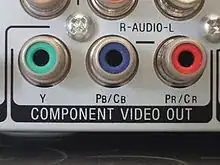
There are 3 plugs. Composite video is a single yellow cable typically. Your TV would need to have the component plugs on it in order to do what you are wanting.
If you need composite I would look into a VGA to composite or VGA to S-Video cable, they are readily available and either one should work for your setup.


-
Thanks 'heavyd', I Do have Component Video in on my Tv as well as well as an s-video Which one would be better. And will a VGA to RCA cable work or should i go for VGA to Convertor????? – POTHEN Apr 24 '10 at 19:21
-
Since you have component on your TV I would either go DVI->component or VGA->component. You may get a slightly better picture with DVI. – heavyd Apr 25 '10 at 04:39
-
-
Note that this will only work if your DVI output includes analog signals - not all of them do; some of them are digital only. You may need to fallback to a VGA strategy. – Bevan Sep 16 '11 at 07:18