29

When changing shortcut icons it's useful to know which DLLs and EXEs included with Windows contain icons, but there are so many DLLs (especially in System32) that it's difficult to find the ones which contain useful icons.

Which DLLs or EXEs included with Windows (any flavor) contain icons?

Kevin Panko
  • 7,346
  • 22
  • 44
  • 53
pyrachi
  • 893
  • 1
  • 7
  • 10

5 Answers5

50

Big ones:

%windir%\system32\shell32.dll           Standard
%windir%\System32\wmploc.DLL            OK
%windir%\system32\setupapi.dll          OK, Hardware / Periphals
%windir%\system32\ddores.dll            OK, lot of devices
%windir%\System32\ieframe.dll           IE and warnings, mixed ugly
%windir%\system32\netshell.dll          Ugly and non ugly
%windir%\System32\imageres.dll          Ugly, New ones
%windir%\System32\pifmgr.dll            Ugly, Win95 Ones
%windir%\System32\moricons.dll          Ugly, very old
%windir%\System32\mmcndmgr.dll          Ugly, Very old
%windir%\System32\compstui.dll          Ugly, Very old

Small ones:

%windir%\system32\accessibilitycpl.dll
%windir%\explorer.exe
%windir%\system32\gameux.dll            Some gaming icons
%windir%\system32\mmres.dll             Audio
%windir%\system32\mstscax.dll           Warnings
%windir%\System32\netcenter.dll         Network
%windir%\System32\networkexplorer.dll   
%windir%\system32\networkmap.dll
%windir%\System32\pnidui.dll            Ugly Exlamations
%windir%\system32\SensorsCpl.dll        Handheld devices
%windir%\system32\xpsrchvw.exe 
%windir%\system32\UIHub.dll
%windir%\system32\vpc.exe
        - provided as a free download for Win7 owners
%windir%\system32\wmp.dll               Media player
%windir%\system32\wpdshext.dll          Battery and arrows
%windir%\system32\wucltux.dll
e-motiv
  • 177
  • 1
  • 10
pyrachi
  • 893
  • 1
  • 7
  • 10
31

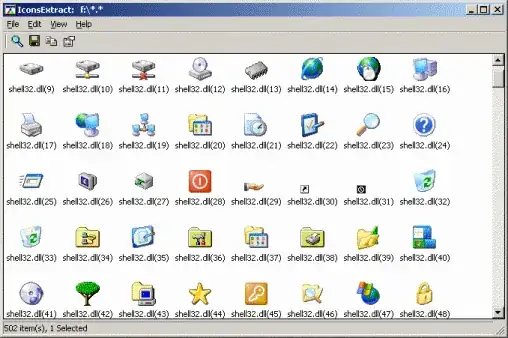
Use IconsExtract from NirSoft.

It scans a folder you select and can list any icons and files which contain icons.

enter image description here

Gaff
  • 18,569
  • 15
  • 57
  • 68
akira
  • 61,009
  • 17
  • 135
  • 165
8

The classic additional icon repository of Win95 is %SystemRoot%\system32\moricons.dll. The file is still included with Windows 7.

Gaff
  • 18,569
  • 15
  • 57
  • 68
Jawa
  • 3,619
  • 13
  • 31
  • 36
0

Since Windows 10 v1903, icons have been moved from C:\Windows\System32\some-file.dll to C:\Windows\SystemResources\some-file.dll.mun (not .mui). See this other SuperUser post and Microsoft's website.

MiTeC's Icon Explorer is a free and convenient tool to search through folders and identify files with icons. It also appears to be smart enough to search C:\Windows\SystemResources instead of C:\Windows\System32.


Note 1: One limitation I found: MiTeC's Icon Explorer shows icon indices but not icon IDs. If you're using the Windows Registry to find/edit links to a specific icon DLL, and the icon number has a negative sign, then the number refers to the ID of the icon, not its index. See here and there for more detail.

Note 2: gameux.dll.mun doesn't exist in C:\Windows\SystemResources, maybe because the Games folder was removed in Windows 10 v1803: see this article. A game folder icon still exists in imageres.dll.mun though (index 177, ID 186).

Narvarth
  • 165
  • 1
  • 4
0

NirSoft has their own library for record keeping for the icons in dll files for older versions of Windows particularly 7 and 8: https://www.win7dll.info/ https://www.nirsoft.net/dll_information/windows8/

A more recent reference can be found in the TechNet: https://social.technet.microsoft.com/Forums/windows/en-US/6b53a304-4110-4ae3-bff1-8dd7ac46a106/default-icon-library-for-windows-7-amp-all-windows-10-versions

  • As it’s currently written, your answer is unclear. Please [edit] to add additional details that will help others understand how this addresses the question asked. You can find more information on how to write good answers [in the help center](/help/how-to-answer). – Community Feb 22 '22 at 06:32