If you're using an older version of Windows then there are various tricks and tools to load a font without admin rights like PortableApps.com or WinFontsForAll.
More detailed information can be find in this question Using custom fonts without administrator rights?
If you're using Windows 10 build 17704 and up then you already have the ability to install fonts without admin rights
If you're allowed to use Win32 API then you can also load the font yourself from VBA using AddFontResource()
Another way that you can try is embedding the font in the Excel file. By default only Word and PowerPoint support that but there's a workaround provided by MS
What about embedding fonts in Excel?
Excel doesn't have the Embed Fonts feature. Therefore, you can't embed a font directly into an Excel file like you can with Word or PowerPoint, but there is workaround: Embed a font in a Word document, as described above, then copy data from an Excel workbook into the Word document, and finally apply the embedded font to the data you copied in from Excel. (You must keep the Excel data in the Word document for the font to remain as it is.)
However note that not all fonts are embeddable
Not all fonts are licensed so that they can be embedded. If a font can be embedded, it will increase the file size of your document by approximately the size of the TrueType font (.ttf) file.
NOTE: Some fonts treat normal, bold, italic, and bold-italic as separate font .ttf files. In this case, the file size of your document is larger when you use bold and italic formatting than it is if you do not.
If a font does not have a bold, italic, or bold-italic version, Windows generates bold or italic from the core font. In this case, the file size increases when you use bold or italic formatting.
Licensing rights for font embedding determine how the font may be embedded in the document.
How to embed a TrueType font in a document
To check if the font is embeddable click on its name in Control Panel > Fonts
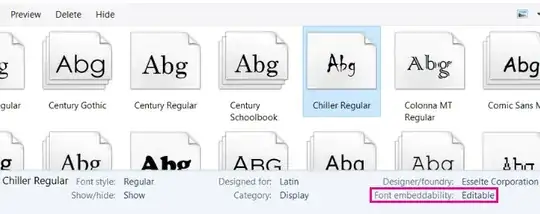
See also Embedding Fonts in Excel
That said, depending on what you're trying to do it may not need to install a font at all. For example to get a barcode you can draw them with VBA. No external font is necessary. See Create code128 barcode without installing font?. You can even go further by writing a font renderer in VBA, although that's not recommended


