I'm converting old Windows desktop machines from 2005-2009 into cheap Ubuntu Linux servers. I want to know which ones can handle a 64-bit OS and which can't. I read that some x86 CPUs are 64-bit compatible. The question is how to check.
Asked
Active
Viewed 1.2k times
2
-
Unless you need to handle more than 4gb of ram, 32 bit is prolly a better choice IMO, even with 64 bit capable systems. – Journeyman Geek May 22 '10 at 00:00
-
@The Journeyman geek -- I went 64-bit because of [this quote from Ubuntu](https://help.ubuntu.com/community/32bit_and_64bit): "Unless you have specific reasons to choose 32-bit, we recommend 64-bit." – Bill Paetzke May 22 '10 at 00:32
2 Answers
11
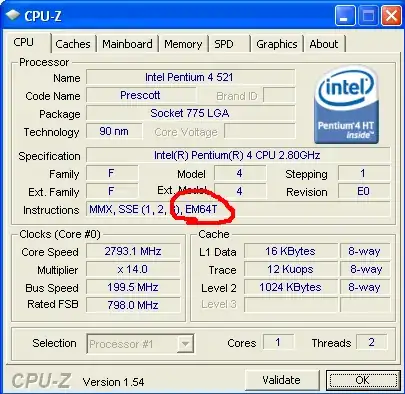
The definitive method:
- Download CPUZ
- Install and run it
- Check the "Instructions" value for EM64T (if Intel) or AMD64 (if AMD).

Gaff
- 18,569
- 15
- 57
- 68

Bill Paetzke
- 665
- 4
- 7
- 17
2
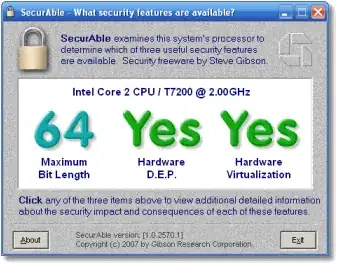
Run this utility and check the field "Maximum Bit Length"; it will show either 32 or 64. This utility is mainly used for checking if your CPU supports hardware virtualization, but it can be used for this purpose as well.
Gaff
- 18,569
- 15
- 57
- 68

Om Nom Nom
- 1,345
- 1
- 10
- 9