447

How can I download all pages from a website?

Any platform is fine.

Robotnik
  • 2,390
  • 3
  • 23
  • 41
joe
  • 12,279
  • 12
  • 67
  • 104
  • @tnorthcutt, I'm surprised too. If I don't recall awfully wrong, my Wget answer used to be the accepted one, and this looked like a settled thing. I'm not complaining though — all of a sudden the renewed attention gave me more than the bounty's worth of rep. :P – Jonik Sep 17 '09 at 06:05
  • did you try IDM? http://superuser.com/questions/14403/how-can-i-download-an-entire-website/42379#42379 my post is buried down. What did you find missing in IDM? – Lazer Sep 21 '09 at 10:30
  • 5
    @joe: Might help if you'd give details about what the missing features are... – Ilari Kajaste Sep 23 '09 at 11:06
  • 2
    Check out http://serverfault.com/questions/45096/website-backup-and-download on Server Fault. – Marko Carter Jul 28 '09 at 13:55
  • [browse-offline.com](http://www.browse-offline.com) can download the complete tree of the web-site so you can ... browse it offline – Menelaos Vergis Mar 05 '14 at 13:11
  • @MenelaosVergis browse-offline.com is gone – user5389726598465 Jul 17 '17 at 17:58
  • Yes, I don't even have the code for that! – Menelaos Vergis Jul 18 '17 at 04:16
  • just FYI please scam!!! do not download from https://websitedownloader.io/ it will ask small amount, which will look convincing but downloads just a webpage, does not even work for plain websites. – Anil Bhaskar Dec 21 '17 at 14:11
  • Try [Cyotek](https://www.cyotek.com/cyotek-webcopy/downloads) best web page scraper for offline viewing. – Sajjad Hossain Sagor Feb 16 '19 at 17:34

16 Answers16

412

HTTRACK works like a champ for copying the contents of an entire site. This tool can even grab the pieces needed to make a website with active code content work offline. I am amazed at the stuff it can replicate offline.

This program will do all you require of it.

Happy hunting!

Santropedro
  • 699
  • 1
  • 13
  • 24
Axxmasterr
  • 7,858
  • 7
  • 41
  • 60
  • 9
    Been using this for years - highly recommended. – Umber Ferrule Aug 09 '09 at 20:38
  • You can also limit the speed of download so you don't use too much bandwidth to the detriment of everyone else. – Umber Ferrule Aug 21 '09 at 22:18
  • Finally this one is bit better than others ;) – joe Sep 23 '09 at 13:33
  • 4
    Would this copy the actual ASP code that runs on the server though? – Taptronic Mar 19 '10 at 13:02
  • 14
    @Optimal Solutions: No, that's not possible. You'd need access to the servers or the source code for that. – Sasha Chedygov Mar 31 '10 at 07:08
  • 4
    After trying both httrack and wget for sites with authorization, I have to lean in favor of wget. Could not get httrack to work in those cases. – Leo May 18 '12 at 11:55
  • 2
    Whats the option for authentication? – vincent mathew May 28 '13 at 18:03
  • what if i try to copy wiki en? – Timothy Nov 04 '14 at 03:03
  • 1
    A nice tutorial for basic use - http://www.makeuseof.com/tag/save-and-backup-websites-with-httrack/ – Erran Morad Feb 16 '15 at 05:52
  • I would like to download for example the large images from the listings on ebay (the ones that are being shown in each listing) by using the link of the search result. is it possible for someone to tell me the settings for HTTrack that I can use to do that? – und3rd06012 Sep 01 '15 at 15:40
  • Is this supporting downloading paged contents like mywebsite.com/games?page=1, mywebsite.com/games?page=2 because seems like it keeps overriding of previously created pages and shows only last page. Please advice. – Teoman shipahi Feb 29 '16 at 16:27
  • Does it support cookies (sessions)? – jayarjo Mar 26 '17 at 17:23
  • 1
    This is a terrible program. It has great trouble downloading single web-pages, poor control over following links and to what depth, and an absurd download speed limit from last decade. Just use wget, save yourself the pain. – aaa90210 Dec 30 '18 at 21:04
  • 4
    For **macOS**, use `brew install httrack` and then run it with `httrack`. It has a great menu after that. Easy peezie, lemon squeezie! – Joshua Pinter Nov 21 '19 at 17:31
  • Program has a lot of options, no documentation and seemed to only download a single page. – DustWolf Nov 29 '20 at 14:40
  • 1/2 HTTrack does not work like a champ for me at all. It downloads with 20 KiB/s speed using 1 connection at the same time, downloading only 1 file at the same time. Which renders it unusable for websites with many pages. In my case I have a website with articles on it, then there is a wiki and then there's a forum. In total it has around 30000-50000 pages. It would take me weeks if not months to download it using HTTrack. And there is no way to increase download speed. – KulaGGin Dec 05 '20 at 14:01
  • 2/2 I tried to set --disable-security-limits while running httrack from command line, set it in Scan Rules in GUI and in the URL list in GUI. None of these work. I also set the transfer rate to 1000000 which is only 1 MiB/s. And set the maximum connections / second to 10. It still downloads with only 20 KiB/s rate. When I browse the website in my browser, it opens the website instantly(in less than half a second), so it definitely works at a much higher speed than 20 KiB/s. And my speed is 100 Mbit/S, when I download something, it reaches 11.2 MiB/s speed in just a few seconds. – KulaGGin Dec 05 '20 at 14:01
  • This application is apparently not able to handle http to https redirects or https pages at all., despite stating otherwise in its FAQ. Maybe it just can't handle the proxy, though. – Tim Apr 19 '21 at 10:52
  • This app doesn't work. It leaves links to online pages untouched, so it doesn't work when offline – Richard May 02 '23 at 12:37
337

Wget is a classic command-line tool for this kind of task. It comes with most Unix/Linux systems, and you can get it for Windows too. On a Mac, Homebrew is the easiest way to install it (brew install wget).

You'd do something like:

wget -r --no-parent http://example.com/songs/

For more details, see Wget Manual and its examples, or e.g. these:

Jonik
  • 5,700
  • 12
  • 46
  • 55
  • 17
    There's no better answer than this - wget can do anything :3 – Phoshi Sep 16 '09 at 22:30
  • 9
    +1 for including the --no-parent. definitely use --mirror instead of -r. and you might want to include -L/--relative to not follow links to other servers. – quack quixote Oct 09 '09 at 12:43
  • 1
    I don't think I've used --mirror myself so I didn't put it the answer. (And it's *not* really fully "self explanatory" like Paul's answer says...) If you want to elaborate on why it's better than -r I'd appreciate it! – Jonik Oct 09 '09 at 13:06
  • 2
    As I also asked for httrack.com - would this cmd line tool get the ASP *code* or would it just get the rendering of the HTML? I have to try this. This could be a bit worrisome for developers if it does... – Taptronic Mar 19 '10 at 13:04
  • 7
    @optimal, the HTML output of course - it would get the code only if the server was badly misconfigured – Jonik Mar 19 '10 at 15:17
  • 4
    unfortunately it does not work for me - there is a problem with links to css files, they are not changed to relative i.e., you can see something like this in files: which does not work locally well, unless there is a waz to trick firefox to think that certain dir is a root. – gorn Jul 27 '12 at 00:42
  • 2
    Homebrew shows how to install it right on their homepage http://brew.sh/ – Eric Brotto Jul 14 '14 at 10:43
  • Httrack vs Wget? Which one should I use on a Mac? – 6754534367 Sep 12 '16 at 14:01
  • @gorn That might be doable with a chroot, though I've never tried it. – wjandrea Sep 24 '17 at 07:31
  • Any chance of running this in parallel? – Luís de Sousa Dec 22 '18 at 10:29
  • 6
    doesn't work with the links, images, and others, so it is useless. The other answer with command `wget -m -p -E -k www.example.com` did all the jobs and display a website locally with proper links, images, format, etc, in so easy way. – BMW Jan 29 '20 at 06:27
  • 1
    @BMW This should definitely be the top comment! I recommend adding this to the answer. – Aldahunter May 05 '20 at 12:37
  • Diskernet it an alternative & works for single page applications & site that require authentication: https://github.com/i5ik/Diskernet – Clifford Fajardo Jan 09 '22 at 02:00
  • Is there any way to save the `JS` scripts separately than the html file? I also don't see any `CSS` files downloaded. – Shayan Mar 10 '22 at 06:56
211

Use wget:

wget -m -p -E -k www.example.com

The options explained:

-m, --mirror            Turns on recursion and time-stamping, sets infinite 
                          recursion depth, and keeps FTP directory listings.
-p, --page-requisites   Get all images, etc. needed to display HTML page.
-E, --adjust-extension  Save HTML/CSS files with .html/.css extensions.
-k, --convert-links     Make links in downloaded HTML point to local files.
-np, --no-parent        Don't ascend to the parent directory when retrieving 
                        recursively. This guarantees that only the files below 
                        a certain hierarchy will be downloaded. Requires a slash 
                        at the end of the directory, e.g. example.com/foo/.
  • 12
    +1 for providing the explanations for the suggested options. (Although I don't think `--mirror` is very self-explanatory. Here's from the man page: "*This option turns on recursion and time-stamping, sets infinite recursion depth and keeps FTP directory listings. It is currently equivalent to -r -N -l inf --no-remove-listing*") – Ilari Kajaste Sep 23 '09 at 11:04
  • 2
    If you don’t want to download everything into a folder with the name of the domain you want to mirror, create your own folder and use the -nH option (which skips the host part). – Rafael Bugajewski Jan 03 '12 at 15:33
  • 4
    What about if the Auth is required? – Val May 13 '13 at 16:04
  • 5
    I tried using your `wget --mirror -p --html-extension --convert-links www.example.com` and it just downloaded the index. I think you need the `-r` to download the entire site. – Eric Brotto Jul 14 '14 at 10:49
  • 6
    for those concerned about killing a site due to traffic / too many requests, use the `-w seconds` (to wait a number of secconds between the requests, or the `--limit-rate=amount`, to specify the maximum bandwidth to use while downloading – vlad-ardelean Jul 14 '14 at 18:33
  • 2
    @EricBrotto you shouldn't need both `--mirror` and `-r`. From the `wget` man page: "[--mirror] is currently equivalent to -r". – evanrmurphy Apr 16 '15 at 23:50
  • 2
    `-p` is short for `--page-requisites`, for anyone else wondering. – evanrmurphy Apr 16 '15 at 23:59
  • 2
    Using `wget` like this will not get files referenced in Javascript. For example, in `` the images for mouseout and mouseover will be missed. – starfry May 07 '15 at 13:40
  • 1
    Does anybody know how can I use wget to get the large images of the listings on ebay? For example I want to get the large images from this link: http://www.ebay.com/sch/i.html?_from=R40&_trksid=p2051542.m570.l1313.TR0.TRC0.H0.X1974+stamps.TRS0&_nkw=1974+stamps&_sacat=0. To be more specific I want the images that are being displayed when you hover the mouse over the image. – und3rd06012 Sep 12 '15 at 12:01
  • 1
    For me it doesn't work as expected, it no recreate all links inside the page in order to be browseable offline – chaim Nov 11 '15 at 08:54
  • 2
    If you only want to download `www.example.com/foo`, use the `--no-parent` option. – Cinnam Sep 10 '16 at 16:43
  • This seems to get confused with some hyperlinks: /contact was converted to index.html?p=11 (which it also copied into the top level directory, even though contact/index.html was downloaded too) – hayd Jan 26 '17 at 04:45
  • Ah, these are apparently redirects in wordpress but not resolved by wget, and strangely used in the downloaded html when resolved in the original html (no `p=` link in the `a` tag). – hayd Jan 26 '17 at 04:54
  • If you want to output a site running locally, use `localhost:4000` (or whatever your port is) and not `127.0.0.1:` or it won't work—at least it didn't for me. For some reason, it would only get the `index.html` files for each page in my site and not all the assets, css, etc. – Evan R Jun 09 '18 at 12:10
  • 1
    `wget --no-parent --recursive --level=inf --span-hosts --page-requisites --convert-links --adjust-extension --no-remove-listing https://……/…… --directory-prefix=……`. There must be someone _needs_ this. – Константин Ван Feb 03 '19 at 12:35
  • 2
    I would like to point out that "--span-host" (not --span-hosts) is an important tag to me that I spent some time finding! Without this, links and images that are not in the domain specified will not be backup-ed! – Student May 16 '19 at 02:20
  • this worked where others (including accpeted answer) failed miserably. – Martin Mucha Aug 14 '20 at 12:17
  • 1
    Is there any way to save the `JS` scripts separately than the html file? I also don't see any `CSS` files downloaded. – Shayan Mar 10 '22 at 06:57
  • wget worked better for me.. – emmaakachukwu Aug 27 '22 at 12:24
7

Internet Download Manager has a Site Grabber utility with a lot of options - which lets you completely download any website you want, the way you want it.

  1. You can set the limit on the size of the pages/files to download

  2. You can set the number of branch sites to visit

  3. You can change the way scripts/popups/duplicates behave

  4. You can specify a domain, only under that domain all the pages/files meeting the required settings will be downloaded

  5. The links can be converted to offline links for browsing

  6. You have templates which let you choose the above settings for you
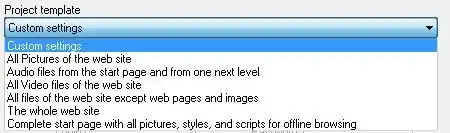
enter image description here

The software is not free however - see if it suits your needs, use the evaluation version.

Gaff
  • 18,569
  • 15
  • 57
  • 68
Lazer
  • 17,227
  • 43
  • 116
  • 141
7

You should take a look at ScrapBook, a Firefox extension. It has an in-depth capture mode.

enter image description here

Gaff
  • 18,569
  • 15
  • 57
  • 68
webjunkie
  • 121
  • 1
  • 6
7

I like Offline Explorer.
It's a shareware, but it's very good and easy to use.

Eran
  • 3,421
  • 5
  • 34
  • 33
  • Very good and really easy to use windows software, in shareware mode it is able to download up to 2000 files which is enough for small websites. – Christoph Lösch Oct 06 '20 at 01:23
4

Teleport Pro is another free solution that will copy down any and all files from whatever your target is (also has a paid version which will allow you to pull more pages of content).

Ashildr
  • 2,698
  • 5
  • 26
  • 45
Pretzel
  • 466
  • 3
  • 17
2

Power wget

While wget was already mentioned this resource and command line was so seamless I thought it deserved mention: wget -P /path/to/destination/directory/ -mpck --user-agent="" -e robots=off --wait 1 -E https://www.example.com/

See this code explained on explainshell

Shwaydogg
  • 727
  • 5
  • 6
2

Try BackStreet Browser.

It is a free, powerful offline browser. A high-speed, multi-threading website download and viewing program. By making multiple simultaneous server requests, BackStreet Browser can quickly download entire website or part of a site including HTML, graphics, Java Applets, sound and other user definable files, and saves all the files in your hard drive, either in their native format, or as a compressed ZIP file and view offline.

enter image description here

Gaff
  • 18,569
  • 15
  • 57
  • 68
joe
  • 12,279
  • 12
  • 67
  • 104
2

For Linux and OS X: I wrote grab-site for archiving entire websites to WARC files. These WARC files can be browsed or extracted. grab-site lets you control which URLs to skip using regular expressions, and these can be changed when the crawl is running. It also comes with an extensive set of defaults for ignoring junk URLs.

There is a web dashboard for monitoring crawls, as well as additional options for skipping video content or responses over a certain size.

Ivan Kozik
  • 987
  • 1
  • 6
  • 15
1

How can I download an entire website?

In my case, I wanted to download not an entire website, but just a subdomain, including all its subdomains.

As an example, I tried :

wget -E -k -m -np -p https://www.mikedane.com/web-development/html/

which worked just fine. 1

In my experience, this doesn't always get all the subdomains or PDFs, but I did get a fully functional copy that works fine offline.

Here are the meanings of the flags I used, according to the Linux man page : 2

-E   – will cause the suffix .html to be appended to the local filename
-k   – converts the links to make them suitable for local viewing
-m   – turns on recursion and time-stamping, infinite recursion depth
-np – only the files below a certain hierarchy will be downloaded
-p   – download all files necessary to properly display the pages

Reference


1 If you try it, expect the download to be about 793 KiB.
In a previous version, I had index.html at the end of the URL. This is unnecessary. It might even make the download fail.

2 Concerning the -np flag, the exception is when there are dependencies outside the hierarchy.
For example, I made a download for which the referred CSS files are in a different subdomain.
Yet, the subdomain that has the CSS files was also downloaded, which is what we want, of course.

Henke
  • 813
  • 1
  • 8
  • 20
0

You can use below free online tools which will make a zip file of all contents included in that URL:

GorvGoyl
  • 237
  • 1
  • 13
0

Cyotek WebCopy seems to be also a good alternative. For my situation, trying to download a DokuWiki site, it currently seems to lack support for CSRF/SecurityToken. Thats why I actually went for Offline Explorer as stated already in answer above.

0

A1 Website Download for Windows and Mac is yet another option. The tool has existed for nearly 15 years and has been continuously updated. It features separate crawl and download filtering options with each supporting pattern matching for "limit to" and "exclude".

Tom
  • 409
  • 4
  • 11
  • 24
-1

The venerable FreeDownloadManager.org has this feature too.

Free Download Manager has it in two forms in two forms: Site Explorer and Site Spider:

Site Explorer
Site Explorer lets you view the folders structure of a web site and easily download necessary files or folders.
HTML Spider
You can download whole web pages or even whole web sites with HTML Spider. The tool can be adjusted to download files with specified extensions only.

I find Site Explorer is useful to see which folders to include/exclude before you attempt attempt to download the whole site - especially when there is an entire forum hiding in the site that you don't want to download for example.

David d C e Freitas
  • 4,511
  • 4
  • 27
  • 35
-5

I believe google chrome can do this on desktop devices, just go to the browser menu and click save webpage.

Also note that services like pocket may not actually save the website, and are thus susceptible to link rot.

Lastly note that copying the contents of a website may infringe on copyright, if it applies.

jiggunjer
  • 1,361
  • 3
  • 16
  • 29
  • 4
    A web *page* in your browser is just one out of many of a web *site*. – Arjan May 16 '15 at 20:05
  • @Arjan I guess that makes my option labor intensive. I believe it is more common for people to just want to save one page, so this answer may be better for those people who come here for that. – jiggunjer May 17 '15 at 10:10