3

The PKZipC documentation mentions the -utf8 option to store non-ASCII filenames as UTF-8 inside a ZIP, but doesn't say how to add such files using an @list argument to pkzipc -add.

I tried several combinations of running with/without the -utf8 switch, and using @list files saved in UTF-8 or UTF-16 encodings with/without BOMs, but they all failed.

I am wondering if anyone had better luck in getting this to work.

dxiv
  • 2,023
  • 13
  • 20

2 Answers2

2

As you have tried all the possible combinations of the -utf8 switch and @list with UTF-8 or UTF-16 encoding and even with/without BOMs, I don't see what else you can do using PKZipC for Windows and its parameters.

I would advise to get in touch with PKWARE Support and complain, although this may not immediately bring a solution.

In the meantime, you will need to transform file-names containing non-ASCII characters into names without such characters. This format is called the short form of the file-name, which is basically the old DOS format of the 8.3 file-name. The dir /x command will display these names.

For getting the short names for a bunch of files, see the post How can I find the short path of a Windows directory/file? where various solutions are listed. I especially liked this answer that proposed the following one-liner:

cmd /c for %A in ("C:\Program Files") do @echo %~sA

Here is an example on how you may use it:
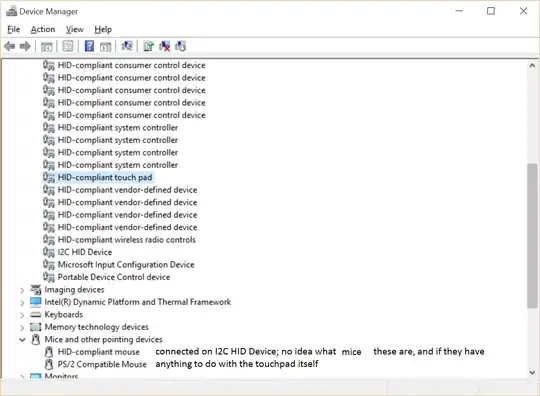
enter image description here


As you say that your IT has decided to disable NTFS 8.3 short names on your network shares, I would suggest looking for an alternative. Some I would suggest testing are:

harrymc
  • 455,459
  • 31
  • 526
  • 924
  • Thanks, but... (a) This could only work with NTFS volumes where 8.3 short name creation has *not* been disabled, which most Windows Server setups *do* disable. (b) This only shifts the problem from having pkZipC read a Unicode response file to writing a batch/scipt file that reads such a file and outputs the 8.3 names to another file. Note that the question is specifically about reading the list from a file, if I could use wildcards, then I could use those with pkZipC directly. – dxiv Jun 06 '19 at 03:24
  • FWIW I have a ticket with PKWare customer support opened more than a week ago, but all I've got thus far is "*passed along your use case to our development team for their thoughts*". That's disappointing, even more so given that WinZip and WinRAR provide full Unicode support at the cmd line, and have done so for a while. – dxiv Jun 06 '19 at 03:27
  • If PKWare is lacking support, there is an enormous choice of other products that do the same thing as good or better, so no reason to stick with PKZipC. For your comments: (a) This isn't my experience, and the performance improvements this gives are mostly urban myth. (b) This requires an additional step, true, but may perhaps be the way to make this work for you without changing zip product. Personally, I have given up on PKZip many years ago. – harrymc Jun 06 '19 at 06:16
  • Having the 8.3 SFN creation disabled on our network shares is an IT choice that I have no saying in or control over. As for the rest, right, there are alternatives, only it's unexpected/sad to see the rightful "owner" of the ZIP format badly falling behind the times. – dxiv Jun 07 '19 at 03:41
  • I have added to my answer some alternatives to PKZip that you could have a look at, both free and commercial. (The commercial products are not better than the free ones.) – harrymc Jun 07 '19 at 05:23
  • Your answer helped, thank you, but it doesn't settle the question of how to do it with pkZipC, or whether it is documented/provably impossible to do so. Therefore my +1 though I am not going to accept any of the answers thus far, in hope the question may catch someone's eye down the road as being still open. – dxiv Jun 12 '19 at 22:59
  • I do supply a method that works, requiring enabling 8.3 names. For the rest, PKZIP is proprietary, so there is no way for anyone to fix it. It's an old product and doesn't fully use Unicode. Only the developers can fix it, and they are not here. – harrymc Jun 13 '19 at 06:34
1

Using command prompt, try this:

  • execute command chcp 65001 to change cmd's code page to utf8

  • Then execute your pkzipc command with -utf8

Hope it helps you.

Tom Kim
  • 111
  • 1
  • Thanks, that's a good hunch, and it's one of the many things I tried, but there were too many to list them all in the question. It doesn't work, in either Win7 or Win10, with or without `-utf8`. With an `@list` file containing just one line with a non-ASCII filename, the error is, in all cases, the same as in other codepages `PKZIP: (E8) Nothing to do!`. – dxiv Jun 07 '19 at 03:12