I don't have the album art for most of my music, and I don't have time to go find and download images for all of my album. Any suggestions?
Asked
Active
Viewed 1.4k times
11

-
Don't use album art? Personally, I never look at it anyway, and it saves some space on your mp3 player (sure, not much, but over 20,000 songs it adds up. – Sean Jul 28 '09 at 18:50
-
Well that is a good idea for the mp3 player, but I'm more interested in having it for my Media Center. – Chris B Jul 28 '09 at 18:56
-
1@Sean, you don't have to embed album art into your music files to use album art. I just put an image in the album's directory. – James McMahon Aug 05 '09 at 21:28
8 Answers
6
I don't know if it's the easiest way, but I use Media Monkey. It goes to Amazon (you choose which nationality) and auto-tags what it finds. Just click on the album and hit Ctrl+L.
My Classical music is the most problematic, but I find amazon.ca pretty good track listings.

Richard Morgan
- 385
- 2
- 5
- 11
3
Try Tag & Rename. It has built-in Amazon lookup that will download cover art and save it to folder.jpg or directly in the music files as part of the ID3V2 tag.

Tomas Andrle
- 3,092
- 4
- 31
- 32
3
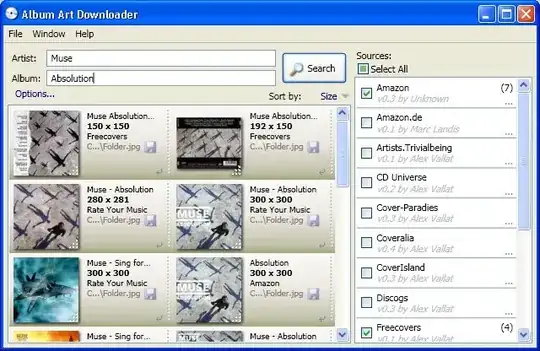
I use Album Art Downloader. It's open source and written in .Net 3.5. To use it you simply point it at a directory and it will search for cover art for all albums within from a variety of sources.

Gaff
- 18,569
- 15
- 57
- 68

James McMahon
- 3,438
- 9
- 36
- 36
3
I use mp3tag for Windows XP. It links to Amazon and Discogs for the album art.

GAThrawn
- 4,326
- 2
- 22
- 42

M1CH43L P4VL
- 53
- 1
- 1
- 6
1
I would checkout Songbird, with the add-on of Album Art Manager.
Songbird is an Open Source project, and has feature rich media control and organization.

Tammen
- 136
- 1
- 3

1
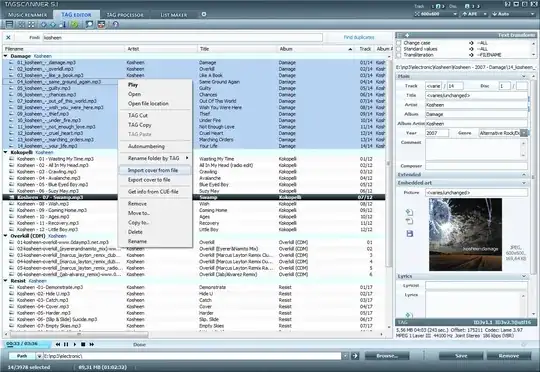
I use TagScanner, it does all the job, from find the artwork and update de ID3 stuff to renaming the files.
Gaff
- 18,569
- 15
- 57
- 68

Eder Gusatto
- 333
- 1
- 4
- 13
