9

I want to determine which sectors a file occupies on an HDD. I want to know if a file is split into different non-sequential sectors.
Is there any way to do this on Windows 10?

The ideal solution would be to have a map of all the sectors of a hard drive and then, after selecting a file, it will mark or color all the sectors this file occupies.

I say Reinstate Monica
  • 25,487
  • 19
  • 95
  • 131
churchill
  • 374
  • 2
  • 14
  • 1
    Just a note that SSDs store data differently and often "hide" the real sectors the files exist on from the OS as the drive controllers work to maintain wear leveling and other features of the drive. – music2myear Oct 19 '19 at 01:49

2 Answers2

18

Tools can use the Defrag API, specifically FSCTL_GET_RETRIEVAL_POINTERS, to get a list of extents (sector ranges) for a given file. You can use it on the command line through fsutil which comes built into Windows:

fsutil file queryextents C:\MyFile.ext

Various other third-party defragmentation apps also frequently have a function to analyze just a single file. For example, SysInternals Contig:

contig -a C:\MyFile.ext

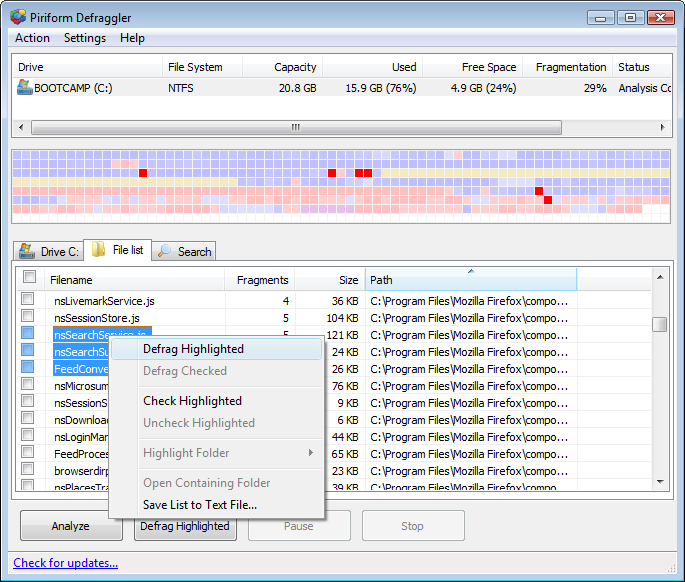
As another example, Piriform Defraggler automatically lists the most fragmented files; selecting one file will show its locations in a graphical view and vice versa.

enter image description here enter image description here


The Linux equivalent is the FIEMAP ioctl which returns a list of file "extents" (and the older FIBMAP which returns a list of blocks). It can be used through tools such as filefrag or xfs_io.

u1686_grawity
  • 426,297
  • 64
  • 894
  • 966
  • +1 this is the correct answer. `DiskView` and the [Microsoft `NFI` tool](/a/347569) might be helpful too (though good luck finding the latter); they can go in the reverse direction. – user541686 Oct 17 '19 at 21:36
0

Perfect Disk (Raxco) does this on hard drives. It does an automatic defrag of the disk and shows a summary of fragmentation.

If you adopt an SSD at some point, the issue becomes irrelevant

John
  • 46,167
  • 4
  • 33
  • 54