0

I have a non-stacked pivot bar chart that is showing two values (Sum of Planned Hours & Sum of Actual Hours) for a number of Series.

What I want to achieve is a formatting rule that if all the bars for Planned Hours for each series are shown in solid, and all the bars for Actual Hours are shown in hashed lines.

This chart will be regularly updated with different series e.g. Assy, Insp, Plan but I want the formatting to remain based on the values planned & actual. Potentially I could run a macro after each chart update?

I've included a picture of the desired format with two series included as an example, linked below.

Any/all help would be much appreciated!

Example Chart:
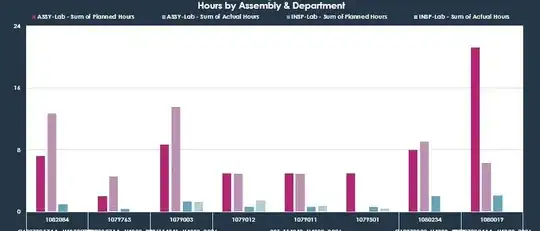
Example Chart

Io-oI
  • 7,588
  • 3
  • 12
  • 41
dnaylor93
  • 11
  • 3
  • I'm sure that you are struggling with `Format Data Series`,, if yes then `select any bar` on graph, `Right click`,, you get Formatting Pan, hit the first one `Fill & Line`,, you find lots of options there to apply. – Rajesh Sinha Apr 15 '20 at 06:18
  • HI @RajeshS I'm aware how that works for changing a series, however, I want to automate that process so that I don't have to go in and reformat the graph every time the series name changes as there are 40+ different resource names for the series. – dnaylor93 Apr 15 '20 at 18:06
  • ,, in that case you need a Macro (VBA) code to automate the execution. – Rajesh Sinha Apr 16 '20 at 06:42
  • Yes, which is what I asked in the original post _Potentially I could run a macro after each chart update?_ – dnaylor93 Apr 16 '20 at 20:41

1 Answers1

1

So, I found a solution. The planning series are always evenly numbered series, so I created a loop that runs through the series for all even numbers and applies the correct bar format:

Dim x As Integer

ActiveSheet.ChartObjects("Hours_By_Department").Activate

For x = 2 To ActiveChart.FullSeriesCollection.Count Step 2

    ActiveSheet.ChartObjects("Hours_By_Department").Activate
    ActiveChart.FullSeriesCollection(x).Select
    With Selection.Format.Fill
        .Visible = msoTrue
        .Patterned msoPatternNarrowHorizontal
    End With

Next
Rajesh Sinha
  • 8,995
  • 6
  • 15
  • 35
dnaylor93
  • 11
  • 3