2

Getting error "Cannot enable Hyper V service" in Windows 10, even though I have already enabled it in Program & Features.

Computer Management under Services and Applications / Services at Hyper-V Host Compute and Hyper-V Virtual Machine Management, are also set to 'enabled'

When I click on Docker app to open, I see the message"Linux containers are starting" on right below corner and after like 10 secs I get that error pop up.
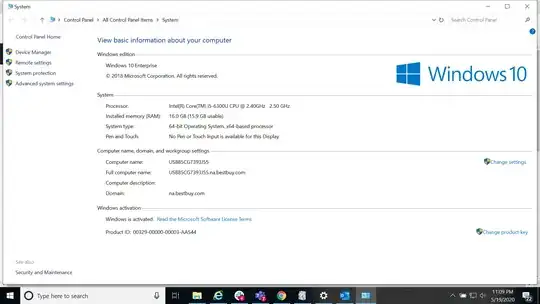
Image of error pop up

Image of Windows version

Dave M
  • 13,138
  • 25
  • 36
  • 47
Rk5
  • 131
  • 1
  • 1
  • 3
  • 2
    Open your BIOS and ensure VT-x / Hardware Virtualization have been enabled. Usually not enabled by default. – John May 20 '20 at 01:44
  • @John oh ok ,this is on company laptop so unable to change BIOS. But yeah that is the only missing piece Im unable to check right now, Will try to check on this – Rk5 May 20 '20 at 01:46
  • Check Requirements: Windows 10 Enterprise, Pro, or Education; 64-bit Processor with Second Level Address Translation (SLAT); CPU support for VM Monitor Mode Extension (VT-c on Intel CPUs). Minimum of 4 GB memory. __The Hyper-V role cannot be installed on Windows 10 Home.__ https://docs.microsoft.com/en-us/virtualization/hyper-v-on-windows/quick-start/enable-hyper-v – vssher May 20 '20 at 01:46
  • 1
    Ask your company if they can help you here. – John May 20 '20 at 01:48
  • Windows 10 System Requirements for Hyper-V : https://docs.microsoft.com/en-us/virtualization/hyper-v-on-windows/reference/hyper-v-requirements – vssher May 20 '20 at 01:48
  • I suspect you are running Windows 10 Home. So I am going to suggest this question is closed a duplicate of [this](https://superuser.com/questions/1550291/how-to-install-windows-10-home-19018-update/1550294#1550294) question. If you are running Windows 10 Professional, you will need to provide more details in your question body, because that error is almost exclusively limited to when Hyper-V is NOT actually enabled and installed. Docker Desktop does not support Windows 10 version 1909 if you are using Windows 10 Home. – Ramhound May 20 '20 at 01:57
  • Possible duplicate of [this](https://superuser.com/questions/858259/hyper-v-reports-that-the-hypervisor-is-not-running-how-to-start-the-hypervisor/1160635#1160635) question. [Please verify all requirements are enabled](https://success.docker.com/article/manually-enable-docker-for-windows-prerequisites) – Ramhound May 20 '20 at 01:59
  • Im using Windows 10 Enterprise , added the image – Rk5 May 20 '20 at 04:09
  • Why exactly is this machine connected to Best Buy’s active directory domain. I assume you are an Administrator on this machine? – Ramhound May 20 '20 at 04:51
  • I work for the company and I cannot be the administrator. I guess the only way I have is contact support team to changes BIOS settings. Let me know incase there is another solution – Rk5 May 20 '20 at 19:34

1 Answers1

-1

I had the same issue, after installing the docker restarting the PC resolved the issue