30

What I've read from UEFI so far is that it has features that BIOS didn't have: it can look in the filesystem and find the boot loader there.

Then, since the UEFI boot system can read directly

C:\Windows\System32\winload.efi

from the main partition for C:\, why is there the need for a separate 100 MB partition when it could just read winload.efi directly in the main partition?

Can't the GPT link that it should use C:\Windows\System32\winload.efi and avoid the 100 MB partition?
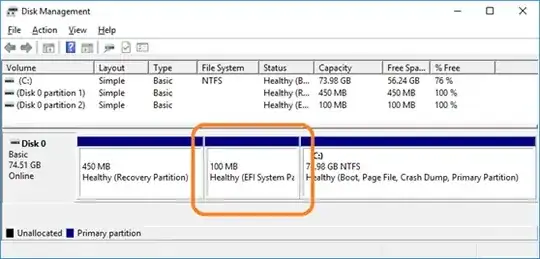
Screenshot

(illustrative image, not taken from my system, thus the different partition sizes)

Basj
  • 1,489
  • 7
  • 47
  • 90

2 Answers2

51
  1. UEFI doesn't support NTFS. The spec calls for FAT family support. Vendors could add NTFS support, but:

    • It's not really necessary, because FAT32 is completely sufficient and much less complex
    • Unless all vendors agreed to add NTFS support, it wouldn't be a universally usable configuration anyway.
  2. EFI System Partition isn't tied to any particular OS. If you're multibooting, you can store multiple bootloaders on a single partition.

gronostaj
  • 55,965
  • 20
  • 120
  • 179
  • 2
    Thank you! Then does it mean the file `c:\windows\system32\winloader.efi` is not used at all by the UEFI boot system? Also, for learning purposes, how can I mount the `100MB Healthy (EFI System Partition)` to see its content (files / folders)? The option `Change drive letter` is disabled in the Windows GUI partitioning tool. – Basj Jun 22 '20 at 09:44
  • 1
    Yup, C: is always NTFS-formatted so UEFI won't be able to see its contents. You can mount ESP with `diskpart`. – gronostaj Jun 22 '20 at 09:45
  • 1
    Thanks a lot! PS: which `diskpart` command should be used to mount EFI system partition? – Basj Jun 22 '20 at 10:01
  • 1
    @Basj The same as any other: `diskpart` > `lis vol` > `sel vol <#>` _(EFI partition)_ > `assign letter=z` > to remove: instead of `assign`, issue `remove`. – JW0914 Jun 22 '20 at 10:11
  • 1
    To add to 1: You don't want the boot files stored on the OS partition, else if the OS partition becomes corrupted, you can't boot WinRE, which is also why WinRE should be on it's own partition _(unsure why Microsoft defaults it to `C:\Recovery` instead of creating a WinRE partition during install)_. – JW0914 Jun 22 '20 at 10:15
  • 2
    @JW0914 Clean installs do create a separate partition if the disk is not partitioned. – gronostaj Jun 22 '20 at 10:17
  • 1
    @Basj, AFAIK it's not used by UEFI itself, but it's used by the _Windows Boot Manager_ (which has a built-in NTFS mini driver). I think it's comparable to Linux GRUB in that way – GRUB itself must be loaded from the EFI partition, but it can then use built-in ext4 drivers to load the OS kernel from any other partition. – u1686_grawity Jun 23 '20 at 07:17
  • 1
    OK, but why 100MB instead of 10? I guess most space of 100MB is empty. – i486 Jun 24 '20 at 12:25
  • 1
    @i486 Windows boot files take up 26 MB on the ESP. You can have more than one OS and their boot files go to that partition too. You may want to skip an intermediate bootloader or use a bootloader that doesn't support target filesystem, in that case you need a kernel image on ESP and eg. Linux supports that - but the kernel + early userspace necessary to boot can take up about 100 MB easily (and you may want to keep the previous kernel during updates just in case). And keep in mind that 100 MB is 0.08% of a 128 GB SSD which is quite small by today's standards. – gronostaj Jun 24 '20 at 13:01
21

In addition to gronostaj's answer there's another feature that require a separate partition: full disk encryption, aka BitLocker in Microsoft world.

From Microsoft documentation:

BitLocker Drive Encryption Partitioning Requirements

BitLocker must use a system partition that is separate from the Windows partition. The system partition:

  • Must be configured as the active partition.
  • Must not be encrypted or used to store user files.
  • Must have at least 100 megabytes (MB) of space.
  • Must have at least 50 MB of free space.
  • May be shared with a recovery partition.

The unencrypted partition contains the info needed to read the encrypted partition, and the UEFI can't access this encrypted partition.

JFL
  • 486
  • 2
  • 6
  • 3
    yeah that's why Windows Vista+ creates a small boot partition when you freshly repartition a disk, even before the UEFI era because in case the user wants to enable encryption, dynamic disks or many other things then almost nothing needs to be changed – phuclv Jun 23 '20 at 03:41
  • Could you also add that the windows volume manager also allows making the C drive a non simple volume in which case it needs a driver to load it? I dont want to make yet another answer. – Vality Jun 23 '20 at 20:23
  • @phuclv BIOS and UEFI both have boot partions separate from the OS partition for one reason: if the OS partition becomes corrupted, WinRE is still possible to boot... It has nothing to do with BitLocker. – JW0914 Jun 24 '20 at 04:17
  • @JW0914 there's no WinRE recovery partition in Windows Vista. In that era each manufacturers have their own recovery partition. If you delete the only active partition then recreate it then Vista will create a small active partition for booting – phuclv Jun 24 '20 at 04:34
  • @phuclv I wasn't aware of that - my comment's intent was to address supported versions of Windows, which Vista is not, with Windows 7 only being supported for business with LTSB licenses _(WinRE was implemented in Windows 7)_. – JW0914 Jun 24 '20 at 12:37