31

When I open a PDF in a non-Acrobat PDF viewer, they look fine, but when I open one in Acrobat, the fonts look absolutely terrible. They look very low resolution and I'm not sure how to increase them.

I've tried PDFs from internet, exporting from Word, and making LaTeX documents.

How can I correct this problem?

Hennes
  • 64,768
  • 7
  • 111
  • 168
user1596
  • 1,494
  • 5
  • 19
  • 28
  • If you're wondering if this question applies to you and you don't have a non-Acrobat viewer installed, the PDF should look fine when you print it as well. – Noumenon Jul 04 '16 at 14:26

2 Answers2

52

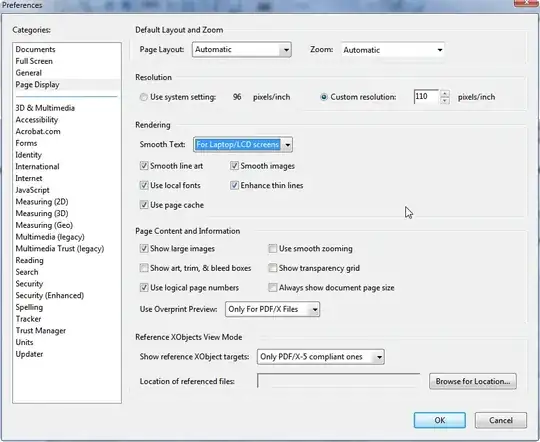
Did you make any changes in Adobe Reader? See the below default settings for Page display (go to Edit | Preferences):

alt text

To increase the resolution increase the pixels/inch from the Resolution section

Gaff
  • 18,569
  • 15
  • 57
  • 68
Nicu Zecheru
  • 5,492
  • 7
  • 33
  • 46
0

Try opening the file on someone else's computer and see if they have the same issue. If not, the first thing I would try is to uninstall adobe acrobat and then install the latest version. You could also try installing older versions of Adobe reader here: http://www.oldapps.com/adobe_reader.php

Jarvin
  • 7,236
  • 6
  • 50
  • 63