Possible Duplicate:
Editor for Windows Explorer’s context menu
So when I right-click a file in Explorer I have a bunch of added menu items.
There are a few I would like to keep however. How can I remove the ones that I want to?
Possible Duplicate:
Editor for Windows Explorer’s context menu
So when I right-click a file in Explorer I have a bunch of added menu items.
There are a few I would like to keep however. How can I remove the ones that I want to?
You can do that with ShellExView; note that this file is clean, Sophos gives a false positive...
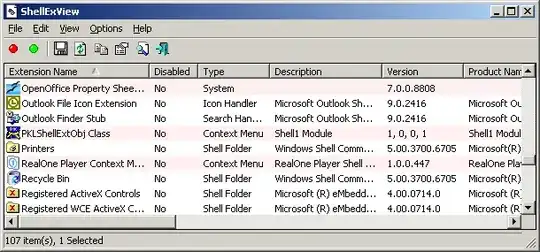
An alternative is to use Autoruns which allows you to clean up the same and a lot more...


Most programs that nest in the context menu offer an option of removing that. Usually found in the program's properties as something like "Add context menu option".
Just found this from http://www.annoyances.org/exec/show/article02-026:
- Select Folder Options from the Tools menu in My Computer or Explorer, and click the File Types tab.
- Highlight the desired file type, and click Advanced.
- Here, you can specify a new name for this file type (to be listed in the type column in Explorer), as well as the default icon for files of this type.
- In the box entitled Actions, is a list of the customizable context menu items. The bold item is the default (the action carried out when you double-click on a file of this type).
- You can add new items, change the default action, and remove unwanted items here. For new items, simply specify the program with which you want the action caried out.
Might be worth a try also.

Try Menu Maid, easier to use than ShellExView for this sort of thing.
http://www.sdsoftware.org/software/menumaid/
.


