0

I posted this question

Disable Touchscreen Automatically on Boot in Bash

Hoping to disable my touchscreen. I followed the answer that begins "to permanently disable the touchscreen input". Now, once I log into my ubuntu account, my mouse and my keyboard no longer work.

Because of this, I can't get back into the file to undo what I changed.

Is there a way I can log in without these things being disabled?

The touchscreen is still working but I can't type anything. Nor can I copy paste into the terminal.


Using copy and paste in my browser, I have been able to navigate to the file in my browser and take a photo of it:
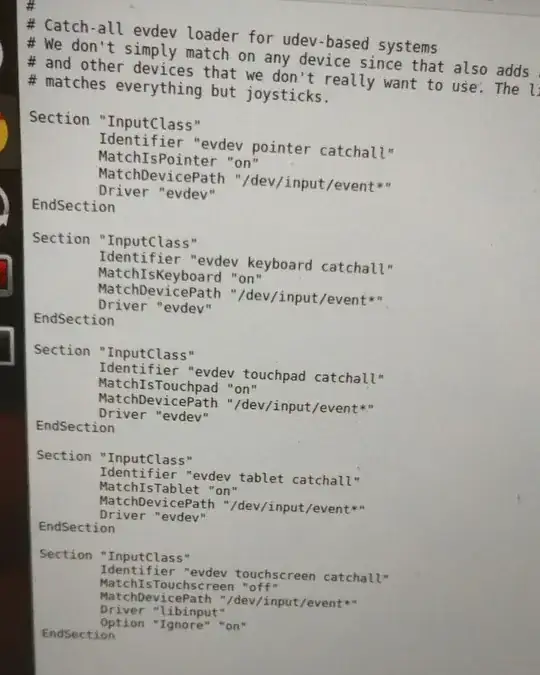
enter image description here

It's the bottom section that I edited.

user1551817
  • 175
  • 2
  • 9
  • 29

2 Answers2

0

If your Touch is working fine then, just open the file with GEDIT and use on screen keyboard to change your settings.

  • Unfortunately, the on-screen keyboard is working fine EXCEPT for about 3 letters for some reason. So I can't actually type the name of the file I need to open. And I can't copy and paste apparently because I need "ctrl" which the on-screen keyboard doesn't have. – user1551817 Aug 09 '20 at 14:31
  • Take another PC or ask your friend for making a Linux live USB, Boot the live USB in your system and change the file and reboot your system and Boot with System OS. – Sahyog Vishwakarma Aug 12 '20 at 03:04
0

On the log in screen I can choose Ubuntu, Ubuntu on Wayland or Unity. I tried logging in on Ubuntu on Wayland and for some reason, my keyboard and mouse work on this. Them I was able to change the file back and everything is as normal again.

user1551817
  • 175
  • 2
  • 9
  • 29