27

This has been a frustration for a while - I am trying to figure out how to configure Notepad++ (now at v5.6.8 Unicode) to use a proxy server with a specific username and password when connecting to check for updates. At the moment I get a dialog stating:

curl error
couldn't connect to host

When setting up the Plugin Manager I have given it the proxy server address in the form: username:password@server-address and supplied the port in the separate box - which works (although somewhat uncomfortable as this exposes my username/password).

How can I achieve the equivalent with the main update configuration? I've searched extensively on both the Notepad++ wiki and Google with no success other than a possible reference to using a local proxy to force connections to gateway properly.

happy_soil
  • 2,411
  • 2
  • 20
  • 22
AJH
  • 373
  • 1
  • 4
  • 8

4 Answers4

29

Notepad++ uses Generic Updater for win32 (it's free).

The updater is located here: C:\Program Files (x86)\Notepad++\updater Assuming you've used default installation path and running 64-bit windows and notepad++ 32-bit. If not look try here as well: C:\Program Files\Notepad++\updater\

What you need to do is start command line (e.g. Start->run->cmd OR Start->(search programs and files)->command) as administrator and execute the following lines:

1. cd /d C:\Program Files (x86)\Notepad++\updater
2. gup -options

This will bring up proxy settings dialog where you can enter your proxy address.

ra170
  • 754
  • 9
  • 18
  • 2
    Thank you! How did you work this one out? – AJH Nov 21 '10 at 20:34
  • 1
    Should be mentioned that the proxy settings of Notepad+ have to be empty to make this work. –  Dec 02 '13 at 05:55
  • I'm on the latest version (7.9.5) and I don't have the option of setting the credentials, just the url and port. None of the answers actually cover the specific "with username and password" part of the question. – user1969903 May 24 '21 at 08:29
12

Notepad++ has added Set Updater proxy... command to the ? menu for setting the proxy of updater since v6.3.1.

Please refer to NotePad++ v6.3.1 Change Log.

daxlerod
  • 3,125
  • 3
  • 21
  • 23
Roger Ng
  • 306
  • 3
  • 8
10

After I completed the steps bellow, I was able to update the Plugin Manager and install new plugins like XML Tools:

  1. Go to Plugins > Plugin Manager > Show Plugin Manager

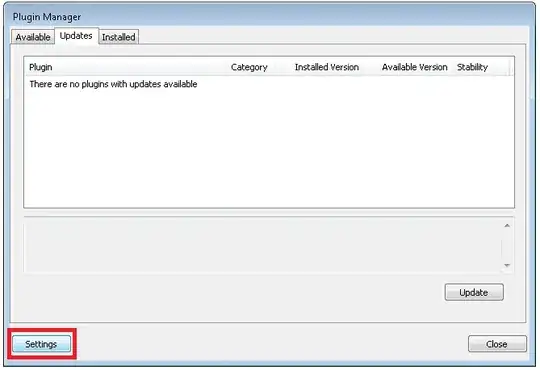
  2. Click on Settings.

    enter image description here

  3. Fill in the Proxy address and port - with your data

    enter image description here

Tassisto
  • 209
  • 2
  • 7
6

Since it appears to be using curl, I tried setting the http_proxy environment variable and that seemed to work as well. I set it to something like

http://username:password@proxy.domain.com:port/

Might be more compatible, central, and obvious than Generic Updater's internal config.

Note, curl also uses https_proxy and ftp_proxy environment variables. Doesn't appear to be needed for current versions of notepad++, but if you're setting one, you may want to set the others for future proofing (HTTPS is probably more important than FTP).

Jon Marnock
  • 600
  • 6
  • 7
  • 1
    Thanks for providing another option - guess it just depends what you're doing and how! – AJH Jan 24 '12 at 20:26
  • 2
    This is the only answer that worked for me. And I didn't even need username and password, just domain and port. – user31389 Mar 28 '18 at 12:21