0

After a bad Windows Update, sfc /scannow has confirmed that a bunch of .NET Framework 4.0 files are "corrupt". Here is an extract from the logs listing all corrupted files:

C:\WINDOWS\Microsoft.NET\Assembly\GAC_MSIL\PresentationFramework\v4.0_4.0.0.0__31bf3856ad364e35\\PresentationFramework.dll; source file in store is also corrupted
C:\WINDOWS\Microsoft.NET\Assembly\GAC_MSIL\PresentationFramework-SystemData\v4.0_4.0.0.0__b77a5c561934e089\\PresentationFramework-SystemData.dll; source file in store is also corrupted
C:\WINDOWS\Microsoft.NET\Assembly\GAC_MSIL\System.Windows.Controls.Ribbon\v4.0_4.0.0.0__b77a5c561934e089\\System.Windows.Controls.Ribbon.dll; source file in store is also corrupted
C:\WINDOWS\Microsoft.NET\Assembly\GAC_MSIL\UIAutomationClient\v4.0_4.0.0.0__31bf3856ad364e35\\UIAutomationClient.dll; source file in store is also corrupted
C:\WINDOWS\Microsoft.NET\Assembly\GAC_MSIL\UIAutomationClientsideProviders\v4.0_4.0.0.0__31bf3856ad364e35\\UIAutomationClientsideProviders.dll; source file in store is also corrupted
C:\WINDOWS\Microsoft.NET\Assembly\GAC_MSIL\UIAutomationProvider\v4.0_4.0.0.0__31bf3856ad364e35\\UIAutomationProvider.dll; source file in store is also corrupted
C:\WINDOWS\Microsoft.NET\Assembly\GAC_MSIL\UIAutomationTypes\v4.0_4.0.0.0__31bf3856ad364e35\\UIAutomationTypes.dll; source file in store is also corrupted
C:\WINDOWS\Microsoft.NET\Assembly\GAC_MSIL\WindowsBase\v4.0_4.0.0.0__31bf3856ad364e35\\WindowsBase.dll; source file in store is also corrupted
C:\WINDOWS\Microsoft.NET\Framework\v4.0.30319\\clr.dll; source file in store is also corrupted
C:\WINDOWS\Microsoft.NET\Framework\v4.0.30319\\mscordacwks.dll; source file in store is also corrupted
C:\WINDOWS\Microsoft.NET\Framework\v4.0.30319\\mscordbi.dll; source file in store is also corrupted
C:\WINDOWS\Microsoft.NET\Framework\v4.0.30319\\peverify.dll; source file in store is also corrupted
C:\WINDOWS\Microsoft.NET\Framework\v4.0.30319\\SOS.dll; source file in store is also corrupted
C:\WINDOWS\Microsoft.NET\Framework\v4.0.30319\NativeImages\\mscorlib.ni.dll; source file in store is also corrupted
C:\WINDOWS\Microsoft.NET\Framework\v4.0.30319\WPF\\PenIMC.dll; source file in store is also corrupted
C:\WINDOWS\Microsoft.NET\Framework\v4.0.30319\WPF\\PenIMC_v0400.dll; source file in store is also corrupted
C:\WINDOWS\Microsoft.NET\Framework\v4.0.30319\WPF\\PenIMC2_v0400.dll; source file in store is also corrupted
C:\WINDOWS\Microsoft.NET\Framework\v4.0.30319\WPF\\PresentationCore.dll; source file in store is also corrupted
C:\WINDOWS\Microsoft.NET\Framework\v4.0.30319\WPF\\PresentationFramework.dll; source file in store is also corrupted
C:\WINDOWS\Microsoft.NET\Framework\v4.0.30319\WPF\\PresentationFramework-SystemData.dll; source file in store is also corrupted
C:\WINDOWS\Microsoft.NET\Framework\v4.0.30319\WPF\\PresentationHost_v0400.dll; source file in store is also corrupted
C:\WINDOWS\Microsoft.NET\Framework\v4.0.30319\WPF\\PresentationNative_v0400.dll; source file in store is also corrupted
C:\WINDOWS\Microsoft.NET\Framework\v4.0.30319\WPF\\System.Windows.Controls.Ribbon.dll; source file in store is also corrupted
C:\WINDOWS\Microsoft.NET\Framework\v4.0.30319\WPF\\UIAutomationClient.dll; source file in store is also corrupted
C:\WINDOWS\Microsoft.NET\Framework\v4.0.30319\WPF\\UIAutomationClientsideProviders.dll; source file in store is also corrupted
C:\WINDOWS\Microsoft.NET\Framework\v4.0.30319\WPF\\UIAutomationProvider.dll; source file in store is also corrupted
C:\WINDOWS\Microsoft.NET\Framework\v4.0.30319\WPF\\UIAutomationTypes.dll; source file in store is also corrupted
C:\WINDOWS\Microsoft.NET\Framework\v4.0.30319\WPF\\WindowsBase.dll; source file in store is also corrupted
C:\WINDOWS\Microsoft.NET\Framework\v4.0.30319\WPF\\wpfgfx_v0400.dll; source file in store is also corrupted
C:\WINDOWS\Microsoft.NET\Framework\v4.0.30319\WPF\en-US\\PresentationHost_v0400.dll.mui; source file in store is also corrupted
C:\WINDOWS\Microsoft.NET\Framework64\v4.0.30319\\clr.dll; source file in store is also corrupted
C:\WINDOWS\Microsoft.NET\Framework64\v4.0.30319\\compatjit.dll; source file in store is also corrupted
C:\WINDOWS\Microsoft.NET\Framework64\v4.0.30319\\mscordacwks.dll; source file in store is also corrupted
C:\WINDOWS\Microsoft.NET\Framework64\v4.0.30319\\mscordbi.dll; source file in store is also corrupted
C:\WINDOWS\Microsoft.NET\Framework64\v4.0.30319\\peverify.dll; source file in store is also corrupted
C:\WINDOWS\Microsoft.NET\Framework64\v4.0.30319\\SOS.dll; source file in store is also corrupted
C:\WINDOWS\Microsoft.NET\Framework64\v4.0.30319\NativeImages\\mscorlib.ni.dll; source file in store is also corrupted
C:\WINDOWS\Microsoft.NET\Framework64\v4.0.30319\WPF\\PenIMC.dll; source file in store is also corrupted
C:\WINDOWS\Microsoft.NET\Framework64\v4.0.30319\WPF\\PenIMC_v0400.dll; source file in store is also corrupted
C:\WINDOWS\Microsoft.NET\Framework64\v4.0.30319\WPF\\PenIMC2_v0400.dll; source file in store is also corrupted
C:\WINDOWS\Microsoft.NET\Framework64\v4.0.30319\WPF\\PresentationCore.dll; source file in store is also corrupted
C:\WINDOWS\Microsoft.NET\Framework64\v4.0.30319\WPF\\PresentationFramework.dll; source file in store is also corrupted
C:\WINDOWS\Microsoft.NET\Framework64\v4.0.30319\WPF\\PresentationFramework-SystemData.dll; source file in store is also corrupted
C:\WINDOWS\Microsoft.NET\Framework64\v4.0.30319\WPF\\PresentationHost_v0400.dll; source file in store is also corrupted
C:\WINDOWS\Microsoft.NET\Framework64\v4.0.30319\WPF\\PresentationNative_v0400.dll; source file in store is also corrupted
C:\WINDOWS\Microsoft.NET\Framework64\v4.0.30319\WPF\\System.Windows.Controls.Ribbon.dll; source file in store is also corrupted
C:\WINDOWS\Microsoft.NET\Framework64\v4.0.30319\WPF\\UIAutomationClient.dll; source file in store is also corrupted
C:\WINDOWS\Microsoft.NET\Framework64\v4.0.30319\WPF\\UIAutomationClientsideProviders.dll; source file in store is also corrupted
C:\WINDOWS\Microsoft.NET\Framework64\v4.0.30319\WPF\\UIAutomationProvider.dll; source file in store is also corrupted
C:\WINDOWS\Microsoft.NET\Framework64\v4.0.30319\WPF\\UIAutomationTypes.dll; source file in store is also corrupted
C:\WINDOWS\Microsoft.NET\Framework64\v4.0.30319\WPF\\WindowsBase.dll; source file in store is also corrupted
C:\WINDOWS\Microsoft.NET\Framework64\v4.0.30319\WPF\\wpfgfx_v0400.dll; source file in store is also corrupted
C:\WINDOWS\Microsoft.NET\Framework64\v4.0.30319\WPF\en-US\\PresentationHost_v0400.dll.mui; source file in store is also corrupted

So far I have tried:

  1. Windows Update (appears to have caused the issue)

  2. Windows Framework Repair Tool - only repairs v4.7 or higher on windows 10. Unhelpfully asserts that everything lower is "included in the operating system".

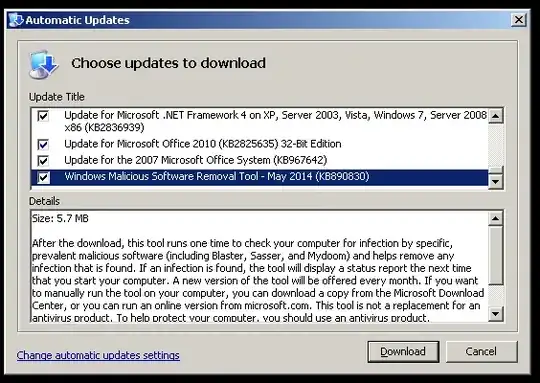
  3. Turning off Windows Features related to .NET, restarting, and turning them back on.
    enter image description here

    I was really hopeful this would work, it claimed to be redownloading from windows update, but the net result appeared to be no change.

  4. DISM.exe /Online /Cleanup-image /Restorehealth (image not found)

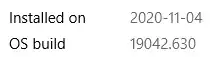
  5. Downloading a source image as per this answer - but according to DISM my image is 10.0.19041.572:

    PS C:\> dism
    Deployment Image Servicing and Management tool
    Version: 10.0.19041.572
    

    and according to "About" my image is 19042.630 - no idea why these don't align:

    enter image description here

    and the only images available are neither of those.

    List item

    I tried downloading and extracting .631 because it seemed close, but using it as a source for repair still failed with "source not found". (Followed the relatively modern instructions on wintips)

    Salient logs:

    Host machine information: OS Version=10.0.19042
    ...
    Executing command line: "C:\Windows\system32\Dism.exe" /Online /Cleanup-Image /RestoreHealth /Source:WIM:F:\sources\install.wim:6 /LimitAccess
    ...
    Target image information: OS Version=10.0.19042.630
    ...
    source for package or file not found, ResolveSource() unsuccessful. (CBS HRESULT=0x800f081f) - CCbsConUIHandler::Error
    The source files could not be found; their location must be specified using the /source option to restore the feature
    
  6. The most success I've had so far was sealing the "Microsoft.NET" folder from another computer in the house running the same version of Windows, took ownership, overwrote the files, and gave ownership back to TrustedInstaller. It did stop every app that depends on Framework 4.0 from crashing at startup (my hint that the corruption had really occurred), but sfc still sees them as corrupt.

Any suggestions that don't involve a reinstall are appreciated.

Alain
  • 803
  • 2
  • 15
  • 24
  • .NET Framework 4.7 is a replacement for .NET 4.0 so if you install .NET 4.7 you will repair your .NET Framework installation. The only way to fix the corruption is with DISM or an in-place repair install – Ramhound Dec 07 '20 at 12:25
  • @Ramhound I've repaired / resinstalled .NET Framework 4.7 and 4.8 several times, but doing so hasn't touched the files located in `C:\WINDOWS\Microsoft.NET\Framework\v4.0.30319\` (and corresponding x64 folder) – Alain Dec 07 '20 at 13:48
  • You cannot have both .NET Framework 4.7, .NET Framework 4.8, and .NET Framework 4.0 on the same system. .NET Framework 4.8 replaces both of those versions. – Ramhound Dec 07 '20 at 14:30
  • @Ramhound I think you might be mistaken, but I suppose a good anecdotal test would to check `C:\WINDOWS\Microsoft.NET\Framework\ ` on your own machine and see whether you have old versions in there. Windows 10 builds-in all end-of-life framework releases here (1.0, 1.1, 2.0, 3.0, 4.0). I can only speculate on the "why" but the "what" seems pretty clear in this case. For extra science, take ownership and temporarily rename the `v4.0` folder on your machine and report back on how your next reboot goes :) – Alain Dec 07 '20 at 15:10
  • @Ramhound NetFramwork 4.0 is available by default on a Windows 19042 installation. If you mount an install.wim with the Dism, you can see that the path mentioned by Alain is there. – Tekkie_Boy Dec 07 '20 at 15:46
  • 1
    @Tekkie_Boy - I am a .NET Developer. I have been using it since before it was publicly released. .NET Framework 4.8 is a in-place replacement for .NET Framework. So the `v4.030319` folder that exists is not actually .NET Framework 4.0 but whatever the built-in version of .NET Framework on Windows 10. The system I am running when I submitted this comment is 1809. So the exact name of the folder might differ slightly against 20H2. [Here](https://docs.microsoft.com/en-us/dotnet/framework/migration-guide/how-to-determine-which-versions-are-installed) is more information. – Ramhound Dec 07 '20 at 17:29
  • @Ramhound Thanks for the information. – Tekkie_Boy Dec 08 '20 at 21:15

1 Answers1

1

The analysis of your CBS log has shown that the corrupt files are not contained in the downloaded ISO file and therefore the repair had to end with the error code 0x800f081f CBS_E_SOURCE_MISSING.

I downloaded the last published Net-Framework update package KB4586876 and unzipped it with 7zip. And then i unpacked the Windows10.0-KB4586876-x64-NDP48.cab file with the command expand "Windows10.0-KB4586876-x64-NDP48.cab" -f: *. * Target path again.

After that i compared the Versions Numbers with the faulty files from their log. The comparison showed that they matched.

The update package would have had to be implemented in the ISO and then the repair would have to be carried out again with the ISO as the source.

https://docs.microsoft.com/en-us/windows-hardware/manufacture/desktop/servicing-the-image-with-windows-updates-sxs

Then the files would have been imported and the repair would have completed successfully.

But I chose an abbreviation and created the repair package as in the comments and the SFCFix program copied the files from the package directly into the WinSxs folder and sfc then used the correct files for the repair.

Tekkie_Boy
  • 177
  • 1
  • 2
  • 10
  • Thanks @Tekkie_Boy, but I already tried that in #5 above. There's no source install (wim) that matches my windows build, so it is rejected by Dism. – Alain Dec 07 '20 at 12:10
  • That’s because the source parameter is optional, but if you do use it, you must mount a Windows 10 ISO – Ramhound Dec 07 '20 at 12:26
  • @Ramhound - to be clear, I did use the `/source` parameter - as well as download and mount the nearest ISO I could find to my own, all as per the instructions I linked to in #5 above, but it nevertheless failed because my image version doesn't match any image version available for download. – Alain Dec 07 '20 at 13:03
  • 1
    DISM doesn’t have to match the version exactly in fact it typically won’t match. It’s unusual that the command without the source parameter didn’t work. What was the exact error you received (text)? – Ramhound Dec 07 '20 at 13:13
  • 1
    Thanks for finding this information. I wasn't aware there was a known issue for this version, and I'd hesitated to download the "update preview" above lest I make things less stable - but Windows Update does give me the option of installing KB4586853, so I'll give that a shot and report back. – Alain Dec 07 '20 at 15:25
  • @Alain Any news for us? – Tekkie_Boy Dec 08 '20 at 21:14
  • @Tekkie_Boy - How exactly did you determine there is a bug that all 20H2 installations? – Ramhound Dec 08 '20 at 21:22
  • Through tests by myself and other people's. You can read there that the bug has been fixed by the update I mentioned: https://www.bleepingcomputer.com/news/microsoft/windows-10-20h2-update-fixes-broken-in-place-upgrade-feature/ – Tekkie_Boy Dec 08 '20 at 21:41
  • FYI: Before the 20h2 update was officially rolled out, all you had to do was uninstall the KB4562830 20h2 enablement update and then perform the in-place upgrade.. The official update can no longer be uninstalled. – Tekkie_Boy Dec 08 '20 at 21:48
  • Unfortunately, installing KB4586853 did not change anything for me. SFC still sees those framework files as having an invalid hash, and claims that the mounted image `19042.631` does not contain sources. I uploaded the full log here if you wanted to take a look: https://pastebin.com/0PBZqeqt - Line 27 shows that it has taken in the source I configured: `wim:F:\sources\install.wim:6`, but it still claims "Missing replacement payload" for all, and I don't see anything in there to indicate *why* it didn't find those framework DDLs in the source. – Alain Dec 09 '20 at 23:39
  • Just to add to my last comment: To be clear, I did not attempt the in-place upgrade, just the DCIM repair. I see now that you weren't suggesting the KB would fix the repair, just enable me to do an in-place upgrade - which is something I am reluctant to do. Reason being that I put a bunch of work into cleaning up windows 10 bloat (as per e.g. https://superuser.com/a/942419/62763), ads, telemetrics, and generally annoying default configurations. I fear an in-place upgrade will reinstate the lot of it. – Alain Dec 09 '20 at 23:58
  • Thanks for your log file. As I suspected, the files in the version you need are not in the ISO. I have created a repair package for you. Download the SFCFix.zip package: https://we.tl/t-QxbLG9obkG and then download the SFCFix Tool from there: https://www.sysnative.com/forums/downloads/sfcfix/ in the same folder as SFCFix.zip Package. Close a open programs and documents! Then drag the SFCFix.zip file over the executable SFCFix.exe and drop it there. As seen in this picture: https://imgur.com/5usZLPK Please answer the question: "Would you like this communication to take place?" – Tekkie_Boy Dec 10 '20 at 11:25
  • with "n" and push the enter button. Then run sfc in the command prompt as admin again. – Tekkie_Boy Dec 10 '20 at 11:26
  • 1
    Tekkie_Boy - that is above and beyond, I really appreciate the effort! That said - stackexchange / superuser is quite insistant on the "how / why" so that others with the same problem can produce their own fix in the future. Would you mind sharing in your answer how you put together the repair package (e.g. where this tool comes from, where you sourced the correct DLLs)? Also, if you have any thoughts on why the typical repair process didn't work out, it would surely be insightful - but if you're unsure, that's alright. If you work for Sysnative I think a disclosure would be appropriate too :) – Alain Dec 10 '20 at 12:08
  • Have the files been successfully repaired? And has your problem been resolved? Then I will answer your questions. – Tekkie_Boy Dec 10 '20 at 12:40
  • Hey Tekkie - I had to do a bit of research on Sysnative to be safe, but yes - I ran the package and it claims to have run smoothly (log: https://pastebin.com/quvDX1gA). I then rebooted and ran SFC once more. Results certainly improved, although it still claimed hashes didn't match and repair was required (logs here: https://pastebin.com/urqHWPye). This time, however, it seems to be saying that it has successfully repaired the corrupt files, so that would certainly be a win if so. Rebooting now to confirm. – Alain Dec 10 '20 at 12:48
  • 1
    `Windows Resource Protection did not find any integrity violations.` Success! Here's the final CBS.log showing what repair actions sfc took after my last reboot, then a subsequent clean scan: https://pastebin.com/jRx4XrQ8 Not sure why running the SFCFix tool didn't fix the issue directly. Perhaps it only corrected the files in WinSxs but not the copies in `C:\WINDOWS\Microsoft.NET`? But from what I could tell, these files are all hardlinked to one-another, so fixing one should have fixed both. I don't know ¯\\_(ツ)_/¯ – Alain Dec 10 '20 at 13:06
  • I edited my answer. I hope the information is sufficient. I don't work for Sysnative, I just use their tools. – Tekkie_Boy Dec 10 '20 at 13:24