Whenever I open a folder, Explorer crashes or stops responding, sometimes with the screen going black with only a cursor, coupled with everything on my PC becoming really slow (deleting/copying takes longer than it should), and context menus take too long to render.
- I've had this issue for the last ten days and have tried
sfc /scannow, with it statingWindows Resource Protection found corrupt files and successfully repaired them. For online repairs, details are included in the CBS log file located at %windir%\Logs\CBS\CBS.log. For offline repairs, details are included in the log file provided by the /OFFLOGFILE flag. - I even reset Wndows 10, keeping files, but it didn't resolve the issue:
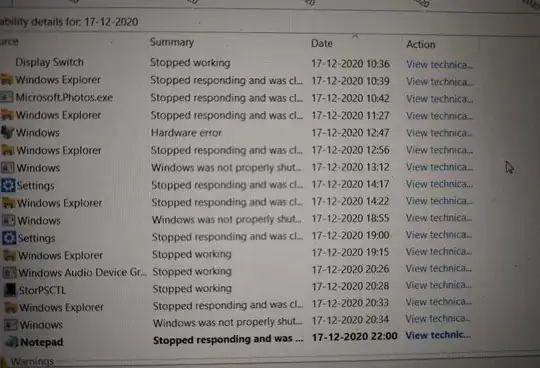
-
Details: Source Windows Explorer Summary Stopped responding and was closed Date 18-12-2020 09:44 Status Report sent Description A problem caused this program to stop interacting with Windows. Faulting Application Path: C:\Windows\explorer.exe Problem signature Problem Event Name: AppHangB1 Application Name: explorer.exe Application Version: 10.0.18362.1171 Application Timestamp: d942099d Hang Signature: 1b8e Hang Type: 134217728 OS Version: 10.0.18363.2.0.0.768.100 Locale ID: 16393 Additional Hang Signature 1: 1b8eed153775311dc16d8b6ee7508253 Additional Hang Signature 2: 4901 Additional Hang Signature 3: 49015d652d0827ad983b953cdfe24a66 Additional Hang Signature 4: 1b8e Additional Hang Signature 5: 1b8eed153775311dc16d8b6ee7508253 Additional Hang Signature 6: 4901 Additional Hang Signature 7: 49015d652d0827ad983b953cdfe24a66 Extra information about the problem Bucket ID: 26cbcd1ca30d218c27ea0b9e68d604ae (1723202582414230702)
How do I troubleshoot and fix this?

