0

With Firefox' Multi-Account Containers one can set a particular website to open always in a given container, like so:

Adding a site to open always in a particular container

Q: How can I avoid being asked to confirm this choice next time I open said website? This one:

Confirmation to open website in particular container from now on

If this can only be done by fixing something in the Firefox profile, that's fine with me, too.

0xC0000022L
  • 6,819
  • 10
  • 50
  • 82
  • 3
    Doesn't checking "Remember my decision for this site" help? – harrymc Mar 26 '21 at 09:26
  • Uhm, sure it helps. But that prompt only appears after I manually open another tab, then enter a URL that belongs to an assigned site and then check that box. The question is how to save time by basically confirming that from the beginning ("**avoid** being asked to confirm") ... – 0xC0000022L Mar 26 '21 at 10:56
  • 1
    You might have a look at the extension [Simple Tab Groups](https://addons.mozilla.org/en-US/firefox/addon/simple-tab-groups/). – harrymc Mar 26 '21 at 11:30
  • 1
    ... And also [Containerise](https://addons.mozilla.org/en-US/firefox/addon/containerise/). – harrymc Mar 26 '21 at 11:54
  • ... And question: Does it also arrive when the container is already open? – harrymc Mar 27 '21 at 11:10
  • Just checked, the confirmation is also prompted for when the container is already open before, yes (checked by creating a new container, then opening a site that I never normally visit in it). That other extension looks promising, though. Thanks for the pointer. – 0xC0000022L Mar 28 '21 at 15:38

1 Answers1

-1

I just installed the extension to confirm the behavior. Note that my Firefox installation is set up to "delete cookies and site data when Firefox is closed".

Scroll to the bottom of this answer to see any possible helpful findings.

Here is what I did, right after installing the extension:

  1. Open the "Multi-Account Containers" extension menu from the Firefox toolbar

  2. Click "Manage Containers" (see fig.1)

    Manage Containers

  3. Click "+ New Container" (see fig.2)

    New Container

  4. Create a new container (in my case, "Stackoverflow") (see fig.3)
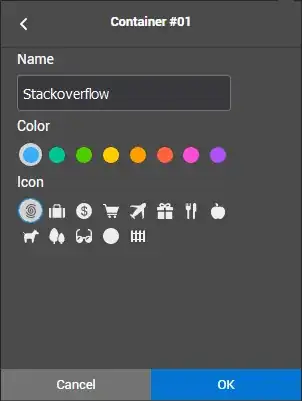
    Create a new container

  5. With a tab open on superuser.com, I go back to the main extension menu, and click "Always Open This Site in..." (see fig.4)
    Always Open This Site in...

  6. I select the newly created container

  7. A notification "Successfully assigned site to always open in this container" is displayed on my open tab (the same tab as the one that I used in point 5)

  8. By going to: "Manage Containers" → "Stackoverflow" (fig.5) → "Manage Site List..." (fig.6), I can confirm that "superuser.com" is configured to always open in that Container (fig.7).
    newly created containerManage containers

    Manage Site List

  9. Now, the first time I opened a new tab on superuser.com, I got a confirmation to "Open this site in your assigned container". This confirmation features a "Remember my decision for this site" checkbox. I checked it. (fig.8)

    Open this site in your assigned container

From that point onwards, every tab I opened (or that opened following a link), under the domain superuser.com, did open with the "Stackoverflow" container tab underline, and url-bar visual indicator (fig.9).

enter image description here


Now, on how to mitigate or prevent this

I'm still investigating what exactly is causing the behavior I have seen from the extension (not the one OP is describing, which I still cannot reproduce; but how new, unrelated tabs are opening in the current container, rather than in a neutral context. This also isn't configurable in the rather limited options page). I thought it might be caused by a page's HTTP referrer, but after setting network.http.sendRefererHeader to 0 in about:config to strip the referrer from my requests by default, I haven't observed a change in the extension's behavior. I'll report back here as I uncover more information.

I hope this helps.

7heo.tk
  • 299
  • 1
  • 11
  • 1
    This is exactly what the poster asks how to avoid. Read the question again with its comments. – harrymc Mar 27 '21 at 09:01
  • @harrymc I re-read the post and all the comments to make sure; but I really don't see how any of it means what you wrote it does, sorry... What I see however, is that the OP asked for how to prevent the continuous nagging from Firefox's Multi Account Containers when manually opening URLs. And I detailed how I set it up from scratch, to help them see any difference with what their experience is. The point 8 especially isn't that obvious. Now, in my short time using this add-on, I did notice it asking me again erroneously. It wasn't from a manually open URL, but from my search engine (continued) – 7heo.tk Mar 27 '21 at 11:02
  • (continuing) I'm expecting the HTTP referrer to play a role here. I also noticed the extension's behavior bug (wrt what I was expecting it to do) in a few cases, for instance when following a link to another domain from a domain in a container. This would confirm it has to do with the referrer. – 7heo.tk Mar 27 '21 at 11:02
  • I've seen that notification and whenever it appears the confirmation doesn't seem to be necessary. But how to reliably get it to a state where this notification shows up and confirmation can be avoided, no idea. And sorry to say, but harrymc is right, I am asking how to avoid the confirmation. And I'm not sure what step 8 is supposed to change here. There is nothing one can do (other than remove a site) in the "manage site list". But I agree, this is where I'd expect an option to confirm as of yet unconfirmed sites. – 0xC0000022L Mar 28 '21 at 15:32
  • 1
    Thanks for explicitly stating that @harrymc is correct. It clarifies things. I will check if I can answer your question properly, and if not, will delete my answer. Also, thanks for adding an information that implies the site was correctly added under the list mentioned in point 8, it confirms that part works as designed. To be fair, I think this extension has a couple of bugs (mostly affecting the UX) and you might have spotted one. – 7heo.tk Mar 28 '21 at 15:38
  • 1
    @7heo.tk although your answer doesn't help me much as it stands, I decided rather not let the bounty go to waste. So there you go. – 0xC0000022L Mar 30 '21 at 07:45
  • @0xC0000022L Thanks a lot, and I'll also do my best not to have that bounty wasted on me; however please allow for a little time, I have much on my plate. Worst case scenario I'll use these points as a bounty for someone else. – 7heo.tk Mar 30 '21 at 09:41