-1

The web has articles describing what should be done. This site even answers the question for a W10 computer, but not a W7 computer. For a W10 computer, the instructions say to:

  1. Hit the Windows key, type gpedit.msc, and press Enter.
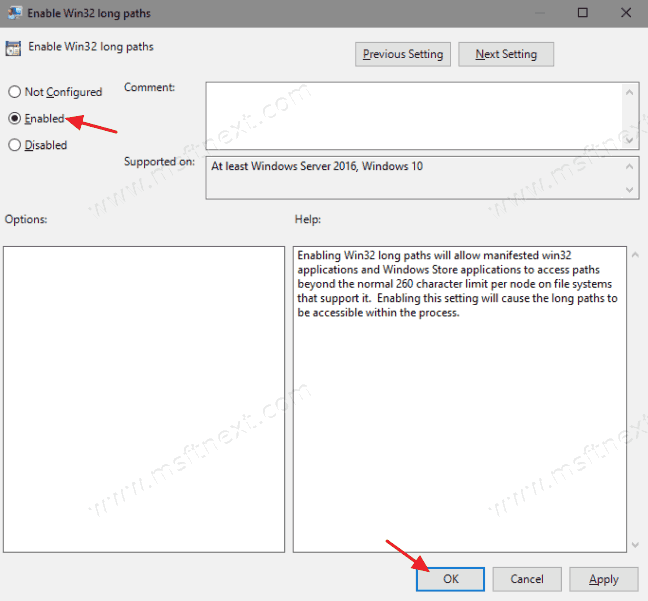
  2. Navigate to Local Computer Policy > Computer Configuration > Administrative Templates > System > Filesystem OR continue to > NTFS.
  3. Then double-click the Enable NTFS long paths option and enable it.

However, I don't have such an option. The option is also not in the registry. Has anybody figured it out?

dsbx9
  • 1
  • 1
  • 1
  • 1
    You might wish to link the article. What you want does not exist in my Windows 7 machine. While there are more options in Windows 10, neither of my Windows 10 Pro machines have the above option. Please link the article (edit your question) – John Jun 25 '21 at 01:49
  • It is in Windows 10, above the NTFS folder, but it is there. – John Jun 25 '21 at 01:59
  • Probably, after I read quite a bit, you should not enable long paths at all. Not enough overall support, and not yet common. Use one of the file rename apps to shorten your paths. Even Windows 10 is not a solution at this point. – John Jun 25 '21 at 02:08
  • It’s only File Explorer that doesn’t support it. Windows Terminal or a PowerShell 7.x prompt does. [Modern applications that are .NET 4.8 and/or .NET 5 also supports it (specifically the File Selection UI)](https://github.com/Microsoft/dotnet/blob/master/Documentation/compatibility/long-path-support.md#:~:text=Starting%20with%20apps%20that%20target%20the%20.NET%20Framework,MAX_PATH%29%20limitation%20on%20path%20lengths%20has%20been%20removed.); If you disable it then that isn’t true – Ramhound Jun 25 '21 at 02:13

1 Answers1

1

The web has articles describing what should be done. This site even answers the question for a W10 computer, but not a W7 computer.

Windows 7 doesn’t support this feature.

You can enable enable Long Path Support in Windows 10. Starting in version 1607 'Anniversary Update', the 260 character limitation for NTFS path length issue is resolved. That path length limitation has been present on Windows since very first versions.

By default Windows 10 has a maximum file path length of 260 characters. All Windows file systems have the concept of files and folders to access stored data. Path is a string value indicating where this data is stored. However, there is a 260 character limit for paths imposed by Windows, which includes a drive letter, a colon, a separating backslash, and a null terminator.

This limitation is not for the NTFS file system, but for the legacy APIs that are used to access data.

Even if you enable this option on Windows 10 it doesn’t change the limit that File Explorer has.

Source: Here

The screenshot from the quoted article clearly indicates only Windows 10+ are supported.

Ramhound
  • 41,734
  • 35
  • 103
  • 130