11

I am aware that this question has been asked before, but none of the solutions work for me.

I have multiple MicroCenter USB 3.1 32GB flash drives that the issue. Originally, they worked, but as soon as I tried to copy multiple files and folders onto them for the first time, they show the error. I also cannot format the disk, as the same error appears

The errors:
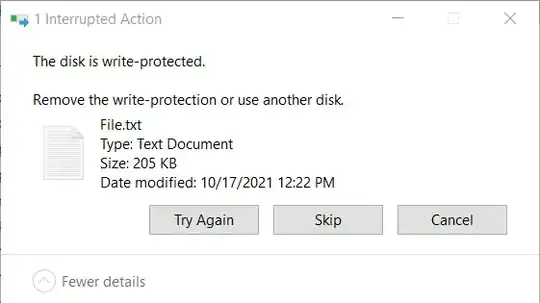
Copy to desk

Trying to Format

What I tried:

Running Attributes Disk

Current Read-only State : Yes
Read-only  : No
Boot Disk  : No
Pagefile Disk  : No
Hibernation File Disk  : No
Crashdump Disk  : No
Clustered Disk  : No

Running chkdsk:

The type of the file system is FAT32.
Shadow copying the specified volume is not supported.

Volume USB DISK created 7/11/2021 10:01 AM
Volume Serial Number is BAAD-502B
Windows is verifying files and folders...
File and folder verification is complete.

Windows has scanned the file system and found no problems.
No further action is required.
   30,232,640 KB total disk space.
           16 KB in 1 hidden files.
          432 KB in 27 folders.
   16,421,008 KB in 49 files.
   13,811,168 KB are available.

       16,384 bytes in each allocation unit.
    1,889,540 total allocation units on disk.
      863,198 allocation units available on disk.

In Registry Computer\HKEY_LOCAL_MACHINE\SYSTEM\CurrentControlSet\Control\StorageDevicePolicies, WriteProtect is set to

Value Data: 0
Base: Hexadecimal

Checking the drive shows the message

You don't need to scan the drive. We haven't found any errors on this drive.

Some other screenshots:

Drive Details

Drive Events - Information

Drive Events - Warning

Edit: I tried removing the cover (Spent a solid 20 minutes on it) but it refuses to budge. It also looks like the actual circuit board is hidden behind a black layer as well. Below are some images of the drive.
enter image description hereenter image description here

Greenreader9
  • 231
  • 2
  • 9
  • 3
    Does this answer your question? [What can I do if my USB flash drive is write-protected or read-only?](https://superuser.com/questions/1125282/what-can-i-do-if-my-usb-flash-drive-is-write-protected-or-read-only) – Tetsujin Oct 17 '21 at 17:41
  • 8
    Best guess is they're fakes, first time you write past their actual capacity, the firmware lock kicks in & they're dead. See https://www.geckoandfly.com/22803/detect-fake-usb-flash-drives-sd-cards-ssd-disk/ for various ways to test them - you'll need to test one that's not already broken. – Tetsujin Oct 17 '21 at 17:43
  • Thanks @Tetsujin. Since these were free (See blow comment), I think my time may be better spent trying to get them replaced. – Greenreader9 Oct 17 '21 at 18:59
  • 2
    I suggest you crack one open, and photograph the chips, and add to question. I bet they're really a 1GB or perhaps 4GB drive that has been intentionally modified to mis-report capacity. – Criggie Oct 18 '21 at 01:58
  • @Criggie Is there a good trusted tutorial out there on how to do this? Thanks – Greenreader9 Oct 18 '21 at 13:20
  • @Greenreader9 not that I know of. Just hit it with a hammer till the case comes off, then take a clear photo of the chips inside showing the numbers. You might be able to separate the housing with a screwdriver. Remember it is already dead, can't kill it any more. – Criggie Oct 18 '21 at 21:02
  • 2
    @Criggie I wouldn't try a hammer, that will probably break things. I'd go with a screwdriver. – Loren Pechtel Oct 19 '21 at 02:40
  • Thanks, I'll check it out later. Should I edit the question to include the images? – Greenreader9 Oct 19 '21 at 13:38
  • Even the Volume Serial Number says it's `BAAD`! – jpfx1342 Oct 20 '21 at 19:26

2 Answers2

25

The disks are dead and they never worked. Their working for a short time was only an optical illusion.

If you look in the messages in the Event Viewer, the device is identified as
Device USBSTOR\Disk&Ven_&Prod_USB_DISK_3.0...

Notice that there is no Vendor ID or useful Product ID, meaning that the firmware on the disk is even incapable of identifying itself. This by itself is not unknown with cheap disks, but it only adds to the general air of cheap fakery.

If there is any way of returning these disks and getting reimbursed, don't hesitate. Better avoid this vendor in the future.

harrymc
  • 455,459
  • 31
  • 526
  • 924
  • 1
    Lovely, that's what I figured based off of other posts. These were free drives as part of a "Come into the store" campaign (Past drives I got from them for free worked). I think I'll print out this topic and bring it into the store and complain, hopefully they can replace these things with something that works. Thanks for your time! – Greenreader9 Oct 17 '21 at 18:56
  • If they were in-store giveaways, I'd seriously consider reporting the store to your national trading standards authority. They could be fined thousands for mis-representation… ;) – Tetsujin Oct 17 '21 at 19:00
  • 10
    @Tetsujin I wouldn't--I doubt the store meant to give away fake drives. I would tell the store what's happening, though. – Loren Pechtel Oct 18 '21 at 02:03
  • 10
    Micro Center is a reputable store. They are the **only** bricks and mortar computer store I go to or recommend to anyone. Seriously. I have been extremely satisfied with customer service from them over the years. Show them the problem. I'd bet if you approach them nicely they will swap for replacement flash drives. – manassehkatz-Moving 2 Codidact Oct 18 '21 at 02:33
  • 3
    @manassehkatz-Moving2Codidact And free thumb drives have been their standard giveaways for years. I got an advert a week or two ago with coupons for them. – Barmar Oct 18 '21 at 04:03
  • I wish to say that I never meant the shop in my answer. I only meant the make of the flash drives, and even then - not if that has also been faked. – harrymc Oct 18 '21 at 07:35
  • 4
    I’m sure it was some sort of accident, I have gotten free ones from them before and they work. It is an amazing store, I’m not going to report them. I will let them know and try to get them replaced though. – Greenreader9 Oct 18 '21 at 13:22
  • Beware, free USB drives can sometimes contain malware and viruses. https://krebsonsecurity.com/2016/04/dental-assn-mails-malware-to-members/ – Nick Bonilla Oct 18 '21 at 16:01
  • @Greenreader9 It is entirely possible they handed out good USB drives on previous marketing events and have a bad batch now. Typically such drives are sourced in bulk from a cheap Asian manufacturer of marketing merchandise. There is a whole industry that will sell you anything you want with your own company logo on it. Pencils, ballpoints, key-fobs and these days also USB sticks. They don't make them themselves. They source from a local outfit and just sticker/print them with the required company logo. No quality control whatsoever. It has to be as cheap as possible. Corners will be cut. – Tonny Oct 19 '21 at 08:54
0

If the device has a functional controller and any amount of functional memory and you can identify their models, it should be possible to reflash the controller using its manufacturer's utility (which would re-detect the actually available memory chips and rescan them for bad blocks, allow to specify heavier ECC for low-quality memory etc). In particular, most such utilities allow to specify the reported vendor and model IDs which are currently not specified as @harrymc noticed.

https://usbdev.ru is the best resource that I know of that has utilities for both identification and flashing. It also has the H2TESTW utility that you can test a new flash drive with for defects (including fake size).


However, as @harrymc said, if you got the drive at a reputable store, it's probably more productive to return or exchange it rather than be stuck with a defective product.

ivan_pozdeev
  • 1,897
  • 18
  • 34