The problem: It's been 2-3 days that my laptop is constantly using the nvidia GPU instead of the integrated one for simple things. Can't find WHAT is using the GPU. Battery autonomy dropped from 3-4 hours to less than 1 hour because of this. System is showing "high power usage", and ~20% CPU usage for no reason.
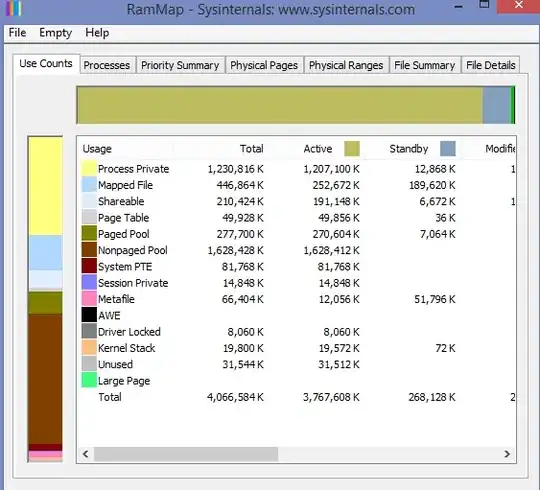
With the help of this post: Troubleshoot High CPU usage by the "System" process I managed to diagnose the issue. Here are the results:

The spikes are associated with this process : nvlddmkm.sys
This is the only process that "stand out" in the analysis, the others have fairly normal values.
What can i do to fix this ? I tried installing the latest nvidia drivers, did windows updates, etc...
My specs:
Serial Number: 9S717F412022ZK5000116 Product Name: GF75 Thin 10SCXR OS: Microsoft Windows 10 Famille 64 bits Ver.2009(OS build 19042.1348) BIOS Version: E17F4IMS.108
- Serial Number: 9S717F412022ZK5000116
- Product Name: GF75 Thin 10SCXR
- OS: Microsoft Windows 10 Famille 64 bits Ver.2009(OS build 19042.1348)
- BIOS Version: E17F4IMS.108
- EC Version: 17F4EMS1.1010914202019:20:18
- CPU: Intel(R) Core(TM) i5-10300H CPU @ 2.50GHz
- Graphics: Intel(R) UHD Graphics, 1024 MB
- Graphics: NVIDIA GeForce GTX 1650, 4096 MB
