I have a complex shape created with the Pen Tool from a vendor (some shapes have strokes, others don't -- and they all combine to create one final shape). I need to convert the shape into an OUTLINE so that I can pass the file to my woodcutter to cut out the shapes on a piece of wood plank. How can I make the outlines? Thank you!
Asked
Active
Viewed 5.2k times
3

-
can't you just select the shape, give it a outline and then turn the shape white or something? – Daisetsu Jul 29 '10 at 00:25
-
No, she's saying it's made up of multiple elements, some strokes, some fills and AI scales them differently. A significantly complex graphic would make individual object adjustment non-trivial. She needs some kind of "flatten" or convert stroke to fill. – hyperslug Jul 29 '10 at 00:49
-
Perhaps, `select all, Object -> Path -> Outline Stroke`? – hyperslug Jul 29 '10 at 00:53
-
Or maybe `Window -> Pathfinder, select all`. In the Pathfinder window, `Pathfinder -> Shape Modes -> Alt-Click`, then `Pathfinders -> Outline`. – hyperslug Jul 29 '10 at 01:07
1 Answers
2
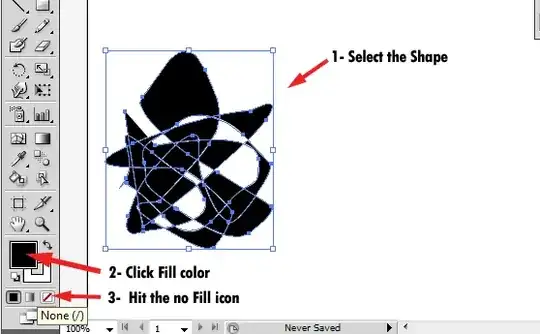


-
Thank you! That worked! Now I have to clean up the drawing my deleting portions of the image. Thank you! – Fiona Jul 29 '10 at 05:43