1

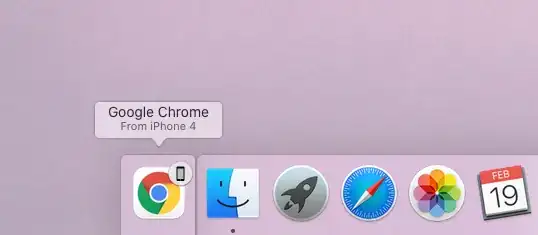
MacBook Pro 2019 showing Chrome running on iPhone 4

I am using Chrome (Version 98.0.4758.102 (Official Build) (x86_64)) on MacOS Catalina (Version 10.15.7) and I keep seeing this popup on my Mac whenever I have a chrome window open on my iPhone 13 Pro, I do understand this is a feature but what I don't understand is it saying from iPhone 4

I did own an iPhone 4s back in 2014 but it was factory reset and sold in 2015. I do not have any other iPhone linked to my iCloud or Apple account, so my concern is if this is just a bug in Chrome or MacOS and I should ignore it or should I be looking into it further?

Any inputs would be appreciated, thanks :)

Tetsujin
  • 47,296
  • 8
  • 108
  • 135
Vipin Dubey
  • 119
  • 3
  • 1
    Super User is not for asking questions about external devices than can be plugged into a computer. That’s against the rules and out of scope. https://superuser.com/help/dont-ask – desbest Feb 19 '22 at 09:33
  • 3
    @desbest - please actually read the help pages, especially [What topics can I ask about here?](https://superuser.com/help/on-topic) before making such statements - *not about* "electronic devices, media players, cell phones or smart phones, ***except insofar as they interface with your computer,"*** This is clearly an interfacing question. – Tetsujin Feb 19 '22 at 09:36

2 Answers2

2

What you are seeing is Handoff. The name is [or should be] the device name of the connected device. This is not necessarily simply the device type, it should be the personalised name of that device.

Check on your iPhone… Settings > General > About > Name

If you do a direct migrate from an old to new phone, rather than setting up as a new device, then the old name will also be imported to the new device.
If you've done this ever since your iPhone 4, then that could be the reason.

Tetsujin
  • 47,296
  • 8
  • 108
  • 135
  • Ok, not sure if this is the case as the name I have in Settings > General > About > Name is Vipin's iPhone. Thanks for taking the time to answer – Vipin Dubey Feb 21 '22 at 09:34
  • Hmm… Interesting. I'm really not sure why it's not reflecting the correct name in that case. It does feel like a 'safe' bug, as you're right there, monitoring it live. tbh, I wouldn't worry too much about it, just mark it down as 'odd'. Do let us know if you do manage to get to the root of the issue, but I'm out of ideas, I'm afraid. – Tetsujin Feb 21 '22 at 09:37
  • 1
    Yes, I think I am safe and this is one of odd macOS/iOS bug. Thanks, I will update this thread if I find the cause. – Vipin Dubey Feb 21 '22 at 09:41
  • Update: I connected my new iPhone 13 Pro to Mac via lightning cable to debug an iOS app I am working on and I see it recognizes the Model as iPhone 4 – Vipin Dubey Feb 23 '22 at 12:43
  • reference image of how it looks when connecting: https://imgur.com/a/WLrYhW3 – Vipin Dubey Feb 23 '22 at 12:50
  • Is that Xcode it's showing in? Is Xcode up to date? – Tetsujin Feb 23 '22 at 14:01
  • 1
    sorry for the late update, yes the last image I uploaded was Xcode, the issue is fixed now after upgrading my Mac to latess OS (Monterey) from Catalina. – Vipin Dubey Mar 03 '22 at 22:18
1

If you wish to disable Handoff, see the article How to Disable Handoff on Mac OS:

  • In the Apple menu choose System Preferences > General
  • Uncheck "Allow Handoff between this Mac and other iCloud devices"

enter image description here

harrymc
  • 455,459
  • 31
  • 526
  • 924
  • Thank you for the tip, however, I do not want to disable this but just wanted to find out if this is a bug as every time I see it confuses me into thinking if I am hacked or someone else is logged into my account, I have verified that by looking at logged in devices in past and that looks ok, so it must be a bug. ☠️ – Vipin Dubey Feb 21 '22 at 09:39