4

I am servicing an iMac in my office and took it apart completely for cleaning and upgrades. I removed the CPU/GPU heatsink (one piece) and found a syringe of Arctic Silver MX-4 paste we had in the office for about 4 years. The office is cooled in the summer and warmed in the winter, so temperatures in the air are never extremes.

When I used some paste, the syringe started releasing an oily liquid along with the paste - I assume it has separated with time.

Question 1: is this paste still safe to use? I tried to mix the paste on the CPU before replacing the heatsink. Furthermore, is it also safe that I did not use so much as to spill over the edges when reapplying the heatsink? The original Apple thermal paste did this.

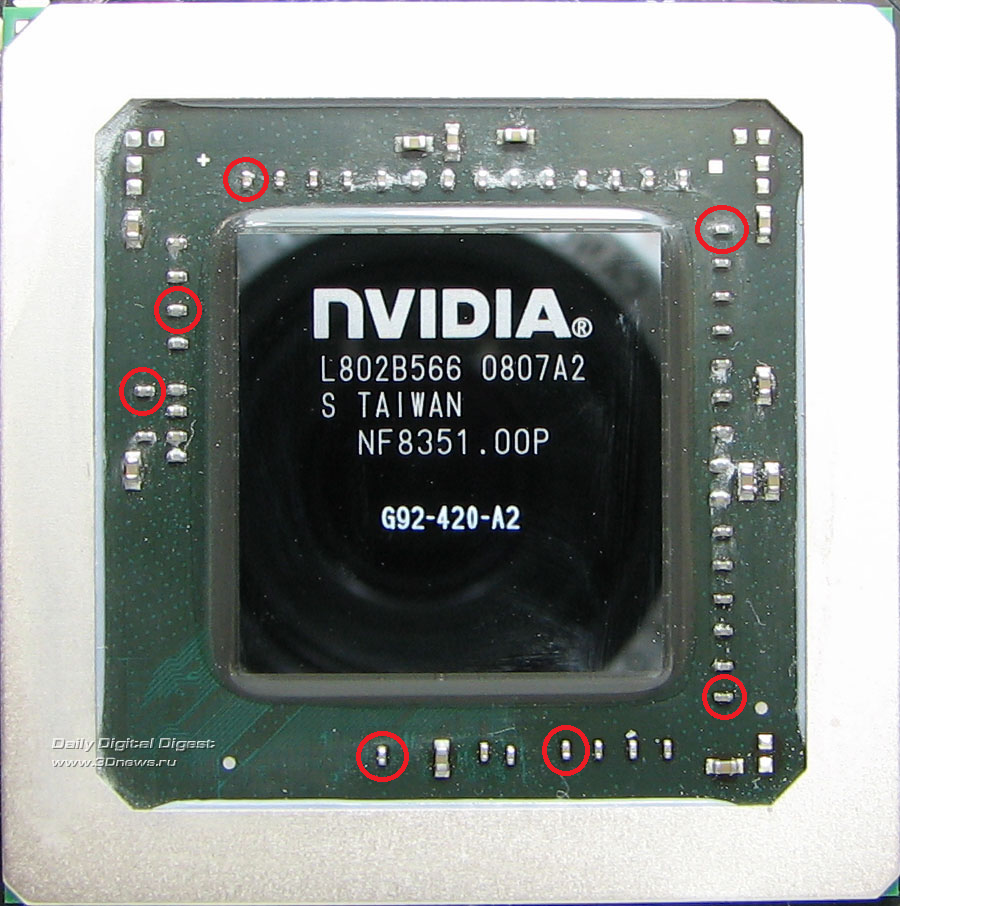
Furthermore, as the GPU die is exposed, I replaced the thermal paste on this also. I also mixed the paste before replacing the heatsink on this also. Additionally, the original Apple thermal paste spilled over the sides of the die and covered the very small capacitors on the GPU chip (the kind I've circled here). Upon replacement, my paste did not do this.

Question 2: Is this a safe replacement? I have not fully assembled the iMac back together, should I remove the heatsink, buy new paste and try again?

I have seen conflicting information surrounding the topic of thermal paste age when still in the syringe. I know the defining test is to run a thermal stress test and see results. Any saved steps will be helpful, because this iMac is a long process to assemble again only to check this.

leetbacoon
  • 231
  • 2
  • 11

1 Answers1

5

I found a syringe of Arctic Silver MX-4 paste we had in the office for about 4 years. .... the syringe started releasing an oily liquid along with the paste - I assume it has separated with time

Yes - your assumption is correct.

Good thermal paste is a true paste that you can spread in an even thin layer on the surfaces to mate. Very little excess should squeeze out.

So get new Thermal Paste (new Arctic Silver is good).

Remove ALL the old paste, clean well with a lint free cloth and isopropyl alcohol, then apply new paste.

I have (only on occasion) re-seated CPUs (well seated CPUs last a very long time with little or no need to re-paste) and the above approach with good paste is successful.

Good luck with your project.

John
  • 46,167
  • 4
  • 33
  • 54
  • Thanks for your insight. Do you have any input on covering the capacitors on the GPU chip? Should I do this to copy the original setup? – leetbacoon May 02 '22 at 23:35
  • 1
    The issue with capacitors (bulging) is a bit older now. Good capacitors in computers (and indeed most electronic equipment) last a very long time. – John May 02 '22 at 23:37
  • Oh, sorry, to clarify, they are the small kind of surface-mount capacitors [like these](https://files.catbox.moe/1cc4rm.png) (I have circled a few of them). – leetbacoon May 02 '22 at 23:53
  • 1
    Surface mount capacitors can last for decades (I have some really old stuff in my basement). – John May 02 '22 at 23:56
  • I understand, yes, but my concern was that Apple covered them with paste before. Would you deem it necessary that I copy this strategy? – leetbacoon May 02 '22 at 23:57
  • 1
    No need to do that. There is nowhere for the heat to go but in the air. No harm in covering them if you wish to, – John May 02 '22 at 23:58
  • Thank you, I appreciate your help! – leetbacoon May 02 '22 at 23:59
  • 3
    Just to add to the great answer. Clean the old paste off the lid with as-pure-as-you-can-get isopropyl alcohol, and a lint-free wipe. – spikey_richie May 03 '22 at 08:28
  • Yes, that is a good thing to do. – John May 03 '22 at 10:55
  • 1
    I amended my answer to take your suggestion into account, – John May 03 '22 at 11:09
  • @spikey_richie Ah, perfect, I had used 99% isopropyl alcohol to remove the old paste already. Good point to include! :-) – leetbacoon May 03 '22 at 19:30