I do not use Opera much. When I do, sometimes, it shows a dotted line when you scroll down to the bottom of a page. What is that for?
Here is a screenshot:
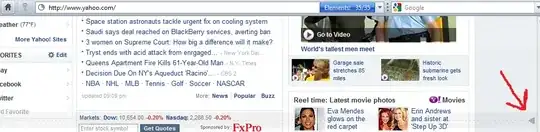
About Opera
Version information
Version
10.00 Beta 3
I do not use Opera much. When I do, sometimes, it shows a dotted line when you scroll down to the bottom of a page. What is that for?
Here is a screenshot:
About Opera
Version information
Version
10.00 Beta 3
It's a "scroll marker". Go to Tools, Preferences, Advanced, Browsing, and check or clear "Show scroll marker" to turn it on or off.
What it's for: When you page down, normally you look back to the top of the screen to start reading again. But when you page down near the bottom of the page, there might not be enough content to fill another full screen. In that case, the the scroll marker will show you where the new stuff starts. (The same thing happens in reverse if you page up.)

In addition to Bavi_H answer I just can say:
Enter this on your Opera address bar to access "Scroll Marker" option instantly:
opera:config#Enable Scroll Marker
Set the value to 0/1 to disable/enable Scroll Marker and save your setting.


