How do I install Internet Explorer 6 as my default browser and remove Internet Explorer 8?
I need this because of the script in my course syllabus.
How do I install Internet Explorer 6 as my default browser and remove Internet Explorer 8?
I need this because of the script in my course syllabus.


Don't.
Seriously.
To clarify: It's okay to install IE6 for testing purposes or the like. But that's probably best done in the sandbox of a VM. Do not make IE 6 the default browser on your machine. Nothing good can come out of that.

IETester will do what you want ...
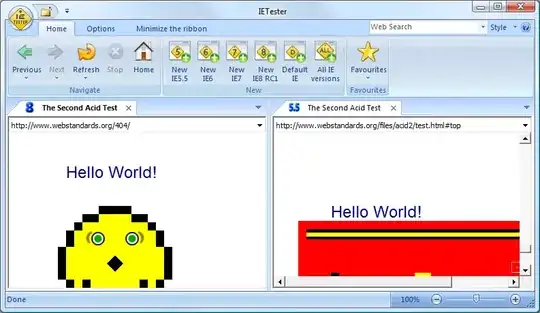
However I would have a talk with your lecturer.
I would have serious concerns with any course syllabus that requires downgrading back to a browser that was released in 2002, because what they are teaching would no longer be relevant.
The syllabus should be updated to use a current version that confirms with ECMA standards.


If you are working under Windows 7 or Vista then there is no possible way to do this.
If you have Windows XP you should be able to uninstall IE 7+ via the "Add / Remove Software"-panel.
If you want to emulate IE6 you can do so by setting the Developer Tools in IE8 (you can access these tools by pressing F12 or navigating to Tools > Developer Tools) to "Quirks Mode".
I recommend, that if reeeally need to use the real IE6 (for testing your websites or something), download the Virtual PC HD image of Windows XP SP3 with IE6 installed: http://www.microsoft.com/Downloads/details.aspx?FamilyID=21eabb90-958f-4b64-b5f1-73d0a413c8ef&displaylang=en and use it in a virtual machine.

You can install a virtual machine (for example, VirtualBox) with either a stock Windows XP (which comes with Internet Explorer 6) or Linux (and install IEs4linux).

You can get all versions of Internet Explorer at Final Builds Site - IE Collection and have them installed at the same time, then choose your default or try Browser Compatibility Check for Internet Explorer Versions from 5.5 to 10.

Uninstalling IE8 on Windows XP
Removing IE8 on Windows Vista
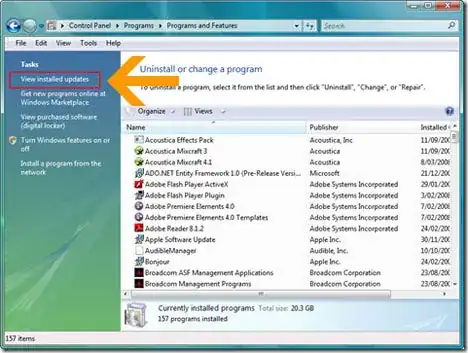
How to Reinstall Internet Explorer 6 or 7?
Source:
http://www.geckoandfly.com/2009/06/30/uninstall-windows-ie8-and-reinstall-internet-explorer-6-or-7/
You should be able to go to the control panel - > Add Remove Programs
Find IE8 in the list and uninstall. This should roll you back to version 7. Go back to add/remove programs and uninstall IE one more time. This will roll you back to version 6.0 That is all there is to it!
Happy Hunting

You can do this with ThinApp (and possibly few other similar app virtualization softwares).
http://blogs.vmware.com/thinapp/2010/06/internet-explorer-6on-windows-7.html


