11

I am hoping to find a way to do more performance monitoring--specifically, I hope that monitoring disk activity on a per-process basis will help me decide which programs are causing the most trouble (aside from the AV). I'd rather avoid a shotgun approach.

For windows XP, is there a process monitor that can give me a solid idea of which processes are slowing me down by causing the most page faults, etc? Thanks!

K Robinson
  • 1,029
  • 2
  • 16
  • 26
  • http://superuser.com/questions/175365/how-can-i-figure-out-what-process-is-constantly-accessing-my-hard-drive-in-window – quickcel Aug 30 '10 at 15:37

3 Answers3

6

Perhaps enabling the I/O reads and writes in the task manager (ctrl+shift+esc). When looking at the processes in task manager select View then Select Columns. Look for the I/O read optiona nd I/O write option and click them.

This is what I get:

alt text

James Mertz
  • 26,224
  • 41
  • 111
  • 163
  • Thanks! This is just what I needed. I ended up using Page Faults and PF Delta, for the most part. – K Robinson Apr 15 '14 at 20:53
  • Network communication is IO as well. With heavy usage of internet this makes the numbers quite uncertain. – Tomáš Zato Mar 05 '15 at 12:27
  • @TomášZato this is true, but if a process is heavily spamming a disk drive, you'll more than likely be able to detect it using this method. – James Mertz Mar 05 '15 at 14:37
5

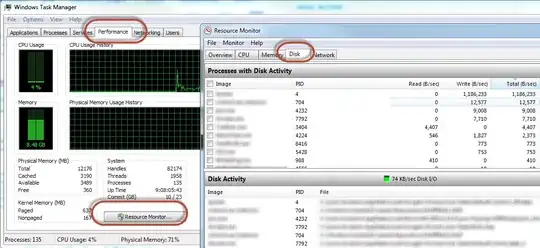
While I prefer the accepted answer, there is another way with the existing task manager.

  • Task manager > Performance (tab) > Resource Monitor (button) > Disk (tab)

enter image description here

K Robinson
  • 1,029
  • 2
  • 16
  • 26
  • This does get the "True" read/write IO to the disk drives. If have a lot of network or other IO traffic, the accepted answer may be masked by those other operations. This is a better option in this case. – James Mertz Mar 05 '15 at 14:40
3

I like the freeware Process Explorer. It provides a bit more detail than the Windows Task Manager, including per-process I/O graphs. Great for immediately spotting processes doing a lot of disk I/O.

boot13
  • 5,819
  • 3
  • 28
  • 42