55

Firefox can do it, can Chrome?

Here's what I'm looking for:

Firefox - always show the tabs in fullscreen mode

snitzr
  • 2,212
  • 4
  • 25
  • 32
  • 2
    It appears to be true that the function you seek isn't supported, but maximizing in Google Chrome is so tight to screen boarders that if you're showing tabs maximized that would seem to be the same effect you're seeking. Did i miss something in your explanation? – Hardryv Sep 05 '10 at 00:09
  • 3
    Sorry, can't find an extension for this... By the way, tip: CTRL+TAB ;-) – Tamara Wijsman Sep 05 '10 at 01:00
  • I want tabs but I want to utilize as much screen space as possible on my laptop. Full screen hides the taskbar and nav bar for that extra bit of space. – snitzr Sep 05 '10 at 01:04
  • 1
    Autohiding the taskbar isn't enough? – digitxp Sep 05 '10 at 02:22
  • I'd prefer not to autohide, but that is an option. – snitzr Sep 08 '10 at 13:36

7 Answers7

37

I'm using Google Chrome (Version 22.0.1229.79) and fullscreen mode still shows the tabs!

You can toggle fullscreen mode using:

  • mac: Shift + Cmd + F
  • windows: F11

and you can toggle the bookmarks bar using:

  • mac: Shift + Cmd + B
  • windows: Shift + Ctrl + B

Which gives you lots more space!

Brad Parks
  • 2,918
  • 3
  • 25
  • 35
27

Try Ctrl+Cmd+F.

That exits presentation mode and (I think) solves your problem.

Indrek
  • 24,204
  • 14
  • 90
  • 93
Dave Underhill
  • 287
  • 3
  • 2
  • 8
    This didn't work in Chrome 26 on OS X 10.8. Cmd-Shift-F is now bound to "Exit Presentation Mode" (see the "View" menu). I note that exiting leaves fullscreen as well. Exiting, then re-entering Fullscreen mode does restore the tabs and address bar as expected. – John Whitley Apr 18 '13 at 22:38
  • 5
    No this isnt the answer to the question asked. The question asked for tabs AND fullscreen, which is what i came here to find so i can flip between my chrome windows with the 4 finger swipe motion. Exiting fullscreen takes away that convenience – stackPusher Jul 29 '16 at 16:08
  • 2
    View -> Always Show toolbar in full screen. – Amit Tandel Dec 16 '17 at 10:20
  • 3
    Doesn't work in Chrome on Linux. – Alexander Jan 26 '18 at 11:02
  • 1
    Any solution for Chrome linux? – Amin Shojaei Jul 22 '20 at 13:14
11

The most recent version is go to "View" and activate

Always Show Toolbar in Full Screen

It says Shift+Command+F also works, but that didn't work for my computer.

zx485
  • 2,170
  • 11
  • 17
  • 24
8

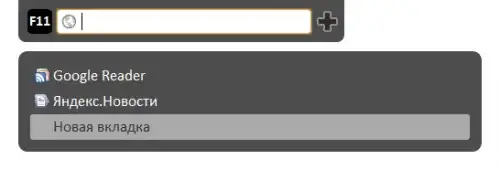
The extension Fullscreen address bar does:

Address bar for fullscreen mode : Use F6 key or move mouse to top screen.
Tab list : Use ctrl key and top/down arrows
image

LifeH2O
  • 1,233
  • 4
  • 21
  • 34
harrymc
  • 455,459
  • 31
  • 526
  • 924
  • Didn't work immediately on Ubuntu, but works if you restart and open new tabs. – Ross Apr 21 '11 at 09:15
  • 1
    I've accepted this as the best answer, but I am concerned. Why does the extension need to access "Your data on all websites...browsing history... bookmarks"? – snitzr Jun 01 '11 at 01:28
  • It only needs them if it intends to display them as choices when one types-in a partial URL. Even if it does not, this may be for "future use". – harrymc Jun 01 '11 at 13:09
  • 1
    Maybe, but there is no way to know. For the record, there is no review on Google's site. Existing on a Google hosted server does not make an extension legit. If you post an extension, it shows up right away. Caveat emptor. – snitzr Nov 30 '11 at 21:24
  • This extension now has many reviews and appears safe, but I can't get it to work. On this other hand, the extension Fullscreen Address Bar has only a few reviews but works for me: https://chrome.google.com/webstore/detail/fullscreen-address-bar/ppmkmdianhgppfjciekeiodmgdppglno – Jess Riedel Mar 30 '14 at 20:39
  • doesn't work for me on windows 8 but this shows address bar, though not tabs https://chrome.google.com/webstore/detail/full-screen-static-naviga/oihgjjmlcmdjjdpkeccmbnmhgaheokfp – rofrol Mar 02 '16 at 12:54
  • Down-voting an answer from 2010 ? – harrymc Jun 24 '16 at 12:59
3

I just toggle the bookmarks bar on and off (ctrl-shift-B) when I need a little bit more space, but not so much more that I use fullscreen mode. There's no way to toggle the address bar as well.

Ctrl-tab still works when you're in fullscreen mode, so this is good enough for me.

1

You can toggle tabs upwards and backward also using Ctrl + Pg Up or Pg Dn.

Slovak Guy
  • 27
  • 1
  • 2
0

Relaunch Chrome in Windows 8 mode. Than right click on task bar (shelf) at the bottom, enable auto-hide

rofrol
  • 1,849
  • 19
  • 17