33

I have downloaded file which is in djvu format. I want to convert it to pdf or some other more common format, so I can read the document from other devices (e.g. my phone etc).

I found a conversion utility at Lizardtech, but when I converted the doc using the lizardtech software, every page had a watermark - which rendered the converted doc virtually useless.

Does anyone know where I can get a free conversion utility that does not watermark the converted doc?

Zeta2
  • 915
  • 2
  • 8
  • 8

7 Answers7

17

For DjVuLibre, you can use File » Export as… » PDF format. It's an open source software, fast converting, and possible to tweak the conversion (i.e. change the resolution by specifying the DPI, or the quality of the JPEG conversion)

devina
  • 171
  • 1
  • 3
  • unfortunately it does not reserve OCR and table of contents – Ooker Oct 25 '17 at 23:56
  • 2
    is it just me or the program doesn't have an Export as PDF option? – Motassem Kassab Jan 03 '19 at 16:34
  • They changed this option in 4.11. They replaced it with export as postscript and various image formats. – Melvin Jefferson Jan 18 '20 at 09:32
  • 1
    The option to export to PDF is (again? still?) there as of 2020. This solution, like all the others I tried, produces huge PDF files. The PDF file size is more than 10 times larger than the DjVu file. Using lossy compression you can stay in the same order of magnitude, but then the result is much worse than the original. – Nobody Oct 03 '20 at 19:52
11

Short Solution: https://0x2a.at/site/projects/djvu2pdf/

For those interested or for those that like using the terminal on a Mac

I recently asked this question when I found a strange file on my computer whilst trying to come up with the answer to the same question posed by this thread.

First, install homebrew through the terminal with this

ruby -e "$(curl -fsSL https://raw.github.com/Homebrew/homebrew/go/install)"

And then install djvu2pdf, which, by the way, has almost no documentation but works like a charm.

brew install djvu2pdf

Then, navigate to the directory where my .djvu file is stored, and run this command:

djvu2pdf [somebook.djvu]

Since most textbooks have really long names that have spaces in between them, just enter a little bit of the name (enough to make it so there is only one file in the directory that starts with the current string) and then press tab.

It takes a while, how long I didn't figure out, but definitely not more than half an hour, and it will place a new file in the directory that is a pdf version of the .djvu file.
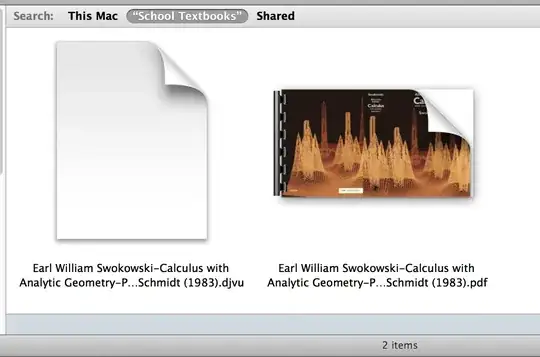
whycantstufflikethisalwayswork This is the only method I've found to work.

michaelsnowden
  • 762
  • 2
  • 11
  • 22
  • `djvu2pdf` works but does not preserve the text layer. It is essentially a wrapper for `ddjvu` and thus running `ddjvu -format=pdf` will produce the same output. For an approach that preserves the text layer see [here](https://superuser.com/a/1806567). – Stefan Schmidt Aug 31 '23 at 12:01
9

The ddjvu utility from the DjVuLibre suite seems to do a good job. Here's a small example:

ddjvu -format=pdf <input>.djvu <output>.pdf
Marco
  • 4,306
  • 1
  • 29
  • 31
  • 1
    This produces extremely large PDF files (factor 25 larger). The man page suggest djvups as an alternative. This also produces extremely large PDF files. – Nobody Oct 03 '20 at 19:22
7

Try the online converter

http://www.djvu-pdf.com

It is working fine for many types of DjVu files and should be easy to use...

Mark
  • 79
  • 1
  • 1
4

Open your Djvu file with the opensource application "SumatraPDF" (which can read Djvu format) and then use your favorite virtual PDF printer to save it as a pdf file.

Fabien
  • 405
  • 1
  • 3
  • 9
1

Convert DjVu to PDF from Internet Explorer

You can convert DjVu documents to PDF files directly from Internet Explorer using the open source DjVu viewer browser plugin.

To convert DjVu to PDF from Internet Explorer:

  1. Download and install the DjVu browser plugin from celartem.com/en/download/djvu.asp
  2. Double-click on the DjVu document (or in Internet explorer go to File->Open and select the DjVu file) you want converted to PDF
  3. Once opened, right-click on any page and select File->Print… (or click the toolbar Print button).
  4. From the Printer section select novaPDF and click on OK. You’ll be asked to choose a location and the PDF will be generated and saved once you click OK

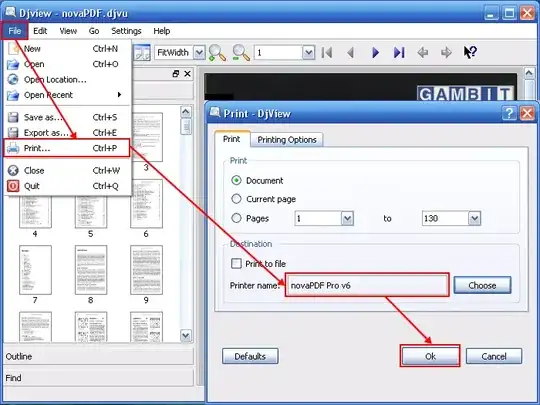
alt text Convert DjVu to PDF using a separate DjVu Viewer
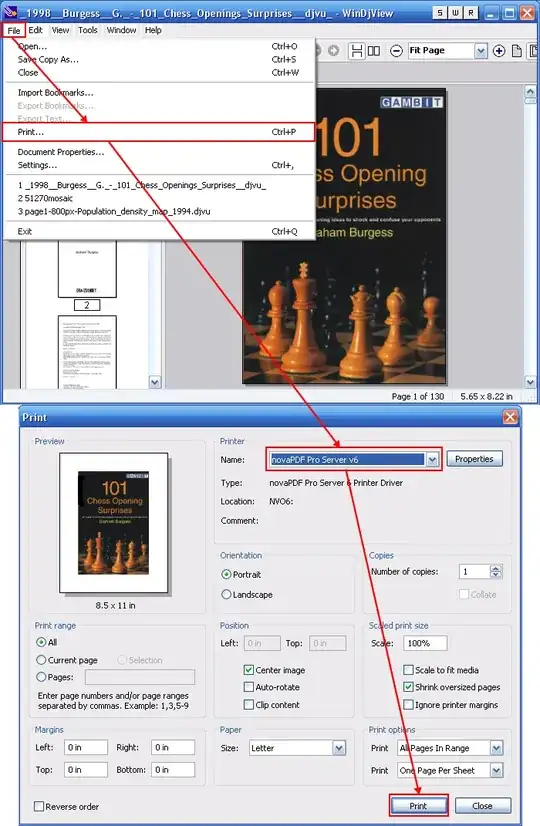
WinDjView and Djview are two open source readers for the DjVu file format.

To convert DjVu to PDF from WinDjView:

  1. Go to File->Open (or press Ctrl+O), browse for the DjVu file you want to convert to PDF select it and click Open
  2. Go to File->Print (or press Ctrl+P) and from the Printer section choose novaPDF. Before creating the PDF file you can customize novaPDF’s settings by using the Properties button and also adjust other printing options
  3. Click on Print and choose a location where you want the PDF document saved

alt text To convert DjVu to PDF from DjView:

  1. Go to File->Open (or press Ctrl+O), browse for the DjVu file you want converted to PDF select it and click Open
  2. Go to File->Print (or press Ctrl+P) and from the Printer name choose novaPDF. In the Printing Options section you can customize the color, orientation and the scaling of the document
  3. Click OK and choose a location where you want the PDF file saved

alt text

Sorry I ended up copy pasting evrything from this site http://www.novapdf.com/kb/convert-djvu-to-pdf-215.html

subanki
  • 7,566
  • 8
  • 44
  • 50
  • 1
    Does this get rid of the watermarks - thats all I really wanted to know. Have you tried what you suggested yourself, and found the printed doc contains no watermarks? – Zeta2 Sep 13 '10 at 18:36
0

Wikipedia commons page on Help:Creating a DjVu file has notes on working with DjVu files.
And, the djvu sourceforge page has additional open-source tool reference.

DjVu (pronounced "déjà vu") a set of compression technologies, a file format, and a software platform for the delivery over the Web of digital documents, scanned documents, and high resolution images.

Converting DjVu to PDF (for general reference, you seem to have already checked it):

  1. Download and install Universal Document Converter software onto your computer.
  2. Install DjVu Browser Plugin for Internet Explorer from the Lizardtech site.
  3. Open the DjVu file in Internet Explorer and press the Print button in the DjVu Browser Plugin toolbar
  4. Select Universal Document Converter from the list of printers and press the Properties button.
  5. On the settings panel, click Load Properties.
  6. Use the Open dialog to select "Text document to PDF.xml" and click Open.
  7. Press OK in the Lizardtech plugin Print dialog to start converting. When the PDF file is ready, it will be saved to the 'My Documents\UDC Output Files' folder by default
  8. The converted document will then be opened in Adobe Acrobat or another viewer associated with PDF files on your computer.

Alternately, look at the standalone viewer for DjVu files, DjView4,
or investigate the DjVu sourceforge page for a suitable tool.

nik
  • 55,788
  • 10
  • 98
  • 140
  • Does this get rid of the watermarks - thats all I really wanted to know. Have you tried what you suggested yourself, and found the printed doc contains no watermarks? – Zeta2 Sep 13 '10 at 18:40