Is one of those types of KVM switches better than the other in any way?
Depends what you want to do, but for the most part they are equal. I often use a USB adapter on my PS/2 KVM switches with no problem. In most modern computers that still have PS/2 ports, the PS/2 bus is actually part of the USB bus. ---EDIT--- After doing some more research I found that the HIDs themselves are actually responsible for making the connection via USB or PS/2, not the motherboard. Please read comments.
One faster than the other?
No.
Is the switching instantaneous?
For the most part. The speed of switching has more to do with how fast your monitor reacts than anything else.
Transparency for the OS: Does the OS even know about the switch?
No.
Does it know when the switching is performed?
It may know that 'something' happened because several events will have taken place (i.e. you might have pressed keys on your keyboard to make the switch happen, the monitor connection might have been lost due to the switching, ect.), but it does not know that the events were caused by the KVM switch.
Is it just like plugging and unplugging the devices?
Yes and no. The result is just like unplugging and plugging in the devices, but without the side effects (for instance your computer will not have to recognize your USB keyboard again when you use a KVM switch, but it probably will if you unplug your keyboard then plug it back in). Hotswapping PS/2 connectors is not recommended because it can cause I/O controller damage.
(if it is, then switching PS/2 is clearly faster than USB) Or it's a more elaborated signal handling?
It is more than signal handling, it is magic.
---EDIT---
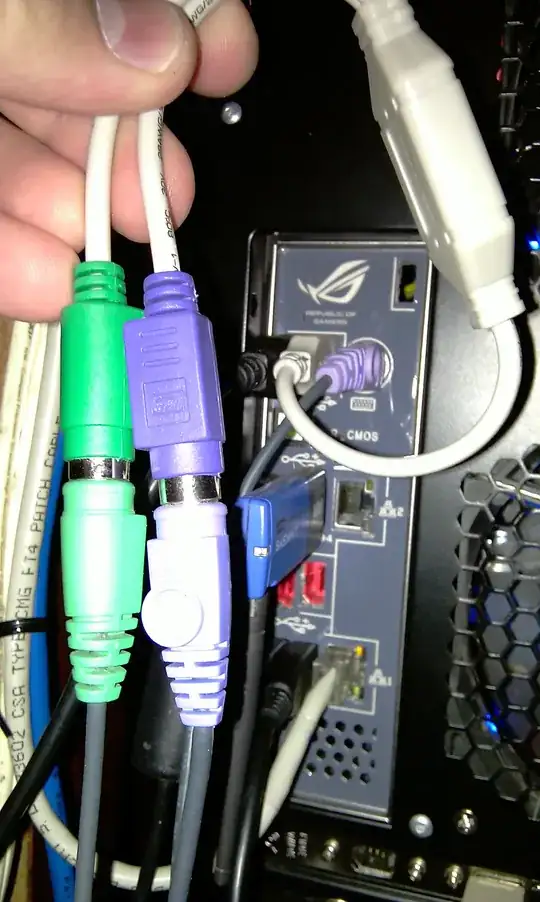
The first picture below is my primary KVM switch. I have a wireless keyboard and mouse combo attached to it. The wireless adapter has both a USB (for keyboard) and PS/2 connector. You can see that I use a passive USB to PS/2 adapter for the keyboard and then I plug the mouse in normally. If you had both USB keyboard AND mouse then you would just use two passive adapters instead of one. From here for normal purposes (only one KVM switch) you would just plug the leads of the KVM switch into your machines and go.
With that said, my particular setup is a bit more elaborate. I have three monitors and three computers that I access all the time (two servers and my workstation). I have it set up so that normally all three monitors are connected to my workstation, but I can use the far left monitor for server one when needed and the far right monitor for server two when needed. I can view all three computers at once with this setup since the first KVM switch controls the leftmost monitor, the second KVM switch controls the rightmost monitor, and the center monitor is dedicated to the workstation via HDMI.
The second picture shows how I accomplish this with a second KVM switch. The first lead of the second KVM switch is attached to a dual PS/2 to USB adapter (because I have no more PS/2 ports) which is attached to my workstation. The first lead of my first KVM switch is also attached to my workstation. The second lead of my second KVM switch is attached to my second server and the second lead of my first KVM switch is attached to my first server. My second KVM switch does not have a dedicated keyboard, instead I use the fourth lead of my first KVM switch as the input of my second KVM switch (no adapters required because the leads of the first KVM switch are PS/2 as are the inputs to the second KVM switch). To avoid any device changing conflicts I had to change the escape sequence of my second KVM switch (from CTRL -> SHIFT -> ALT -> DEVICE_NUMBER to something different (I used ALT -> SHIFT -> CTRL -> DEVICE_NUMBER)).
Please let me know if any of this is unclear.
FIRST PICTURE
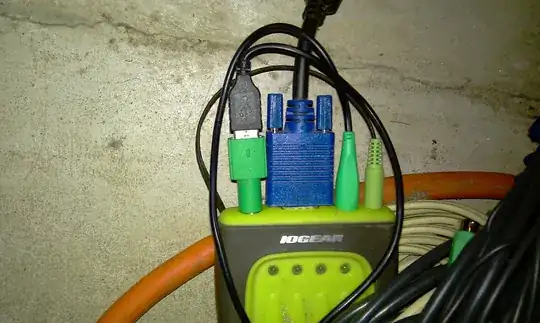
SECOND PICTURE