55

I'm using Safari to preview web pages as I develop them on my local server. I've got 'Disable Caches' checked in the Develop menu. And yet Safari is still working from a cached version of a stylesheet that's linked from the HTML file being displayed.

I can sometimes override this by Option-clicking the reload button in the location bar, but I want to refresh the page automatically when I save the CSS file. At the moment I'm doing it using an AppleScript that's bound to the Save action in my text editor. I could see using Keyboard Maestro instead. But I need some consistent way to force Safari to do a full reload from the keyboard.

Hennes
  • 64,768
  • 7
  • 111
  • 168
Gabe
  • 681
  • 1
  • 5
  • 10
  • Do you have any extensions installed. Had this problem once with Adblock... It messed up one page in particular, thought it was a stylesheet problem too, tried everything... but it was Adblock messing with it. – unom Jan 08 '14 at 22:08

9 Answers9

55

Enable the Develop menu from Safari menu - Preferences - Advanced.

On Safari version 11.1 and above :

CMD+OPTION+R reloads the page ignoring cache.

On Safari version 9 and above :

CMD+SHIFT+R reloads the page ignoring cache.

Emptying caches seems not to reload the stylesheets everytimes…

On Safari below version 9 :

Empty cache and then reload so full "hot key" would be :

CMD+OPTION+E

Then

CMD+R to refresh the page

Of course probably turning opening and closing a New Private Windowfrom the File would also work but…

wickdninja
  • 668
  • 5
  • 6
17

The shortcut has now changed to OPTION + CMD + R. (Safari 11.1)

sayan
  • 271
  • 2
  • 4
7

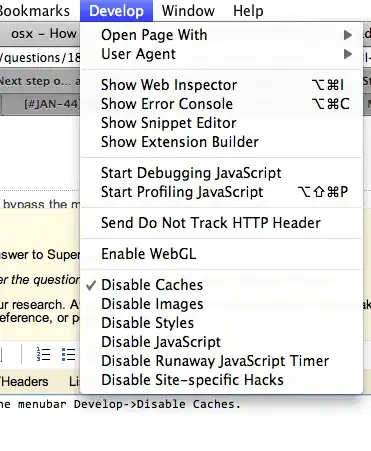
There is an option in the menubar Develop->Disable Caches. This is true for Safari 5.1. I'm not sure for the rest.

Screenshot

Gaff
  • 18,569
  • 15
  • 57
  • 68
mist
  • 233
  • 3
  • 9
2

Hard refresh was removed as a keyboard shortcut in Safari 5. The old command for that was +SHIFT+R

CTRL+F5 May work but I can't test here.

JNK
  • 8,218
  • 28
  • 31
  • Yes, that's how to refresh the page, but it doesn't bypass the cache. – Gabe Sep 09 '10 at 16:02
  • 2
    Control-F5 just selects the location bar, like Command-L. – Gabe Sep 09 '10 at 16:45
  • Then it's been disabled completely. I found a number of threads complaining about it. There is an extension that I have NOT tested here: http://twitter.com/siracusa/status/15683201068 that may do what you want. – JNK Sep 09 '10 at 16:47
  • No, that extension just creates a button in the toolbar (which I guess some people prefer to the icon in the location bar). I also found a lot of threads complaining about it—i was wondering if someone on here had any special knowledge. – Gabe Sep 09 '10 at 19:37
  • Sorry! :( <15chars> – JNK Sep 09 '10 at 19:47
  • Shift + Click on the refresh button – Brian Wigginton Apr 07 '11 at 00:14
2

Turn on Private mode and refresh the page. It won't get it from the cache in private mode.

Jawa
  • 3,619
  • 13
  • 31
  • 36
Jahanzeb
  • 21
  • 1
1

I stumble upon this question and apparently the current answers do not work.

Issue is currently CMD+ALT+R opens the Responsive design.

However if the inspector is open via CMD+ALT+I, then the same shortcut does a clean refresh.

Current Safari Version: 12.1.2

Ant
  • 111
  • 3
1

Workaround: in the develop menu, select "start debugging javascript" and it must reload the code properly. You can then stop debugging... I know it's not a clean solution and I'm not sure if it works always or in all versions, but it's working for me now.

Rico
  • 11
  • 1
0

CMD+L focus on the address bar SHIFT+ALT+ENTER full reload for the current address

It seems to work on Safari 9

rraallvv
  • 355
  • 1
  • 4
  • 15
-3

Go to Safari's preferences and tick "Show develop menu". In the develop menu, click disable Caches.

cpast
  • 2,455
  • 2
  • 19
  • 27