5

I got a Mac recently and would love to try iPhoto, but I have 15000+ images arranged in folders, which are referenced by image file path in a database. I don't want iPhoto to copy all the photos, and I don't want my database references to get ruined.

Any advice?

Chealion
  • 25,408
  • 8
  • 67
  • 75
Jason S
  • 7,503
  • 16
  • 60
  • 79

1 Answers1

11

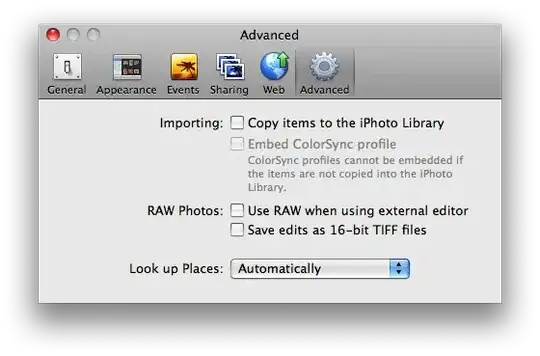
iPhoto has a preference for controlling whether imported photos are copied from their original locations into the iPhoto library folder, or left where they are. Launch iPhoto, select "Preferences…" from the "iPhoto" menu, click the "Advanced" toolbar icon, and uncheck the checkbox at the top of the "Importing" section to give it a try:

iPhoto preferences

Gaff
  • 18,569
  • 15
  • 57
  • 68
John Siracusa
  • 1,277
  • 2
  • 10
  • 10
  • 1
    That's a good answer. But the downside is now you have to manage your own photo file and directory structure. Please keep in mind that since iPhoto is maintaining its own database of where your images are, it really doesn't like you renaming things or moving them around once they've been imported. Unless you've got a good reason to maintain your own file structure (and it sounds like you might), I'd just as well give up that hassle to the computer and let me enjoy looking at the pictures. – Barry Brown Aug 20 '09 at 01:13