78

I know it existed as sort of a folder in Windows Explorer in at least Windows XP, but I just can't seem to find it in Windows 7...

How can I take a picture with my webcam in Windows 7 without using any 3rd party tools?

Svish
  • 38,310
  • 61
  • 136
  • 181
  • It's not included per-se, but if you use Windows Live Messenger you can go to webcam preview mode and take a screenshot of yourself. – John T Sep 14 '10 at 22:37
  • 1
    @JohnT Messenger was decommissioned a year ago (but is still available in mainland China). I suggest upgrading to Windows 8 and using the built-in Camera app :) – gparyani Sep 09 '14 at 14:42
  • possible duplicate of [How can I view my webcam in vista?](http://superuser.com/questions/65367/how-can-i-view-my-webcam-in-vista) – kinokijuf Mar 03 '15 at 16:30
  • @EladKarako That sounds very Lenovo/IBM specific... – Svish Nov 19 '15 at 21:49
  • 1
    **For Lenovo/IBM users:** Use `"C:\Program Files\Lenovo\Communications Utility\CommMain.exe"`, or run `"C:\Program Files\Lenovo\Communications Utility\CommOSD.exe"` and press `[FN]+[F6]`, **both are similar**, using the built-in driver/program of Lenovo/IBM so it is the best solution, and you can also switch resolutions and check different camera settings while you choose your best settings. **Just click `"Take Snapshot"`**. –  Nov 21 '15 at 14:18
  • 1
    Not enough rep to post answer, but this one worked great for me. Fast, free, no hassle: https://webcamtoy.com – angularsen Feb 22 '16 at 15:17

8 Answers8

39

Answer I wrote from another similar question.

Technically it isn't built in, but it is by Microsoft - so hope that doesn't count as third party in your books.


I find the best and quickest program to be Microsoft AMcap.

It works via native DirectX functions and is very lightweight.

It is a free utility available through the DirectX SDK - and here is a direct link to Amcap.exe.

William Hilsum
  • 116,650
  • 19
  • 182
  • 266
  • 8
    I just downloaded the DirectX SDK (all 571MB) and installed it to Win 7 - unfortunately AMcap doesn't seem to be included any more. – Highly Irregular Jan 16 '12 at 09:58
  • Amcap is included in some webcam drivers, for example ZS0211. Google it and you'll find some downloads. For example file with that name works for me: `ZS0211_ov7648&PO2030_Setup` (exe or zip) – gronostaj Sep 03 '14 at 10:30
  • 1
    And AMcap.exe doesn't work alone either..... – JuliandotNut Jul 02 '15 at 19:24
  • The Microsoft version of AmCap is old abandonware (actually just a DX sample), but it seems to have been extended and maintained (at least up to 2008) by Noël Danjou, and can be downloaded e.g. here: https://en.softonic.com/download/amcap/windows/post-download?sl=1# (The Dropbox link in the answer is 404, BTW.) – Sz. Oct 24 '17 at 17:36
  • The direct link to Amcap.exe is no longer working. Can someone post a working link. Thank you. – user674669 Dec 30 '17 at 20:01
  • @user674669 - Thanks, I organised my Dropbox a while ago and didn't realise it was still linked to - I've updated the link now and will try to find a more permanent link later. – William Hilsum Jan 05 '18 at 01:38
15

You can do that easily with an free online flash app: http://blog.chrometaphore.com/wp-content/uploads/2010/04/WebcamSnapshot.swf

(it's an example but you can found a lot)


Edit:

https://amw.github.io/jpeg_camera/demo/

An other example of an online photobooth (using HTML5, with Flash fallback), which require no additional software

mems
  • 354
  • 1
  • 9
14

The most straightforward way it to install Picasa ..: http://picasa.google.com/

.. click on icon for "Capture photos and videos from a webcam or other video device" ..:
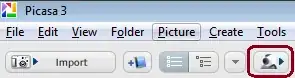
Take webcam picture

.. and then take picture or record video:
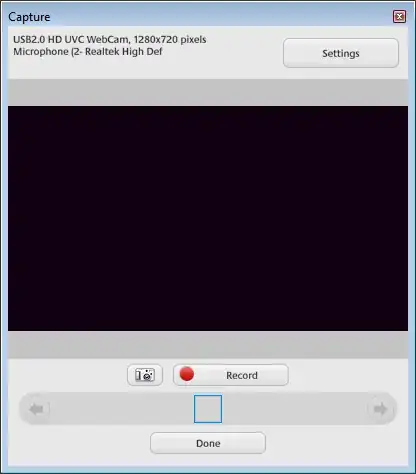
enter image description here

iljau
  • 349
  • 1
  • 3
  • 10
5

For Lenovo users, there's the Web Conferencing tool that comes with your ThinkPad that allows you to save camera snapshots. I know it's not an answer to the original question, but I arrived here via a Google search for a quick way to take a snapshot with my built in webcam so I guess more people will.

mvexel
  • 101
  • 1
  • 3
3

Windows 7, start Menu -> Run, type "webcam" or "camera" and you should see camera related software that came with your PC. Click on the software and that will allow you to take a pic.

TheTechGuy
  • 2,024
  • 7
  • 25
  • 35
1

The one thing I had already installed on my computer was VLC. This seems to work just fine: Media menu, Open capture device..., select the device name and click Play button.

Sanjay Manohar
  • 413
  • 1
  • 7
  • 17
1

Check Picanom -- its an online service (I don't trust such stuff much).
Your HP ProBook must have also come with its own Webcam Software.
Check this for example

nik
  • 55,788
  • 10
  • 98
  • 140
1

I use CommandCam: http://batchloaf.wordpress.com/commandcam/

To convert to JPEG, I use this: http://code.google.com/p/jpeg-compressor/

PhilHibbs
  • 195
  • 1
  • 3
  • 13
  • 4
    There are only two sentences in that question and the second one is "How can I take a picture with my webcam in Windows 7 **without using any 3rd party tools**?". – gronostaj Sep 03 '14 at 10:28
  • 3
    Other people searching for information on taking pictures with webcams will find this question, and my answer will be useful to them. – PhilHibbs Sep 03 '14 at 14:34