15

I have always wondered if there is any way or trick to un-select a radio button once you have selected one.

I'm asking this as a generic question, not regarding a specific program. it could be a desktop program or a webpage.

Once you click on a radio button it seems like there is no way to unselect it, so if you wanted to leave the field blank, you can't once you have already made a selection. It kind of 'forces' you to select something.

UPDATE: Im sorry, I was referring to radio buttons and not checkboxes, I confused the terms.

BinaryMisfit
  • 20,643
  • 10
  • 67
  • 76
nmuntz
  • 751
  • 4
  • 10
  • 23
  • 2
    Can you give a specific example of where you have seen this behavior? Typically check boxes allow you to both check and uncheck the box. – heavyd Aug 06 '09 at 13:36
  • 2
    I think you're talking about radio buttons? – fretje Aug 06 '09 at 13:43
  • @fretje: yes, im sorry. i was referring to radio buttons – nmuntz Aug 06 '09 at 13:58
  • 3
    radiobuttons can't be de-selected "by design" – fretje Aug 06 '09 at 14:11
  • 3
    If you've ever encountered an old car radio, the preset buttons were physical objects that you had to push in. Pushing in one popped out the other. It was nigh-impossible to "unselect" one without pushing in another. I'm sure that's where the name "radio buttons" comes from. – ale Aug 06 '09 at 16:38
  • @Al Everett; +1 but I remember the 'press-to-at-a-time' trick which released all the buttons... at least on my old radios. – beggs Aug 27 '09 at 09:47
  • @Al Everett, on my radio, I can press any button halfway to release all buttons. Still have one at home. – puri Sep 03 '09 at 12:59

5 Answers5

31

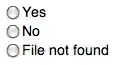
You're thinking of radio buttons:

a group of round checkboxes where only one can be selected at a time

…and any interface that leaves you wanting to uncheck a group of radio buttons is Doing it Wrong™. Radio buttons should (best) start out with a default option checked, not accept input if the user doesn't make a choice, or (worst) provide a button to uncheck everything.

If complaining to the software/website designer isn't an option, here's a bookmarklet which unchecks every radio button on a page:

javascript:(function(){var%20inputs%20=%20document.getElementsByTagName(%27input%27);for(var%20i%20=%20inputs.length-1;i>=0;i--){if(inputs[i].getAttribute(%27type%27)===%27radio%27)inputs[i].checked=false}})()

...and here's a version that works in the console:

(function(){var inputs = document.getElementsByTagName('input');for(var i = inputs.length-1;i>=0;i--){if(inputs[i].getAttribute('type')==='radio')inputs[i].checked=false}})()

If you're dealing with desktop software, the only option is usually to exit out of the problematic screen and go back in.

Vomit IT - Chunky Mess Style
  • 40,038
  • 27
  • 84
  • 117
s4y
  • 3,809
  • 1
  • 22
  • 20
  • I stumble upon this every now and again with online surveys that are badly designed. I couldn't run this script as it said "_Unexpected token %_" when running it in Chrome's console. What I did instead was use Chrome's ability to edit html: Press F12. Press the little magnifying glass on the far left, select the radiobutton (it should be an `li` element), then right click the surrounding `ul` element and select **Edit as HTML**. Copy one of the other radio buttons (`li` elements) and insert it beside the others. Select it on the page, and then edit the `ul` again to remove the radio button. – Aske B. May 19 '14 at 09:05
  • 1
    @AskeB. I just added a version that works in the console! – s4y May 19 '14 at 20:44
7

Add a radio button called None

svandragt
  • 3,243
  • 4
  • 24
  • 28
3

That is generally a problem with Radio Buttons, the circular type of selection widgets that allow for only one of a group to be selected. Checkboxes are designed to have them either checked or unchecked. I doubt that checkboxes in general don't allow deselection. It might be good to give examples of your issue.

Note that if you have a problem 'unselecting' the last selected item in a set, it is always good to attempt clicking on your selection while pressing CTRL at the same time.

akf
  • 3,971
  • 4
  • 23
  • 15
  • 2
    It's not really a problem, they're supposed to require a selection. They aren't supposed to be used when "no answer" is valid. – Greg D Aug 06 '09 at 14:12
  • I was using 'generally a problem with' to as a rhetorical device to point out that the OP was probably referring to radio buttons, not checkboxes. I didn't mean to imply that it actually was a problem. – akf Aug 06 '09 at 14:57
  • 1
    +1 for the CTRL solution, which is often not known – Gnoupi Aug 06 '09 at 15:05
0

Edit:

If it's a radio button you could use this Javascript sample or perhaps do something with AutoHotKey to make your own shortcut for it:

<script language="JavaScript">
<!--
function unCheckRadio(oRadio) {
      var or = document.getElementsByName(oRadio);
      for (var i = 0; i < or.length; i++) {
         or[i].checked = false;
     }
}
//-->
</script>

Not really relevant anymore, though still useful:

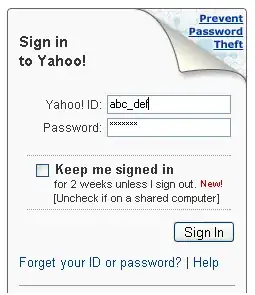
I have written a couple of posts on the topic keyboard Shortcuts for different application and How to improve efficiency and experience by learning to use keyboard shortcuts. But whenever I login to any account, I use the tab button to move across field box to enter the userid and password and I use the mouse to select or deselect ‘Keep me signed in’ check box.

alt text

Only today I realized that I am not aware what's the keyboard shortcut to select or deselect the check box. Did a bit of Googling and found out that Space bar is used for check box. You may come across check box in various places like ‘Remember Me’ or ‘I accept the policy’ and in all those places do remember to use the space bar to select or deselect a check box.

Gaff
  • 18,569
  • 15
  • 57
  • 68
Ivo Flipse
  • 24,696
  • 32
  • 103
  • 147
0

Are you sure you're not referring to a radio button? You can usually uncheck a checkbox. If you are referring to a radio button, the closest thing I can think of is using the dev toolbar plugin for Firefox's to clear radio buttons.
Menu > Forms > Clear Radio buttons