2

I'm using "Chicken of the VNC" to use a remote machine, and I have an issue with scrolling up the view to see the results of the commands.

Also JollyFastVNC doesn't have any scrolling bar. So I cannot see the full results if the lines are too many.

Am I missing something?

Peter Mortensen
  • 12,090
  • 23
  • 70
  • 90
aneuryzm
  • 2,105
  • 10
  • 37
  • 46

4 Answers4

3

On OS X Lion, resizing the window briefly causes the scrollbars to reappear; if you're quick enough you can use them.

This is clearly a (horrible) usability bug - it wasn't a problem before I upgraded to Lion. Hopefully the developers fix it for the next release.

Gaff
  • 18,569
  • 15
  • 57
  • 68
  • Here we are on macOS El Capitan and they still have not fixed it. Terrible. I will update to Sierra later tonight and see if it changes it. Probaby not. Thx – raddevus Oct 13 '16 at 23:09
0

May I suggest you try Jolly’s Fast VNC? Used to be “free” while in Alpha, but now is shareware. Although you can ’try it’ and keep asking for a trial. Other than the nagging screen at launch, the functionality is the same.

I’ve used COTVNC in the past, but jolly’s VNC is much faster.

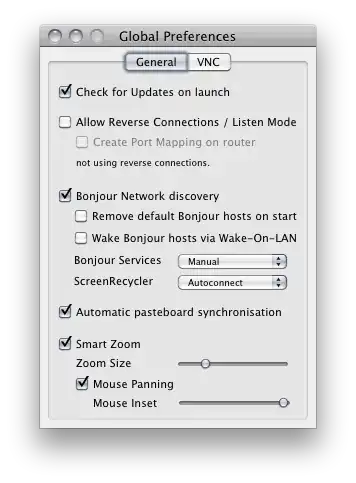
update: Jolly’s Fast VNC has a smart zoom + mouse panning that allows you to scroll with the mouse: alt text

Maybe that will help you?

Martin Marconcini
  • 1,519
  • 1
  • 13
  • 14
  • It is funny, because I have the same issue with Jolly Fast VNC (which I hope not expiring after a while). I actually don't have scroll bar, cannot read first results lines. What am I missing ? – aneuryzm Sep 20 '10 at 18:40
  • I see the options they are both enabled but how is supposed the scrolling to work ? I'm using the wheel of the mouse with the pointer over the window.. still nothing. I found out a key combination to do it and it is: Fn + Shift + ArrowUp (or Down).. not very comfortable though – aneuryzm Sep 21 '10 at 06:47
  • Also, is APPLE + V (or CTRL + V) working ? I have to go to "Edit > Paste as Keystrokes" to copy paste the symbol "/" when I need it because for some reason it isn't in the keyboard mapping. – aneuryzm Sep 21 '10 at 06:49
  • @Patrick the mouse panning follows the mouse pointer, and it’s intended to allow you to “view” remote computers that have a bigger resolution than yours, avoiding the annoying scroll bars. It consists of a “zoomed area” (you can define de size) and when you move your mouse to one side (for example) the zoomed area will move with you. If the remote computer has a 1024x768 resolution and your computer is on a 1900x1200 display, you’ll not see the effect in action. – Martin Marconcini Sep 21 '10 at 16:31
  • Regarding the copy/paste, if the remote box is Windows (or linux), I believe you’ll have to do CTRL-C/V respectively. – Martin Marconcini Sep 21 '10 at 16:31
  • @Martin: it is not anymore that important, since I can work anyway. But the CTRL+V and APPLE+V doesn't work and I actually don't need to zoom but to scroll up. The window is too small. – aneuryzm Sep 22 '10 at 11:09
  • @Patrick yes, I see what you mean. You can give it one more try by using the built in OSX VNC client: Screen Sharing. It won’t show up in spotlight because it’s mysteriously hidden in /System/Library/CoreServices. Give it a try. – Martin Marconcini Sep 22 '10 at 13:38
0

For chicken of VNC, you need to resize the window, and the scroll bar will appear. Looks like this is a bug (or a feature ;) ). It's quite annoying. I'd just reset the server's window size, to match the max windows size in your client.

shiva
  • 111
  • 2
0

Chicken of the VNC is now obsolete, but a branch has been started called just "Chicken", which solves this problem.

http://sourceforge.net/projects/chicken/

docsteer
  • 101