How can I scroll horizontally in Excel 2003 using the mouse wheel with the keyboard? Operating system is Windows XP.
Asked
Active
Viewed 9,306 times
4

-
3how about "SCROLL LOCK" on, and then ARROWS? – wilson Sep 21 '10 at 02:46
-
1Unfortunately the solutions provided so far are only workarounds, they don't strictly actually answer the question in its current form, although to be fair to those that have provided answers, that's probably because it's not possible in excel (I still have this issue with Excel 2013). I was hoping there might have been an option to allow holding down a modifier key (e.g. shift) whilst operating the scroll wheel. – Bryan Aug 18 '14 at 11:03
-
1"SCROLL LOCK" on, and then [CTRL] + [Cursor Left]|[Right] to scroll a complete page left/right or omitting the [CTRL] for scrolling a single column (but in most cases the scroll-wheel button click mentioned by AdamV helps more) – Simon Sobisch Jul 11 '17 at 14:33
3 Answers

4
If you press down the scroll wheel on most mice, that shows a centre point on screen and then as you move the mouse left / right / up / down it scrolls away from that point. Move further away to scroll faster.

AdamV
- 6,177
- 2
- 22
- 38
2
If this is a laptop, take a look at mouse properties. There is usually an option that allows you to configure horizontal scrolling:
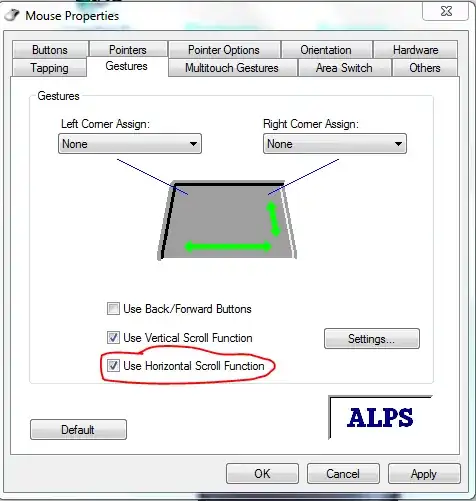
If this is a desktop, I am sure someone could write some sort of AHK script that when you hold down a key and use the scroll, it does horizontal scroll but by far the easiest way, purchase a new mouse, many have an extra axis that allows you to "tilt" the scroll wheel. I think this is called 3D scroll, they are usually available from mice costing around £15 and up.

William Hilsum
- 116,650
- 19
- 182
- 266
-
The problem is that the new mice **don't work with Excel** in this way. Excel is broken compared to most other programs in this way. – Ross Presser Jun 22 '16 at 00:11