2

I save my notes in Outlook notes. However it's just a list of notes without any kind of categorization.

I am looking for a replacement software where I can define my categories and I can place a note in one the categories.

Plus the ability to search text across all the notes.

I prefer an Outlook plugin but a small quick launch app will do.

fixer1234
  • 27,064
  • 61
  • 75
  • 116
Tony_Henrich
  • 11,506
  • 28
  • 86
  • 116

6 Answers6

4

Microsoft OneNote

UPDATE

All Microsoft Office version contains OneNote

And good and cheap is Evernote - Dillie-O mentioned

MicTech
  • 10,328
  • 5
  • 45
  • 55
1

Evernote is a very popular program that does those kind of things, plus you can access it over the web or on your iPhone.

Dillie-O
  • 1,381
  • 1
  • 18
  • 25
  • 1
    At 21M download and requirement to create an account with them, it's more than what I feel comfortable with. I don't like software which force me to create accounts for it to work when I am not interested in being connected. I just want a small stand alone app with no strings attached. – Tony_Henrich Aug 06 '09 at 18:14
1

There are lots of programs that do this task, and many outperform Outlook.

  • Evernote: Will note just about anything and make it searchable. It does OCR text recognition on pictures and PDF files to make them searchable as well.

  • Google Notebook: Now defunct for new users. I used to use this and loved it. Evernote works pretty well as a replacement.

  • Tomboy notes: It is loved by Linux, available for Windows too.

And these are just the free ones!

If you prefer Microsoft's route, try OneNote.

Peter Mortensen
  • 12,090
  • 23
  • 70
  • 90
jweede
  • 6,793
  • 3
  • 38
  • 39
1

Microsoft OneNote is my personal favorite. It's very easy to use, starts directly, and it integrates with Outlook.

It also has nice features such as screen clippings and print to OneNote, making it easy to save webpages as notes.

I've tried Evernote and Google Notebook, and they didn't work for me; may be personal preference, who knows?

Peter Mortensen
  • 12,090
  • 23
  • 70
  • 90
Paxxi
  • 7,118
  • 1
  • 22
  • 25
0

Try using a small app called memento. It sticks around in the taskbar and you can access it by right or left click of the icon. It is pretty handy if you need to keep the information available at all times.

Memento Download Page

Axxmasterr
  • 7,858
  • 7
  • 41
  • 60
  • I don't see why it's better than Outlook Notes. It just adds new notes. I can't add notes and organize them in categories. No search facility. It doesn't meet the requirement I specified. – Tony_Henrich Aug 06 '09 at 18:18
0

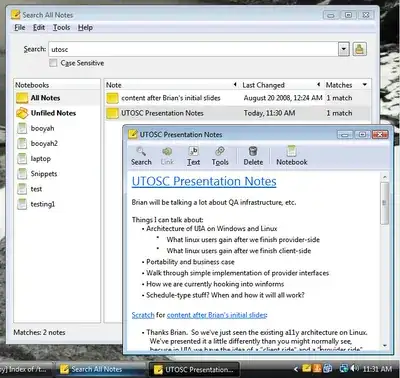
Tomboy notes is my Linux preference, and there is a Windows version that is easy to install as well.

Screenshot:

Alt text

As you can see, they are easy to categorize and fully searchable.

Peter Mortensen
  • 12,090
  • 23
  • 70
  • 90
John T
  • 163,373
  • 27
  • 341
  • 348