5

Sometimes, when Firefox doesn't quit cleanly (perhaps because it crashed, or because the whole computer crashed or didn't successfully terminated Firefox when shutting down), Firefox shows a Well, this is embarrassing page where you can manually select the tabs you want to restore.

I really like this feature, and I'd like to see that screen every time I start Firefox. I have a tendency of not closing tabs, and with this screen, I can choose which tabs I really want.

Is there a way (an extension I suppose) to get this message each time (other than manually crashing Firefox each time I want to quit it)?

Peter Mortensen
  • 12,090
  • 23
  • 70
  • 90
user36520
  • 2,805
  • 3
  • 22
  • 19
  • 1
    Here How to get the “well, this is embarrassing” screen every time you start Firefox http://blog.dt.in.th/2011/02/firefox-sessionrestore/ –  Dec 01 '11 at 05:41
  • Why don't you make this as an answer. I'll try it right away, and hope it will be the validated answer. – user36520 Dec 02 '11 at 09:22
  • The problem is that on GNU/Linux, I don't have such a file, it must be included in a .jar. And I would need root access. – user36520 Dec 02 '11 at 09:27

3 Answers3

3

You can display the session restore "well, this is embarrassing" page at any time once Firefox is running (and quite possibly all your tabs are already open!) by typing about:sessionrestore in the address bar. Can you do this if you have selected "Show a blank page" for the "When Firefox starts" option as Pierre suggests? Worth a try.

Can you make about:sessionrestore your "home page" and display your "home page" when Firefox starts?!

More information:

MrWhite
  • 2,848
  • 4
  • 32
  • 43
2

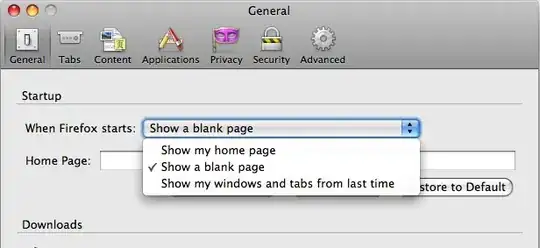
I don't know if I'm getting well what your need is, but there is a preference that you can set to re-open Firefox with the tabs opened like they were when you've closed Firefox the last time you used it:

Alt text

Peter Mortensen
  • 12,090
  • 23
  • 70
  • 90
Rabskatran
  • 4,759
  • 7
  • 31
  • 32
  • 1
    No, he's looking to have the "Which of the former tabs do you want me to open?" screen on restart, which is not an option here. – CarlF Sep 22 '10 at 12:34
  • Ok. But he is not far from there.. He just has to close the opened tabs he doesn't want anymore. It's a reverse selection, and the websites are "reached" before he can choose the one he wants to keep. But it's way better than to have to crash an app ;°) – Rabskatran Sep 22 '10 at 12:42
1

This can be a problem with the file sessionstore.js and sessionstore.bak in the Profile Folder.

Delete sessionstore.js and sessionstore.bak in the Profile Folder. If you see files sessionstore-##.js with a number in the left part of the name like sessionstore-1.js then delete those as well.

Peter Mortensen
  • 12,090
  • 23
  • 70
  • 90