9

In order to paste unformatted text, I need to paste into notepad, then cut, then paste in my original target app.

I came here looking for a way to avoid this and found How do I cut-and-paste an email, so that paste will be in pure text (stripping all html), but the accepted answer said to do my notepad trick.

This is ridiculous. I'm sick of the cut & paste notepad shuffle.

Are there any utilities which will do this for me?

Ideally, I'd like to be able to paste as plain text by default, but have an easy way to paste with the format on those rare occasions when I'd like to.

John MacIntyre
  • 448
  • 1
  • 5
  • 11

4 Answers4

11

You might want to try Puretext. It runs in the background and lets you set a Hot-Key to paste plain text. It runs on Windows NT/2K/XP/2003/Vista/7.

From their website:

PureText only removes rich formatting from text. This includes the font face, font style (bold, italics, etc.), font color, paragraph styles (left/right/center aligned), margins, character spacing, bullets, subscript, superscript, tables, charts, pictures, embedded objects, etc. However, it does not modify the actual text. It will not remove or fix new-lines, carriage returns, tabs, or other white-space. It will not fix word-wrap or clean up your paragraphs. If you copy the source code of a web page to the clipboard, it is not going to remove all the HTML tags. If you copy text from an actual web page (not the source of the page), it will remove the formatting.

PureText is basically equivalent to opening Notepad, doing a PASTE, followed by a SELECT-ALL, and then a COPY. The benefit of PureText is performing all these actions with a single Hot-Key and having the result pasted into the current window automatically.

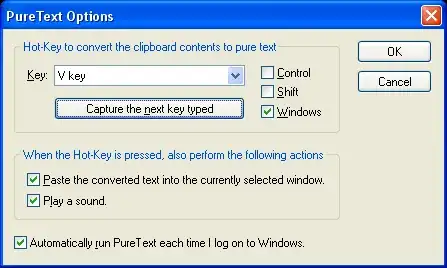
Screenshot of the options panel:

PureText Options screen shot

Pylsa
  • 30,630
  • 16
  • 89
  • 116
4

@scottgal answered my question on Twitter. I thought I'd pass it along for him.

ClipboardFusion

John MacIntyre
  • 448
  • 1
  • 5
  • 11
2

Where are you pasting your text into?

Word, for example has a "Paste Special..." option that allows you to paste unformatted text:

Paste Special options

ChrisF
  • 41,278
  • 17
  • 101
  • 154
  • This would only work for word... – Pylsa Sep 23 '10 at 14:03
  • Yeah, I've used that, but I can't do that with Outlook ... even though I believe Outlook uses the Word editor. – John MacIntyre Sep 23 '10 at 14:05
  • @John - for Outlook you could always compose your e-mails as plain text ;) – ChrisF Sep 23 '10 at 14:17
  • @Blood - I know, which is why I qualified my answer. – ChrisF Sep 23 '10 at 14:18
  • It works in Excel too. And there's a keyboard shortcut: Alt-Control-V. – John D. Cook Sep 23 '10 at 14:24
  • @ChrisF - I could compose my emails in plain text, but sometimes you need to paste in images as well, and my current corporate signature requires formatting. And besides, there are other places other than word where I want to paste as plain text (although I can't think of an example now). ... but thanks for the response. – John MacIntyre Sep 23 '10 at 17:02
2

You might be able to write a PowerShell script to do what you want. See Manipulating the clipboard with PowerShell.

John D. Cook
  • 643
  • 3
  • 6
  • 12