1

I've got a 0 byte, errorous pdf file, which I can't delete. Neither in normal nor in safe mode.

I can't run format on the partition where the pdf file is because I have no room to move all the files to other partitions.

The reason apparently is that said pdf is no longer on the disk.
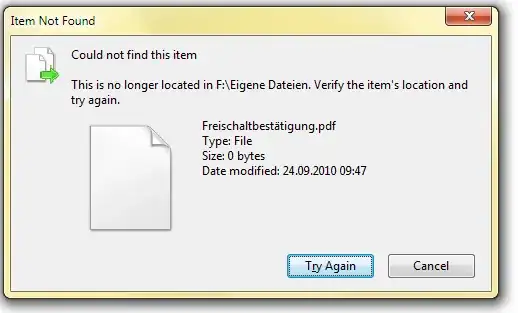
http://imgur.com/3VD1e.png

I'm using Win7. Any ideas? Suggestions?

Oliver Salzburg
  • 86,445
  • 63
  • 260
  • 306
Grumpy ol' Bear
  • 6,271
  • 12
  • 58
  • 78
  • Why can't you delete it? What does the error message say? Does the filename contain special characters? – Bobby Sep 24 '10 at 08:12

4 Answers4

2

Using either Unlocker or File Assassin should do the trick. I usually use either of them to delete stubborn files, if BloodPhilia's answer does not work.

Unlocker supports up to Windows 7, but File Assassin supports up to Vista. I've tried it on my Windows 7 box and it works fine.

Bob
  • 60,938
  • 25
  • 191
  • 216
Isxek
  • 3,915
  • 2
  • 28
  • 35
2

for me, simply the reason was that somehow after the extension ".pdf" there was a space so it was ".pdf ". after renaming, back to "pdf" I could simply delete the file.

somebody
  • 21
  • 1
1

Does deleting it from the command prompt work?

  1. Press Win Key + R
  2. Type "cmd" and hit "Run" or Enter
  3. Type DEL FILENAME, for example DEL C:\User\BloodPhilia\Documents\corruptpdf.pdf
  4. Hit Enter

If that doesn't work, try scanning your disk for errors. From http://support.microsoft.com/?scid=kb%3Ben-us%3B315265&x=13&y=8:

How to run Chkdsk from My Computer or from Windows Explorer

  1. Double-click My Computer, and then right-click the hard disk that you want to check.
  2. Click Properties, and then click Tools.
  3. Under Error-checking, click Check Now. A dialog box that shows the Check disk options is displayed,
  4. Use one of the following procedures:

    • To run Chkdsk in read-only mode, click Start.
    • To repair errors without scanning the volume for bad sectors, select the Automatically fix file system errors check box, and then click Start.
    • To repair errors, locate bad sectors, and recover readable information, select the Scan for and attempt recovery of bad sectors check box, and then click Start.

Note If one or more of the files on the hard disk are open, you will receive the following message:

The disk check could not be performed because the disk check utility needs exclusive access to some Windows files on the disk. These files can be accessed by restarting Windows. Do you want to schedule the disk check to occur the next time you restart the computer?

Click Yes to schedule the disk check, and then restart your computer to start the disk check.

Pylsa
  • 30,630
  • 16
  • 89
  • 116
1

Try LockHunter. It is a free tool to delete files blocked by something you do not know. LockHunter is useful for fighting against malware, and other programs that are blocking files without a reason.

Size: ~1.2 MB, OS: Windows 2000, XP, 2003, Vista, 7 (32-bit and 64-bit)

Mehper C. Palavuzlar
  • 55,164
  • 49
  • 193
  • 250