27

I'd like to add an "Open with Notepad++ as Administrator" context menu for all files to Windows 7.

I've tried the solutions listed here: Run a program from context menu with admin priveledges (vista UAC)

with minimal success. I'm running windows 7 home premium 64-bit. Does anyone have either more explicit instructions, or a different solution?

Thanks!

wulftone
  • 953
  • 2
  • 8
  • 9

4 Answers4

25

Reading a privileged file is not the problem. Save changes is.

Download latest plugin nppsaveasadmin:

http://sourceforge.net/projects/nppsaveasadmin/

Decompress on your plugins folder: (only NppSaveAsAdmin.dll)

C:\Program Files (x86)\Notepad++\plugins

Restart notepad++, and next time you will be prompted every time a file needs admin rights to change it.

You can try on C:\Windows\System32\drivers\etc\hosts to see the effects.

albfan
  • 551
  • 6
  • 8
  • That's exactly what I want. I open admin files too often I think this solution is better than restart as admin. – JoseJC May 21 '15 at 17:58
  • 9
    Or you can just use the Plugin Manager (Plugins -> Plugin Manager -> Show Plugin Manager) and install the 'Save as admin' plugin from there. This is the same plugin. – Alex Che May 20 '16 at 07:30
  • 1
    x64 version: https://github.com/Hsilgos/nppsaveasadmin/releases – Mehmet Fide Dec 17 '18 at 16:24
6

to do this i used 2 programs

1 - Elevate Power Toy : http://technet.microsoft.com/en-us/magazine/2008.06.elevation.aspx

2 - Context Edit : http://www.softpedia.com/progDownload/ContextEdit-Download-78704.html

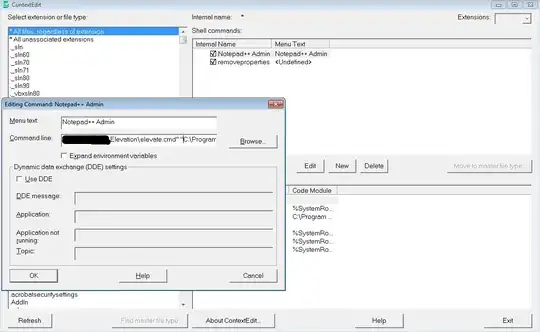
first i downloaded elevate power toy and unziped it. after that in context edit (which you should run as admin too) i created a new entry and name it Notepad++ Admin

To new entry's command line write : "[Path]\Elevation\elevate.cmd" "C:\Program Files (x86)\Notepad++\notepad++.exe" "%1"

after that you can see Notepad++ Admin on all items. i added screenshot for command options (actually nothing is selected).

alt text

Halil Bozdogan
  • 638
  • 5
  • 7
0

Here's a free utility which creates a "Open in Notepad as Admin" in Windows Explorer Context-Menu for any file. Comes with proper uninstaller.

Get it here - How to Add an "Open With Notepad As Administrator" Shortcut to the File Context Menu in Windows 10.

enter image description here

Markus
  • 189
  • 1
  • 3
0

You could also try with this to run an elevated scheduled Task

http://www.winhelponline.com/blog/run-programs-elevated-without-getting-the-uac-prompt/

and the to add to an context menu:

http://www.howtogeek.com/howto/windows-vista/add-open-with-notepad-to-the-context-menu-for-all-files/

patricks
  • 616
  • 3
  • 7
  • A general solution via registry [here](https://superuser.com/questions/212914/shellexecute-failed-2-error-for-notepad-on-windows-7-64bit/1269546#1269546). – Laurie Stearn May 21 '18 at 15:01