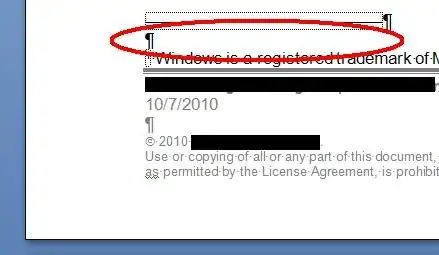
I'm working on a document in Word 2007. Somehow, when I was moving things around, a phantom footnote was introduced. (See attached image.) I have not been able to delete it. Any suggestions would be appreciated.
Asked
Active
Viewed 3,019 times
2

studiohack
- 13,468
- 19
- 88
- 118

Jim Fell
- 5,836
- 16
- 55
- 76
5 Answers
1
- Go to beginning of document.
- Click the References tab.
- Click Show Notes.
- Click Next Footnote until the cursor moves to a position where a footnote does not exist.
- That is the phantom footnote.
- Delete the next around the cursor.
Jim Fell
- 5,836
- 16
- 55
- 76
0
I did not see a Next Footnote option in Word 365. But I realized that what happened is that the text of the endnotes was deleted but the endnotes themselves were left intact. The endnote numbers were particularly phantom-like because the Find utility doesn't find footnote or endnote numbers. But by manually searching the text where the sequential endnote numbers should be, I found them and was able to delete them. This also deleted the blank endnotes themselves.

Chris Jenks
- 101
- 2
0
After spending (way too much) time, I realized I was editing my document using track changes... Aaaand I found out that if I switched view to seeing All markup I was able to see - and delete - my already deleted (and hence invisible) footnotes.
Bloody hell...

-
As it’s currently written, your answer is unclear. Please [edit] to add additional details that will help others understand how this addresses the question asked. You can find more information on how to write good answers [in the help center](/help/how-to-answer). – Community Jan 31 '22 at 12:06
0
Providing you haven't made a lot of changes since, undo (ctrl + Z) always fixes things like these :)

JT.WK
- 1,978
- 4
- 15
- 19
-1
Turn on the Show/hide feature. Search through the document for the 'hidden' footnotes in the body of the text and delete.

KTB
- 1