How do I configure a fixed-size font for Notepad++'s console output?
Asked
Active
Viewed 6.6k times

3 Answers
40
Have you tried setting the global font? Go to Settings > Style Configurator... and then you can set the global font (1).
If you want you can change the font for a particular file format (2).
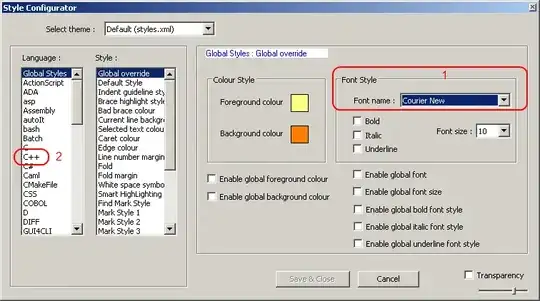
If you decide to change the global font, you will also need to check the "Enable global font" and "Enable global font size". Both of these check boxes are below the global font (1) question.


-
Yes, it has the same setting as in your picture. Can't find the Console's configuration in the Style Configurator. As for the file format associated style - thanks, but that is not really what I am wondering about : I want to set the style of the Console window, you know the place where stuff like NppExec outputs get written to. – Per Oct 23 '10 at 19:55
-
@Per - I thought the global styles would cover the console output. If not I don't know what would. I included the note about file formats for completeness. – ChrisF Oct 23 '10 at 20:13
-
Also I need to run it as an local administrator. – Jan Hommes Nov 06 '14 at 08:54
-
3Don't forget to check the box "Enable global font." – kmote Jul 27 '15 at 13:31
28
Found the answer. Menu -> Plugins-> NppExec --> Change Console Font ...

Per
- 691
- 1
- 6
- 6
-
8You should mark this answer as correct so it moves above the less correct answer above. – Paul Jan 30 '13 at 20:40
-
1
-
0
Or you can just simply use CTRL and adjust the size with the mouse wheel.

Concerned_Citizen
- 563
- 5
- 11
- 22
-
5-1: does not answer the question. (If you look carefully, the question is asking how to change the font to a fixed-width font, not how to change the font size.) – Oct 08 '14 at 00:57