1

I want to access my router's files but I don't know how. I own BaudTec router. I tried \\192.168.1.1 , it asks for username-password I gave the same as when I login router web interface but I couldn't login. Probably it needs something else, I don't know... Does any know what can I do?

Thanks

Kenster
  • 7,483
  • 2
  • 32
  • 44
Sotiris
  • 131
  • 1
  • 5
  • The default IP address for home routers is usually 192.168.2.1. – ChrisF Oct 14 '10 at 22:09
  • 2
    @ChrisF the routers I've seen usually have 192.168.0.1 or 192.168.1.1, but never 192.168.2.1. And the fact that its asking for a username/password leads to believe that it is connecting to something. – heavyd Oct 14 '10 at 22:14
  • @heavyd - mine's 192.168.2.1. Interesting. – ChrisF Oct 14 '10 at 22:16
  • @Sotiris what IP do you use to connect to the web interface? – ChrisF Oct 14 '10 at 22:17
  • @Sotiris also, what model of router do you have? – heavyd Oct 15 '10 at 01:11
  • I own a baudTec router (I don't know exactly the model). I connect on web interface through 192.168.1.1 – Sotiris Oct 15 '10 at 18:33
  • Are you trying to access files stored on a SMB share connected to your router or do you want to actually get the image (operating system) that your router uses to boot? – moo Oct 31 '21 at 08:24

2 Answers2

0

You would have to flash your device with an alternate firmware.

However, finding a compatibly firmware maybe be difficult with an off brand like BaudTec.

Your only other hope is to exploit a security vulnerability in your router.

Here's one: https://github.com/abdelsalamshahlol/PLDT-Baudtec-login-credentials-exploit.

Don't know what model you have so this may or may not work.

here's another article:

http:\cgi.di.uoa.gr\~xenakis\Published\Technical_Reports\ZTExploit_Paper.pdf&usg=AOvVaw2942DYAYpaac663n_aucq-

cybernard
  • 13,380
  • 3
  • 29
  • 33
0

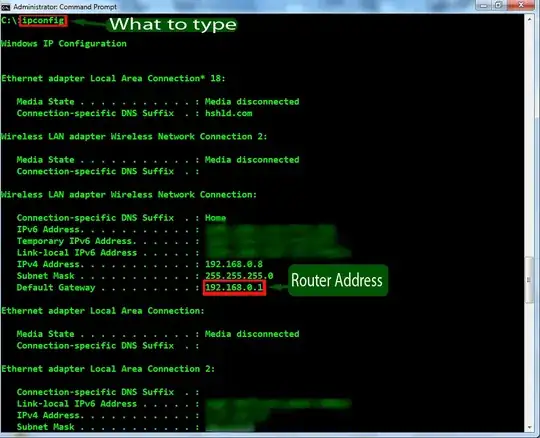
You are attempting to connect to your gateway local IP address, which may be different for any router but most always starts with 192.168.#(1-3).#(1-3) and can be obtained by typing ipconfig into your command prompt.

Under LAN there should be your local IP address and the gateway (router) you are connected to. Typing this in a browser will open your configuration via HTML webpages, your login SHOULD be what username and password you're using to even go on the internet.

slhck
  • 223,558
  • 70
  • 607
  • 592
tincopper2
  • 53
  • 6