Under Windows and Linux, the mouse scroll wheel seems to be linear. Under Mac OS the scroll wheel some sort of acceleration which means it either goes too slow or too fast.
Asked
Active
Viewed 1.4k times
23
-
3"it either goes too slow or too fast" another brilliant design element brought to you by Apple. Yay Apple. :( – Lemmings19 May 14 '12 at 14:46
4 Answers
6
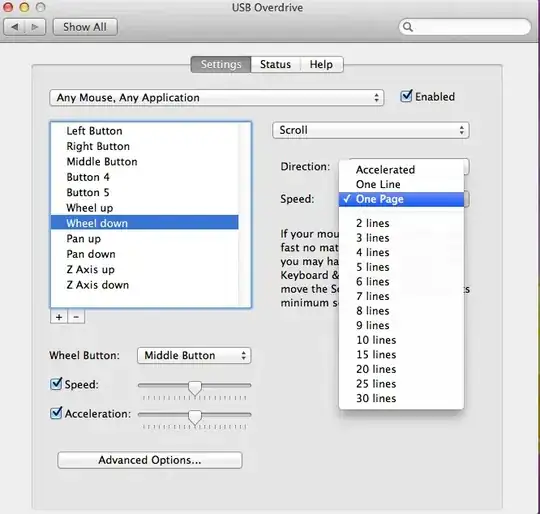
USB Overdrive does this as well, and it is shareware. It can also remove the acceleration added to mouse movements.

p.campbell
- 4,338
- 9
- 38
- 45

Blake
- 69
- 1
- 2
2
Apparently SteerMouse lets you change scroll wheel settings but it is not free software.

Nick Sonneveld
- 621
- 2
- 6
- 9
-
I've tested this and it works great for changing the scroll wheel for linear motion. – Nick Sonneveld Oct 19 '10 at 04:46
1
SmoothScroll for Mac fixes this problem (you can disable acceleration or give your own parameters). Even better it makes scrolling animated between wheel ticks so you get a smooth experience.
By paying for it you ensure that there's somebody out there who cares about the mouse scrolling experience on Macs.
(disclaimer: I'm the developer)

gblazex
- 111
- 4
1
For anyone with a Logitech mouse try to download Logitech Options and turn on "Smooth scrolling". That fixed it for my MX Master.

Bjørnar Hagen
- 111
- 1
-
-
Tried to install the newest (10.0) version from [here](https://support.logi.com/hc/en-us/articles/360024847273-Download-Wireless-Trackball-M570) but it doesn't have such option. Only allows to customize the pointer speed. – jakub.g Apr 26 '23 at 09:33