17

Just been working on a new laptop today (Acer) and it was pre-installed with all sorts of crapware. Mostly games and "backup utilities" and McAfee. I had to manually uninstall about 30 apps via Vista's Programs and Features

So it got me wondering is there any way of mass uninstalling or queuing an app to be uninstalled? Through Vista/XP you need to wait for Install Shield or whatever to close before beginning to uninstall the next app. Took way more time than it should have.

Just another one of those Windows annoyances! Any help appreciated as I often need to do this when I come across a slow machine that's just been clogged with a bunch of useless apps

John T
  • 163,373
  • 27
  • 341
  • 348
Ciaran
  • 4,485
  • 8
  • 30
  • 48

5 Answers5

22

PC Decrapifier will do this. Free for personal use.

John T
  • 163,373
  • 27
  • 341
  • 348
11

You won't do better than re-installing Windows.

Once you've done that you could also set a System Restore point and revert to an early (clean) state, but reinstalling is the cleanest way.

Ian G
  • 1,617
  • 3
  • 21
  • 26
  • Too drastic! This was a brand new laptop with no recovery disc. Just annoyed me that it came with so much crap pre-installed – Ciaran Aug 08 '09 at 22:54
  • i usually always do this when I get a new pc... its a lot easier and I always get it exactly like I want it :) – Svish Aug 09 '09 at 01:32
  • 4
    Personally, I don't trust a PC until I scrape it myself, delete all partitions, format, install windows. – JP Alioto Aug 09 '09 at 01:39
  • 1
    I'm with JP on this one. Full format and reinstall. Never know what didn't get uninstalled. – Jack M. Aug 13 '09 at 22:26
3

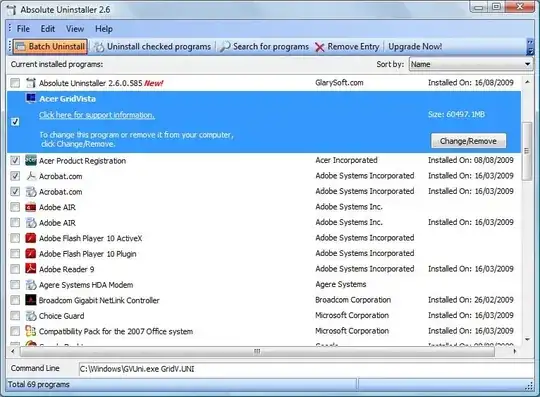
I've already accepted PC Decrapifier as my answer but here's another one I've had luck with called Absolute Uninstaller

Absolute Uninstaller is similar to standard Windows Add/Remove program but more powerful.The standard Add/Remove program can't uninstall applications completely which often leaves broken registry keys ,unnecessary files on the hard disk.The more junk files your computer have ,the slower it runs. Uninstall Manager can wipe off all the junk files clearly in seconds.It offers a more user-friendly way to remove unneeded applications and to improve your computer efficiency.

enter image description here

Strange though, I don't know why its saying that app is so big.

Gaff
  • 18,569
  • 15
  • 57
  • 68
Ciaran
  • 4,485
  • 8
  • 30
  • 48
1

I always use the following when I come across a slow machine: CCleaner then JkDefrag afterwards with PageDefrag to be absolutely sure page file and registry aren't fragmented.

Umber Ferrule
  • 3,439
  • 9
  • 40
  • 54
  • In the question @Ciaran says, '...slow machine thats just been clogged with a bunch of useless apps.' The apps I suggested will have an effect on this so why the down vote? (And also for PC Decrapifier? @Jim McKeeth above) – Umber Ferrule Aug 15 '09 at 23:57
  • jkDefrag is now http://www.mydefrag.com/ and is even better than ever :) – kkaploon Aug 16 '09 at 15:19
  • Upvoted to restore at least neutral karma; your answer didn't deserve the down-vote, so far as I could see. – David Thomas Aug 17 '09 at 02:03
0

YourUninstaller 2008 is probably the best uninstaller program

joe
  • 12,279
  • 12
  • 67
  • 104