37

Possible Duplicate:
Switch between windows on Mac OS X?

OS X Snow Leopard Server

For Google Chrome or Terminal, is there any keyshort to switch different Chrome windows within Chrome? Since cmd+tab can only switch to different programs. Please advise, thanks.

Stan
  • 7,215
  • 35
  • 97
  • 142

1 Answers1

59

You can configure the key combination in System Preferences » Keyboard » Keyboard Shortcuts (tab) » Keyboard and Text Input (left list) » Move focus to next window in application (right list). This works globally for all applications.
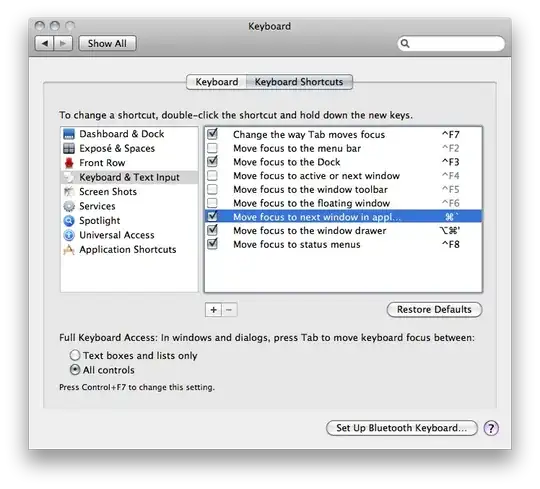
Screenshot

For Terminal the Windows have a CmdNumber combination assigned (e.g. Cmd1 for the first window).
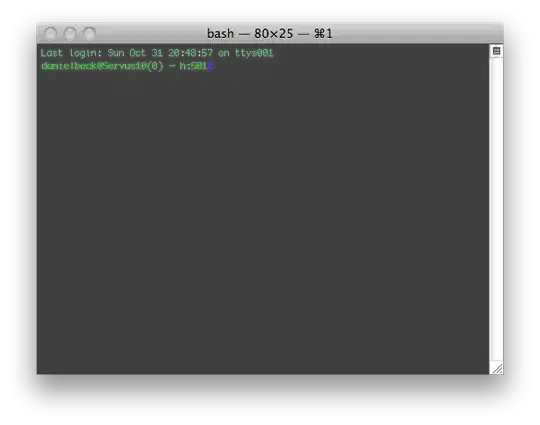
Screenshot

You can display this shortcut in the window title in Terminal » Preferences… » Settings » (select your active settings) » Window (tab). Check Command key.

Additionally, the shareware Witch provides several different Window switchers, like "all windows of all applications" etc.

Daniel Beck
  • 109,300
  • 14
  • 287
  • 334
  • 4
    Perfect answer (thank you!!), but just to add, in "OS X El Capitan", you now need to change the shortcut which is simply called "Move focus to next window". – Mike Gledhill Apr 13 '16 at 19:50
  • @Daniel, This **cycles** instead of alternate tab. What's the command to alternate? – Pacerier Oct 17 '17 at 05:29
  • I may be misunderstanding but it appears to me that this keyboard shortcut works by default without any additional configuration. – jpierson Jan 25 '18 at 15:05
  • 1
    @jpierson That's correct; I just included instructions how to change because it can be weird on some keyboard layouts. (Or used to be, it's been a while.) – Daniel Beck Jan 25 '18 at 20:44