1

I'm faced with strange behaviour in IE8. There is an HTTPS web page which contains an IFrame pointing to non-secure page.

When I receive a security warning from IE, if I choose "Yes", I see "Navigation Cancelled" page in the IFrame part but if I choose "No", the IFrame will be shown correctly (reverse behaviour). When I disable the warning message, everything is fine!

What can I do when the security warning is enabled though?

Oliver Salzburg
  • 86,445
  • 63
  • 260
  • 306

1 Answers1

5

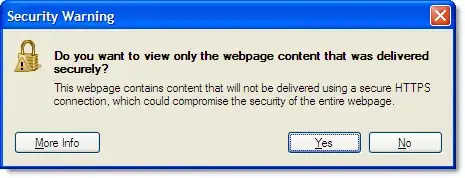
You are surely talking of the following dialog box:

alt text

The wording for the mixed content dialog box has changed with IE7 and you usually would click "Yes" - like you did. But clicking "Yes" actually shows only the secure content (read the message) - the correct way to "Show all content" is to click "No".

If you want to disable the message box go to:

  1. Tools->Internet Options->Security
  2. Select ‘Security’ tab
  3. Click ‘Custom Level’ button
  4. In the ‘Miscellaneous’ section change “Display mixed content” to Enable
slhck
  • 223,558
  • 70
  • 607
  • 592
Dennis G
  • 1,300
  • 5
  • 20
  • 28
  • Wow! I used to use IE7! Thank you :) –  Nov 01 '10 at 11:32
  • 1
    If the answer is the one you seeked consider marking it as the answer with the checkmark on the left. – Dennis G Nov 01 '10 at 11:33
  • I would rather have the prompt and select Yes, to keep the page secure. – Moab Nov 01 '10 at 15:53
  • Who wouldn't want that... It's just the way MS chose to design this dialog. – Dennis G Nov 01 '10 at 16:00
  • 3
    And the problem with either version of the dialogue box is that your average Joe user has no idea what it means and will click whatever is required in order to see the page they want to see...so it doesn't provide them with any security! – Rory Alsop Dec 04 '10 at 14:03