19

I have several processes scheduled in my Windows 7 environment, mainly for backups, that are supposed to run in the background.

However instead of just doing it's work quietly in the background, the task scheduler pops up a black (console like) "taskeng.exe" window. The window goes in front of all other windows. Luckily it doesn't steal my keyboard focus, but it blocks the view on everything.
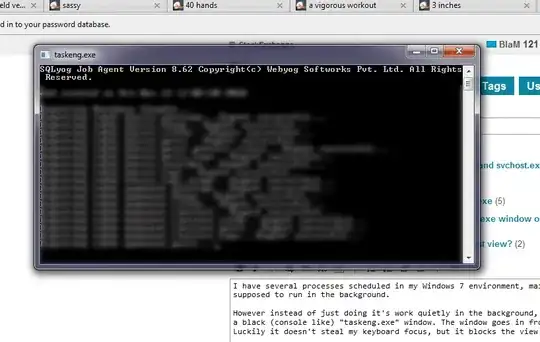
taskeng.exe

Is there a way to avoid this window - or at least have it appear in the background without stealing my VISUAL focus?

Example edited in after bounty applied:

Here is my last attempt at using the WScript stuff (in a file named RunSignatured.bat):

Set Shell = CreateObject("WScript.Shell")
Shell.Run C:\Users\danh\Bin\signatured.bat, 0, False

The signatured.bat file contains:

cd C:\Users\danh\bin
"C:\Program Files\Java\jre7\bin\java.exe" Signature
Ƭᴇcʜιᴇ007
  • 111,883
  • 19
  • 201
  • 268
BlaM
  • 479
  • 2
  • 7
  • 20
  • I'm looking for a solution for this problem that works on Vista SP2 without installing other tools and will execute a simple (but continuously running -- on timer) Java app from Task Scheduler. I used to have this working somehow before my install got hosed but cannot figure out how to do it now that I've restored (sort of) my box. (I've not gotten the WshShell scheme to work -- the target bat file apparently never runs (or is killed immediately for some reason).) – Daniel R Hicks Sep 21 '12 at 16:46
  • (The Java program has its own internal timer loop, meaning it continues to run after it's started.) – Daniel R Hicks Sep 21 '12 at 18:34
  • @DanielRHicks check out this [SU solution](http://superuser.com/a/416820/86550) may be it can help you. – avirk Sep 22 '12 at 14:39
  • Can you provide the actual command being run by the Task? – Ƭᴇcʜιᴇ007 Sep 22 '12 at 15:24
  • @techie007 -- See above, once the edit is approved. – Daniel R Hicks Sep 22 '12 at 17:01

8 Answers8

9

More specifically to Daniel R Hicks' bounty/example, but I think it can still be applied to the original problem:

If it's a batch file being launched from Task Scheduler, then instead of just launching the Batch file minimized/invisible, you probably also need to modify the batch file itself to run it's commands invisibly.

So change:

cd C:\Users\danh\bin
"C:\Program Files\Java\jre7\bin\java.exe" Signature

To something like:

cd C:\Users\danh\bin
start /b "C:\Program Files\Java\jre7\bin\java.exe" Signature

Or perhaps eliminate the batch file completely and just do everything from the (VBS) script you're launching directly from the Task Scheduler.

Something like:

Set Shell = CreateObject("WScript.Shell")
Shell.CurrentDirectory = "C:\Users\danh\bin" 
Shell.Run "C:\Program Files\Java\jre7\bin\java.exe Signature", 0, False

Solution as implemented by DanH, in response to techie007's suggestions, satisfying the bounty:

One file, named RunSignatured.vbs, containing:

Set Shell = CreateObject("WScript.Shell")
Shell.CurrentDirectory = "C:\Users\danh\bin" 
Shell.Run "java.exe Signature", 0, False

Note that the above relies on java.exe being in path, since the technique does not work with the blank in Program Files when specifying a full path. There are no doubt other ways to work around this problem, but that's for others to discover.

Then add RunSignature.vbs as the "program/script" name in the "Action" in Task Scheduler.

Ƭᴇcʜιᴇ007
  • 111,883
  • 19
  • 201
  • 268
  • 1
    I tried numerous variations of the `start /b` approach. Nothing seemed to eliminate the window -- I think it's been created by the time you begin executing the bat file, so by then it's too late. – Daniel R Hicks Sep 22 '12 at 17:45
  • For the second approach, when I try to run it directly (by double-clicking the file) I get "Line: 3 Error: The system cannot find the file specified." – Daniel R Hicks Sep 22 '12 at 17:51
  • That was an example, not fully tested code. ;) Does java.exe exist at the path provided? Perhaps test with launching something simple like "notepad.exe", as java.exe can have some weird quirks sometimes. – Ƭᴇcʜιᴇ007 Sep 22 '12 at 17:54
  • (Note the problem with the blank in the path name -- not clear how to deal with that.) – Daniel R Hicks Sep 22 '12 at 17:55
  • (But removing the path appears to work! Apparently `java` is making through into the search path OK.) – Daniel R Hicks Sep 22 '12 at 17:57
  • Using something like `c:\progra~1\` may be easiest. ;) If your still stuck, I'm sure you can find lots of info on dealing with the space (and other script-related Q&A) over on StackOverflow. – Ƭᴇcʜιᴇ007 Sep 22 '12 at 17:58
  • OK, set the latest (bare `java`) version into the Task Scheduler and it appears to start OK, (with no pop-up) when I click "Run". I'll edit in the full solution above and then give you the bounty. – Daniel R Hicks Sep 22 '12 at 18:02
  • Nice. looking forward to the edit. :) – Ƭᴇcʜιᴇ007 Sep 22 '12 at 18:05
4

You could run the scheduled tasks as a different user, that way they will no interact with your normal account's interactive desktop at all. This certainly seems to work on the Windows2003 servers I administer. Just be careful to make sure that file permissions and other authentication details are set such that the tasks can access what they need to when un as this different user.

Edit: Or instead of running a console tool directly you could have a small script that runs it using WScript.Shell.Run with the "minimise, no focus change" option:

' sample script: c:\scripts\test.vbs
Set WshShell = WScript.CreateObject("WScript.Shell")
WshShell.Run "c:\location\of\tool\utility.exe", 7

then run this with the task scheduler (the command line being something like wscript c:\scripts\test.vbs) instead of calling the tool directly. You should be able to call batch files and other scripts that way too. There is also a "completely hide" option (replace the 7 above with a 0), though in either case the hide/minimise only controls the initial window: if the tool opens more itself then they may still steal focus as before.

See http://msdn.microsoft.com/en-us/library/d5fk67ky%28VS.85%29.aspx for a full list of options for the run method.

David Spillett
  • 23,420
  • 1
  • 49
  • 69
  • I'm afraid that's not possible because I need my kerberos credentials for some of the tasks. – BlaM Nov 12 '10 at 15:57
  • You could try running the task indirectly and using the windows scripting host's run method which allows you some control of how the initial window of a task is presented. See edit. – David Spillett Nov 13 '10 at 13:01
  • Similar question, with the same answer to use a vbs: http://serverfault.com/questions/9038/run-a-bat-file-in-a-scheduled-task-without-a-window – Anthony Hatzopoulos Mar 24 '15 at 19:16
3

Try running your scheduled task like this:

C:\Windows\System32\cmd.exe /c start /b c:\fullpath\mybackup.bat

The start /b should start the application without creating a new window.

If this does not work, then you can create an standalone AutoIt script that will hide the taskeng.exe window. AutoIt scripts can be compiled to a .exe.

The .exe would be the first line in your mybackup.bat file. The AutoIt code would look like this:

WinSetState("taskeng", @SW_HIDE)
jftuga
  • 3,177
  • 1
  • 19
  • 23
3

The simplest way to hide an application launched from the Task Scheduler is to set it to "Run whether user is logged on or not". This setting can be found in the General Tab of the Scheduled Task Properties.

escyld
  • 31
  • 1
2

Try 4trayMinimizer. You can define apps that are hidden by default.

slhck
  • 223,558
  • 70
  • 607
  • 592
integratorIT
  • 853
  • 8
  • 18
1

Here's the SyncToy script I use. Notice the multiple quotes around the file location:

' SyncToy Scheduler
Set WshShell = WScript.CreateObject("WScript.Shell")
WshShell.Run """C:\Program Files\SyncToy 2.1\SyncToyCmd.exe"" -R" ,7
Carl
  • 11
  • 1
0

Apparently you have installed SQLyog MySQL GUI, which has scheduled the execution of the SQLyog Job Agent. It looks like it is a console application that does not try to hide itself.

You should look in the Task Scheduler for a task referring to SQLyog and correct its entry. If it is a cmd call, try to add /b to the parameter list. If it is just a call to an executable, you could correct it in view of this answer of mine.

If you have troubles locating this entry, use autoruns to find how SQLyog is started. You could also use regedit to search for all mentions of SQLyog or whatever is the name of its installation directory.

You could of course also uninstall SQLyog MySQL GUI, if you don't need it.

If you have not installed SQLyog MySQL GUI, then your computer might be infected. You could use Process Monitor to verify when the popup appears, to see whether it is the taskeng.exe from system32 or one of the Look alikes of Taskeng.exe.

harrymc
  • 455,459
  • 31
  • 526
  • 924
  • Already posted in another answer, [doesn't seem to work](http://superuser.com/questions/210059/stop-taskeng-exe-window-from-popping-up#comment565218_413428). – Tamara Wijsman Sep 22 '12 at 14:56
  • @TomWijsman: If you refer to the "/b" part, I only included it for completeness. – harrymc Sep 22 '12 at 15:18
0

i was having the exact problem using SQLyog after doing some research i fixed it creating a file called invisible.vbs and inserting this code:

Set WshShell = WScript.CreateObject("WScript.Shell")
WshShell.CurrentDirectory = "C:\Program Files (x86)\SQLyog\"
WshShell.Run "SJA.exe C:\Users\REPLACE_UR_USER\Desktop\test.xml -lC:\Users\REPLACE_UR_USER\AppData\Roaming\SQLyog\sja.log -sC:\Users\REPLACE_UR_USER\AppData\Roaming\SQLyog\sjasession.xml ", 0

Than create a Task Scheduler to run the invisible.vbs file and that's it!

Ered
  • 101