9

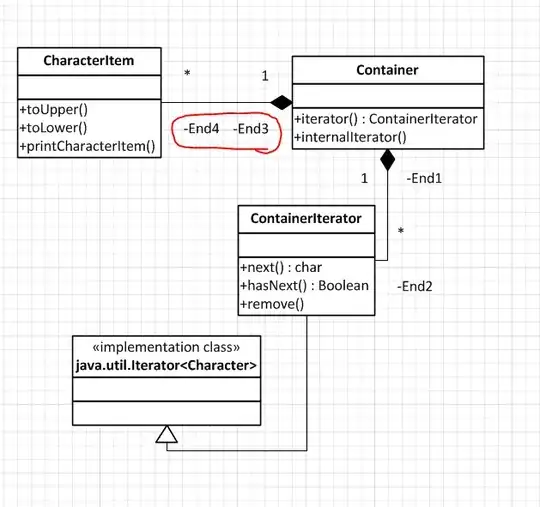
I am trying to draw a UML diagram and have become frustrated at the inclusion of some unwanted labels (see circled in red below) when I add composition relationships. When I select them and press Delete I get the following message:

Shape protection, container, and/or layer properties prevent complete execution of this command

Any ideas on how to overcome this?
alt text

Ryan Berger
  • 677
  • 2
  • 9
  • 20

3 Answers3

14

While the statement in the answer above is true it is not the solution to the problem. Most of the UML shapes have a wide variety of display options. To remove the decorations on a UML connector do the following:

  1. right-click the shape

  2. Select "Shape Display Options..." from the menu

  3. Un-check End Options ' "First end name", "Second end name" and "End multiplicities"

  4. (Alternative) In this case you might select Suppress / "First end" and "Second end". Checking the "End Options" turns things on; checking "Suppress" turns things off.

Play around with the other UML shapes to see how they behave.

Simon Sheehan
  • 9,114
  • 12
  • 52
  • 71
Randy Wheeler
  • 156
  • 1
  • 3
  • 2
    Is there a way to reposition the text labels on certain UML shapes? I want to move some labels on my sequence diagram messages? – B Johnson Jan 09 '12 at 18:30
  • 1
    Responding to @B Johnson: on the home ribbon, in the tools section, the tool at the bottom of the right column is an A inscribed in a 270-degree arc ending in an arrow head. This allows you to move, resize and rotate text independently of the shape to which it is attached. – Gdalya Dec 06 '12 at 18:20
3

That label is probably grouped with other items and cannot be removed.

See if this Microsoft article helps :

Visio: Cannot Ungroup or Modify an Object in Visio

harrymc
  • 455,459
  • 31
  • 526
  • 924
1

If you disable the Auto assign name to newly created UML model element option in the UML Options dialog (UML -> Drawing Options), Visio will not assign meaningless names to the ends anymore.

utapyngo
  • 1,903
  • 2
  • 19
  • 33